

CarDash: Car Dashboard & HUD
Maksym Kiryanov · Navigation
Independent analytics for this App Store listing. AppTracker is not affiliated with Maksym Kiryanov.
Chart standing · US
What changed · US
Listing changes AppTracker has observed for this app in this storefront — new versions, price moves, rating shifts, and store copy.
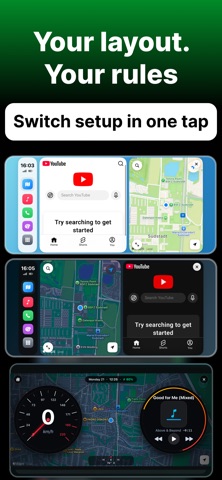
• Brand New Customizable Dashboard: Personalize your driving view! Choose your grid layout and configure widgets to place your speedometer, navigation, music, and trip stats exactly where you want them. • Dynamic HUD Compass: Fixed and enhanced the compass in Need for Motion & Need for Motion Lite — now featuring a smooth, real-time heading tape and accurate directional readout. • Concurrency & Stability Fixes: Resolved critical multithreading and GPU rendering issues when switching themes during active navigation for an ultra-smooth experience. • Full Multi-Language Experience: Completed and polished localizations across all 9 supported languages. • Polished Settings & Controls: Optimized on-screen control placement to avoid button overlaps, fixed the "Rate App" direct review link, and improved "Share App" compatibility.
Ratings breakdown · US
The star breakdown behind this app's rating in this storefront.
In-app purchases · US
What this app sells inside itself, grouped by kind and priced for this storefront.
Screenshots



About
CarDash turns your iPhone into a real car dashboard — built for the phone mount in your car. Perfect for Tesla owners — no CarPlay needed. Mount your iPhone and get a full dashboard: widgets, music, maps and karaoke right on your phone screen. ---- DASHBOARD ---- Your screen, your way. Choose a layout, pick your widgets, make it yours. Available widgets: - Clock — fullscreen or compact, always readable - Weather — live conditions by your location - Now Playing — album art, track, one-tap controls - YouTube — watch music videos right on your dashboard - Navigation — tap to open Apple Maps, Google Maps, or Waze - Phone Shortcuts — call your people in one tap Switch between saved layouts instantly. Morning commute setup or weekend drive — change the whole dashboard in one tap. ----- SPEEDOMETER & HUD ----- Real-time GPS speed — no OBD2 needed. - Speedometer — clean, large, always visible - HUD Mode — mirror projection on your windshield - 0-100 km/h Timer — measure your acceleration. See exactly how fast your car really is. Perfect for Tesla owners and any car without CarPlay. Mount your iPhone — and your dashboard is ready. ---- MUSIC & KARAOKE ---- Full music player built for driving. Large controls, high contrast, no squinting. CarDash Karaoke: real-time synced lyrics scroll as your music plays. Sing along on the road — or let your passenger take the mic. Works with Apple Music. ---- PHONE ---- Recent calls and full contacts, always one tap away. No dialing, no searching. ---- HUD MODE ---- Mirror mode for projecting onto your windshield. Time and direction — right in your line of sight. ---- THEMES ---- Dark, Light, or System — switches instantly with your iPhone. Dark mode is designed for night driving: deep blacks, high contrast, zero glare. ---- CARPLAY SOUNDS ---- Set a custom sound for CarPlay connection and disconnection. Via Shortcuts — works even when the app is closed. ---- HONEST ABOUT WHAT IT IS ---- CarDash is a fullscreen iPhone dashboard app. It runs on your phone, mounted in your car. It is not a CarPlay replacement and does not modify your car's built-in screen. No weekly traps. One price, everything unlocked. ---- CARDASH PRO ---- Unlock all layouts, themes, karaoke, YouTube widget, CarPlay sounds, and every future feature. One-time purchase. No subscription required. App uses standard Apple Terms of Use (EULA) https://www.apple.com/legal/internet-services/itunes/dev/stdeula/
What's new · 1.1.1
• Brand New Customizable Dashboard: Personalize your driving view! Choose your grid layout and configure widgets to place your speedometer, navigation, music, and trip stats exactly where you want them. • Dynamic HUD Compass: Fixed and enhanced the compass in Need for Motion & Need for Motion Lite — now featuring a smooth, real-time heading tape and accurate directional readout. • Concurrency & Stability Fixes: Resolved critical multithreading and GPU rendering issues when switching themes during active navigation for an ultra-smooth experience. • Full Multi-Language Experience: Completed and polished localizations across all 9 supported languages. • Polished Settings & Controls: Optimized on-screen control placement to avoid button overlaps, fixed the "Rate App" direct review link, and improved "Share App" compatibility.
Details