

Paperless24
Thomas Dillmann · Utilities
Independent analytics for this App Store listing. AppTracker is not affiliated with Thomas Dillmann.
Chart standing · US
What changed · US
Listing changes AppTracker has observed for this app in this storefront — new versions, price moves, rating shifts, and store copy.
New in 2.4.0 VERSIONS • With paperless-ngx 3.0 or later, the app shows every version of a document, such as the signed contract next to the original. Open and share older versions, add new ones by scan, photo or file, rename and delete them. Title, tags and notes stay with the document. PROOF OF PURCHASE • Under Settings › Help & info › Proof of purchase, the app shows that your copy is unlocked for good and when you first downloaded Paperless 24. The information comes from the App Store and stays on your device. ALSO NEW • Pick several photos at once – they become one document. • Saved views from the web interface show the same documents in the app as in the browser. • New share links expire after 7 days by default, and deleting by swipe asks first. • Direct link to dillwerk.de with the guide, support and privacy policy. FIXED • Notes from paperless-ngx did not appear in the app. • The import form overrode the detected document date with “today”. • Reminders for notice periods came far too late. • A new version from the web interface did not appear while the old file was stored on the device. • “Download all” and “All” in selection mode did not cover every document. • A proxy in front of the server rejecting a request signed you out. • Ranges like “Last month”, empty date fields and the permissions of new tags, correspondents and types. • With several accounts, widgets and links could point to the wrong account.
Price & rating history · US
Reconstructed from the listing changes AppTracker has observed in this storefront. A field is charted once it has changed more than once, and each line starts at the value it moved from.
Price · 3.99 USD now · 5 changes on record
In-app purchases · US
No in-app purchases.
Screenshots





Similar apps
Competitors and close alternatives, as estimated by AppTracker.
 Paperless One: Doc Scanner
Umut Kantarci
Paperless One: Doc Scanner
Umut Kantarci
 Archi — Paperless Scanner
Arne Stenmanns
Archi — Paperless Scanner
Arne Stenmanns
 Scan2Paperless Documents
RENE SUESS
Scan2Paperless Documents
RENE SUESS
 Paperless Go for Paperless-ngx
Ingo Weinzierl
Paperless Go for Paperless-ngx
Ingo Weinzierl
 Kantan Scan - Docs to PDF
NOBUHIRO MIYARA
Kantan Scan - Docs to PDF
NOBUHIRO MIYARA
 Paper Ai Assistant
Bholeshankar Enterprises Private Limited
Paper Ai Assistant
Bholeshankar Enterprises Private Limited
 Do Scan: PDF Scanner & OCR
Ammar Ahmad
Do Scan: PDF Scanner & OCR
Ammar Ahmad
 ProScan: PDF Scanner & OCR
bitrzr, LDA
ProScan: PDF Scanner & OCR
bitrzr, LDA
About
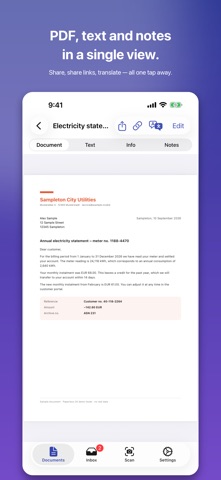
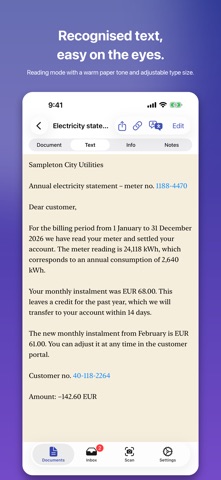
Paperless 24 puts your document archive on your iPhone and iPad. The app talks straight to your own paperless-ngx server — no detour through someone else's cloud, no subscription, no account with us. SCAN AND FILE • Document scanner with edge detection, multi-page • Quick scan: scan and upload without the form — your server handles title, date and assignment • Photos, PDFs and other files from your library or the Files app, several at once • Drive a network scanner over Wi-Fi (AirScan/eSCL, 300 dpi) • Batch scan: feed a whole stack at once — the app splits it into separate documents, and one tap corrects a wrong split • Send anything into the archive from any other app via the share sheet NAMED FOR YOU • The magic wand reads the first page and suggests title, correspondent, type, tags and date • Missing correspondents, types and tags are created along the way • It all runs on device — the text never leaves your iPhone FIND • Full-text search across the recognised text of every document, with search history • Filter by tag, correspondent, type, date range and custom fields • Load, apply and create saved views from your server • Spotlight: your documents show up in iOS search • Ask your archive: put a question in your own words and get an answer with its sources READ AND EDIT • PDF view with search hits highlighted • Recognised text in reading mode: warm paper tone, serif type, adjustable size • Phone numbers, links and addresses are tappable • Summary at the press of a button • Translate with no connection needed • Change title, date, correspondent, type, ASN, tags and custom fields • Add and delete notes • Create, list and revoke share links STAY ON TOP OF IT • Overview: inbox, deadlines due, pinned documents and saved views on one page — can be turned off • Inbox as its own tab, with a badge • Swipe to tag, edit or delete • Multi-select: set a tag or correspondent on many documents at once • Manage tags, correspondents and types — nested tags included • Trash with restore and permanent delete • Custom fields of every kind: text, number, date, select, yes/no, monetary, document link OFFLINE • Download everything and read it with no connection • Edits and uploads are queued and sent automatically once you are back • Storage use always visible, single files removable MULTIPLE ACCOUNTS • As many servers and users as you like, with separate data per account • Face ID or Touch ID lock • Two-factor sign-in (TOTP) • Sign in with a password or an API token (for SSO/OIDC) • Credentials live in the iOS keychain ON EVERY DEVICE • Widget with your latest documents or an overview • Siri and Shortcuts: scan, search, open inbox, ask your archive • A notification when new post lands in the inbox • Three-column layout on iPad • Settings kept in sync across devices via iCloud • Six colour themes, a free accent colour, OLED black, five alternative app icons • German, English, French, Spanish, Italian, Dutch WHAT YOU NEED Paperless 24 is a client app. You need your own paperless-ngx server (version 2.x through 3.0.x). Without one, try the demo mode with sample data at any time. PRIVACY The app only ever talks to your server. No tracking, no ads, no analytics, no relay servers. Summaries, suggestions and translations run on device.
What's new · 2.4.0
New in 2.4.0 VERSIONS • With paperless-ngx 3.0 or later, the app shows every version of a document, such as the signed contract next to the original. Open and share older versions, add new ones by scan, photo or file, rename and delete them. Title, tags and notes stay with the document. PROOF OF PURCHASE • Under Settings › Help & info › Proof of purchase, the app shows that your copy is unlocked for good and when you first downloaded Paperless 24. The information comes from the App Store and stays on your device. ALSO NEW • Pick several photos at once – they become one document. • Saved views from the web interface show the same documents in the app as in the browser. • New share links expire after 7 days by default, and deleting by swipe asks first. • Direct link to dillwerk.de with the guide, support and privacy policy. FIXED • Notes from paperless-ngx did not appear in the app. • The import form overrode the detected document date with “today”. • Reminders for notice periods came far too late. • A new version from the web interface did not appear while the old file was stored on the device. • “Download all” and “All” in selection mode did not cover every document. • A proxy in front of the server rejecting a request signed you out. • Ranges like “Last month”, empty date fields and the permissions of new tags, correspondents and types. • With several accounts, widgets and links could point to the wrong account.
Details