

Remindify - Lock Screen TODO
CROSSEDGE Inc. · Utilities
Independent analytics for this App Store listing. AppTracker is not affiliated with CROSSEDGE Inc.
Chart standing · US
What changed · US
Listing changes AppTracker has observed for this app in this storefront — new versions, price moves, rating shifts, and store copy.
New: • Remindify now fills the whole screen on iPhone Duo Improvements: • In the Notebook design, the ruled lines now line up with your tasks in the app, on the Lock Screen and in widgets If you enjoy Remindify, a review would mean a lot!
Ratings breakdown · US
The star breakdown behind this app's rating in this storefront.
In-app purchases · US
What this app sells inside itself, grouped by kind and priced for this storefront.
Screenshots


About
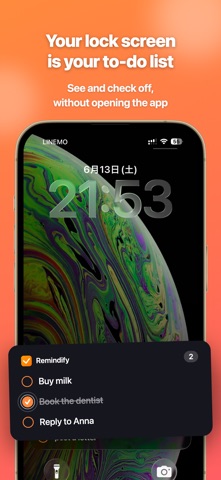
Manage your to-dos without unlocking your iPhone. Remindify shows your reminders and to-do list right on your Lock Screen as a Live Activity. Tap to check items off—no Face ID, no unlocking, no app launch. From grocery lists to daily habits, your tasks are always one glance away. ■ Who is it for? • People who forget shopping lists, to-dos, and reminders • Anyone who finds it tedious to open a task manager app every time • Users who want a simpler alternative to the stock Reminders app • iPhone users who want their schedule and notes on the Lock Screen • Power users who want to add memos quickly via the Action Button or Siri ■ Features ◎ Always on your Lock Screen Live Activity shows your top reminders and to-dos as a persistent banner. Check them anytime—no unlocking required. ◎ One-tap complete Tap the checkbox right on your Lock Screen to mark tasks done. Face ID unlock not needed. ◎ Add from anywhere • Action Button (iPhone 15 Pro & later) for instant capture • "Hey Siri, add a reminder to Remindify" for voice input • Spotlight Search quick access • Share Sheet from Safari, Notes, and other apps to save URLs and text ◎ Reminders-app-style inline editing Tap any row to edit in place. Hit Return to add the next item—fluid, frictionless to-do entry. ◎ 24-hour completed view Completed tasks stay visible in gray for 24 hours so you can see your wins, then auto-hide for a clean list. ◎ Lock Screen widgets Alongside Live Activity, Lock Screen widgets are supported in multiple sizes. ■ Use cases • Shopping lists, grocery memos • Travel packing checklists • Project task lists • Daily habit reminders • Quick brain-dump memos ■ Requirements • iOS 18.0 or later • iPhone, iPad, and Apple Watch • Supports Lock Screen widgets, Live Activity, and Dynamic Island If you want a lightweight reminders app that stays in front of you on the Lock Screen, Remindify is for you. ◎ Make it yours Backgrounds (colors, gradients, paper, photos), fonts, and check shapes—style your Lock Screen, widgets, and the app itself. ◎ Attach photos & links Long-press any task to attach a photo or a link. ■ Remindify Pro These features are available with Remindify Pro (monthly/yearly subscription, or a one-time lifetime purchase): • Task-count reactive design: the Lock Screen design and Dynamic Island icon change automatically with your remaining tasks • Custom Dynamic Island icon: keep your favorite photo in the Dynamic Island • App icon in 12 colors • (Coming soon) Photo cloud sync & Web version The yearly plan includes a 7-day free trial. Subscriptions renew automatically unless canceled at least 24 hours before the end of the current period. Manage or cancel anytime in your App Store account settings. Terms of Use (EULA): https://www.apple.com/legal/internet-services/itunes/dev/stdeula/
What's new · 1.2.4
New: • Remindify now fills the whole screen on iPhone Duo Improvements: • In the Notebook design, the ruled lines now line up with your tasks in the app, on the Lock Screen and in widgets If you enjoy Remindify, a review would mean a lot!
Details