

Cropper: Vertical Video Editor
Rocco Contini · Photo & Video
Independent analytics for this App Store listing. AppTracker is not affiliated with Rocco Contini.
Chart standing · US
What changed · US
Listing changes AppTracker has observed for this app in this storefront — new versions, price moves, rating shifts, and store copy.
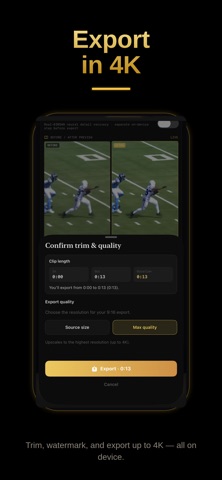
What’s new in Cropper 2.3.22 This release is a cleaner first session: the monitor is the picture, trim already covers the whole clip, and Enhance stays off until you turn it on. Then you still steer the gold 9:16 with your finger — sports, podcasts, product, vlog — and export on the phone. Nothing is uploaded. CLEANER MONITOR Hand, Keyframe, and Track no longer sit as three little icons on the crop. The gold frame is the shot. Choose the tool in the Tool section (in landscape, the compact control on the side). Follow the play, tap a pin, or lock Track without covering the subject. TRIM STARTS AT THE WHOLE CLIP When a video loads, Out is the end of the clip — not a blank dash. In still marks where you start; Out already sits on the last frame. Shorten from there. The chips match what Export burns. ENHANCE STAYS OFF UNTIL YOU ASK Enhance on export now defaults to Off. The file matches the original grade unless you pick Light, Auto, or Manual. Faster when you only need the crop. Turn enhance on when a clip needs it. Manual still unlocks brightness, contrast, saturation, warmth, sharpening, and denoise, with a before/after preview. HOW TO IS EASIER TO READ On How to use, footer type — copyright, Privacy, local-only, NOTICE, version — is bright white on the dark screen. Tips and cropper.video stay gold. HAND MODE — FOLLOW THE PLAY Wide 16:9 still does not fit Reels, TikTok, or Shorts. Load the match, the interview, the runway. Set 0.5× (or 0.25× for fast action). One finger drags the gold 9:16 crop while playback runs. The path is recorded. Two fingers pinch to tighten or spread. Paused, a drag just repositions. Sport for a snap pan; Smooth for a glide; Movie for a hold-then-cut. No timeline clutter. Your finger is the steadicam. TAP, TRACK, DUAL Tap Keyframe to pin who is in frame — taps use your Default transition (Movie / Sport / Smooth), and that selection sticks. Drag to paint a continuous path. Edit any pin: change transition, delete, or jump with prev/next. Track: tap a subject — on-device vision follows them forward. Dual View stacks two crops in one 9:16 for podcasts, interviews, and reaction cams, with a thin separator. Frame top and bottom on their own paths; export burns both panes. CAPTIONS ON THE PHONE Whisper speech-to-text stays on device — no account, no cloud. Trim first for a faster pass; only the trimmed range is transcribed. Edit every line; add, delete, or insert. CapCut-style looks: None, Color, Reveal, Highlight, Bounce, Paint, Custom, Comic Book, Social, Street, Neon, Bold, Classic, Boxed, Shadow, Outline, and more. Active-word color lights the word being said. Drag captions on the After preview — including onto the Dual seam. English by default, Auto detect, or any listed language. JOIN, TRIM, EXPORT Pick from Photos or Files (iCloud, Drive, Dropbox). Join two or more clips end-to-end, reorder, then frame. Speed 0.25×–2×. Crop zoom is recorded over time. Rotate to landscape for a bigger canvas. Export Video: Source size (fast, native detail) or Max quality (up to 4K where the device can encode). Crop, motion, Dual, enhance, captions, and logo bake into an MP4 in Photos — AVFoundation only. STILL PRIVATE. STILL ON DEVICE. Speech-to-text, tracking, enhance, and export never leave the phone. Airplane mode still works. Free forever with a Made with Cropper watermark; Pro removes it. Add your own logo, position, and size. Scene Detection finds hard cuts on device when you want Prev / Next Scene. CROPPER PRO Unlimited clean exports, AI subject tracking, Light / Auto / Manual enhance, up to 4K. $4.99/month, $19.99/year, or $99.99 lifetime. Cancel anytime in Settings. Built by After Video Inc. — Rocco Contini, broadcast cinematographer and solo maker. Default playback still starts at 0.5× so you can steer without overshooting. Reset keyframes clears framing without reloading. Every feature request sent to the site is read. Tips and support: https://cropper.video Privacy: https://cropper.video/privacy
Price & rating history · US
Reconstructed from the listing changes AppTracker has observed in this storefront. A field is charted once it has changed more than once, and each line starts at the value it moved from.
Average rating · ★ 4.78 now · 4 changes on record
Ratings breakdown · US
The star breakdown behind this app's rating in this storefront.
Screenshots



About
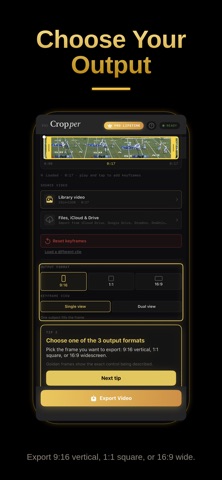
Cropper is the professional vertical reframing app built for social — drag the crop over the subject you care about, add closed captions, and export ready for Reels, TikTok, and Shorts. No timeline clutter. No cloud upload. Your finger steers the frame. The app is free forever with a watermark — Pro removes it. FINGER EDITING - One finger — swipe and drag the crop over the player, the host, the product, or any subject that matters - Two fingers — pinch to zoom while you frame, like Photos - Tap editing — tap who’s in frame; smooth keyframes fill the gaps - Track — lock onto a person or object and let on-device vision follow Drag the crop where the story is. Cropper turns wide landscape into a deliberate vertical shot — not a blind center cut. CLOSED CAPTIONS Burn-in captions that look social-ready: - On-device speech-to-text (nothing uploaded) - Editable transcript — fix every line - CapCut-style looks: Highlight, Bounce, Paint, Comic Book, and more - Drag captions where you want them on screen - Any language + Auto detect (English default) DUAL VIEW Stack two speakers in one 9:16 export — podcasts, interviews, reaction cams — with a thin, clean separator between halves. WHY CROPPER Most reframing apps upload your footage, watermark free exports, or bury you in a timeline. Cropper keeps every frame on your phone. Built by a broadcast cinematographer for creators who care how the frame feels. WHY PREMIUM No ads. No tracking. No cloud uploads. Your footage never leaves your device. The vertical editor that respects your footage — from an independent studio led by a broadcast cinematographer. $4.99/month, $19.99/year (save ~67%), or $49.99 lifetime. The app stays free forever with a watermark — Pro removes it. Cancel subscriptions anytime. Manage Apple subscriptions in Settings. CINEMATIC MOTION Movie, Sport, or Smooth — control how the crop travels between taps and keyframes. FINISH ON DEVICE Enhance, logo watermark, dual-view split, and export in 9:16, 1:1, or 16:9 — sharp, private, ready to post. CROPPER PRO Unlock the full toolkit with a subscription: - Unlimited clean exports (no free-tier watermark) - AI subject tracking - Export enhancement (Light, Auto, and Manual grading) - Up to 4K output - And you directly support a tiny independent developer MADE FOR - Sports creators reframing match clips around the play - Podcasters repurposing landscape recordings for vertical platforms - Fashion and product shoots that need the subject locked in frame - Vloggers turning YouTube footage into mobile-first content - Anyone shipping polished vertical for social without giving up the original wide shot Whether you're posting daily or polishing one hero clip, Cropper keeps the subject centered, captions on-point, and your footage entirely in your hands. Built by After Video Inc. — created by Rocco Contini, broadcast cinematographer and solo maker of Cropper. Privacy Policy: https://cropper.video/privacy Founder: https://cropper.video/founder Support: https://cropper.video
What's new · 3.7
What’s new in Cropper 2.3.22 This release is a cleaner first session: the monitor is the picture, trim already covers the whole clip, and Enhance stays off until you turn it on. Then you still steer the gold 9:16 with your finger — sports, podcasts, product, vlog — and export on the phone. Nothing is uploaded. CLEANER MONITOR Hand, Keyframe, and Track no longer sit as three little icons on the crop. The gold frame is the shot. Choose the tool in the Tool section (in landscape, the compact control on the side). Follow the play, tap a pin, or lock Track without covering the subject. TRIM STARTS AT THE WHOLE CLIP When a video loads, Out is the end of the clip — not a blank dash. In still marks where you start; Out already sits on the last frame. Shorten from there. The chips match what Export burns. ENHANCE STAYS OFF UNTIL YOU ASK Enhance on export now defaults to Off. The file matches the original grade unless you pick Light, Auto, or Manual. Faster when you only need the crop. Turn enhance on when a clip needs it. Manual still unlocks brightness, contrast, saturation, warmth, sharpening, and denoise, with a before/after preview. HOW TO IS EASIER TO READ On How to use, footer type — copyright, Privacy, local-only, NOTICE, version — is bright white on the dark screen. Tips and cropper.video stay gold. HAND MODE — FOLLOW THE PLAY Wide 16:9 still does not fit Reels, TikTok, or Shorts. Load the match, the interview, the runway. Set 0.5× (or 0.25× for fast action). One finger drags the gold 9:16 crop while playback runs. The path is recorded. Two fingers pinch to tighten or spread. Paused, a drag just repositions. Sport for a snap pan; Smooth for a glide; Movie for a hold-then-cut. No timeline clutter. Your finger is the steadicam. TAP, TRACK, DUAL Tap Keyframe to pin who is in frame — taps use your Default transition (Movie / Sport / Smooth), and that selection sticks. Drag to paint a continuous path. Edit any pin: change transition, delete, or jump with prev/next. Track: tap a subject — on-device vision follows them forward. Dual View stacks two crops in one 9:16 for podcasts, interviews, and reaction cams, with a thin separator. Frame top and bottom on their own paths; export burns both panes. CAPTIONS ON THE PHONE Whisper speech-to-text stays on device — no account, no cloud. Trim first for a faster pass; only the trimmed range is transcribed. Edit every line; add, delete, or insert. CapCut-style looks: None, Color, Reveal, Highlight, Bounce, Paint, Custom, Comic Book, Social, Street, Neon, Bold, Classic, Boxed, Shadow, Outline, and more. Active-word color lights the word being said. Drag captions on the After preview — including onto the Dual seam. English by default, Auto detect, or any listed language. JOIN, TRIM, EXPORT Pick from Photos or Files (iCloud, Drive, Dropbox). Join two or more clips end-to-end, reorder, then frame. Speed 0.25×–2×. Crop zoom is recorded over time. Rotate to landscape for a bigger canvas. Export Video: Source size (fast, native detail) or Max quality (up to 4K where the device can encode). Crop, motion, Dual, enhance, captions, and logo bake into an MP4 in Photos — AVFoundation only. STILL PRIVATE. STILL ON DEVICE. Speech-to-text, tracking, enhance, and export never leave the phone. Airplane mode still works. Free forever with a Made with Cropper watermark; Pro removes it. Add your own logo, position, and size. Scene Detection finds hard cuts on device when you want Prev / Next Scene. CROPPER PRO Unlimited clean exports, AI subject tracking, Light / Auto / Manual enhance, up to 4K. $4.99/month, $19.99/year, or $99.99 lifetime. Cancel anytime in Settings. Built by After Video Inc. — Rocco Contini, broadcast cinematographer and solo maker. Default playback still starts at 0.5× so you can steer without overshooting. Reset keyframes clears framing without reloading. Every feature request sent to the site is read. Tips and support: https://cropper.video Privacy: https://cropper.video/privacy
Details