

Serious Notebook
BILGESU KADAN · Productivity
Independent analytics for this App Store listing. AppTracker is not affiliated with BILGESU KADAN.
Chart standing · US
What changed · US
Listing changes AppTracker has observed for this app in this storefront — new versions, price moves, rating shifts, and store copy.
More room to write. More ways to bring paper into your notes. • Scan directly into an open notebook with lifetime access. Each scan becomes an object you can move, resize, and rotate. Capture several pages in one session. • Take multiple photos, review them, and add them to the current page together with lifetime access. • On iPad, drawing tools and notebook actions now share the top toolbar. Tools collapse into a menu when the library is open. • Long notebook titles wrap so you can read the full name. • Improved scan display after switching pages and clearer pen-width controls. • Start writing immediately or try the included example. Try one handwritten notebook and one separate PDF or scan notebook, up to 10 pages each. Scanning from the library creates a new notebook. No subscription, ads, or tracking.
Ratings breakdown · US
The star breakdown behind this app's rating in this storefront.
In-app purchases · US
What this app sells inside itself, grouped by kind and priced for this storefront.
Screenshots



About
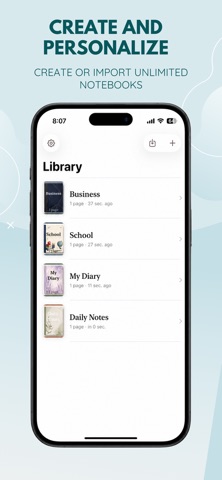
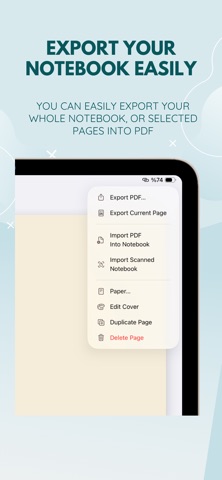
Your handwriting, PDFs, and ideas. A quieter place to think. Write naturally with Apple Pencil on iPad. Type notes and highlight pages on iPhone. Import a PDF planner, annotate a worksheet, or scan paper into a notebook you can keep working in. Serious Notebook keeps your work on your device, with no account, ads, tracking, or subscription. WRITE, STUDY, AND PLAN • Handwrite and sketch on iPad with pen, pencil, highlighter, and eraser tools. Apple Pencil works on compatible iPads. • Type notes and highlight with your finger on iPhone. • Choose blank, ruled, grid, or dot-grid paper in soft white or cream. • Give each notebook its own title and cover. MAKE DOCUMENTS YOUR OWN • Import PDFs as notebooks and annotate their pages. • Scan paper on supported camera-equipped devices, review the pages, then start writing. • Add text boxes and sticky notes. With lifetime access, insert photos, PDF pages, and scans into your notes. • Move, resize, and rotate inserted objects. • Export a notebook or selected pages as PDF to save or share. NEW IN 3.0 Scan several pages straight into your open notebook as movable objects with lifetime access. Take multiple photos, review them, and add them together. On iPad, a clearer top toolbar leaves more room to write. TRY YOUR OWN NOTES The free workspace includes one handwritten notebook plus one separate PDF or scan notebook, up to 10 pages each. Try the included example without using either allowance. ONE LIFETIME PURCHASE Unlock unlimited notebooks, pages, PDF imports, camera scans, and photo insertion with a single non-consumable purchase. No recurring payments. Existing lifetime customers and eligible original paid-app customers keep access. Restore Purchases is available in Settings. PRIVATE, ON YOUR DEVICE Notes, imported documents, photos, and scans stay on the device where you create them. No app account or document upload is required. Notebooks do not automatically sync between devices. Export PDFs regularly to keep a copy of your work. Purchase and restoration use Apple's App Store services. For class notes, project ideas, PDF planners, and everyday thinking on iPhone and iPad.
What's new · 3.0
More room to write. More ways to bring paper into your notes. • Scan directly into an open notebook with lifetime access. Each scan becomes an object you can move, resize, and rotate. Capture several pages in one session. • Take multiple photos, review them, and add them to the current page together with lifetime access. • On iPad, drawing tools and notebook actions now share the top toolbar. Tools collapse into a menu when the library is open. • Long notebook titles wrap so you can read the full name. • Improved scan display after switching pages and clearer pen-width controls. • Start writing immediately or try the included example. Try one handwritten notebook and one separate PDF or scan notebook, up to 10 pages each. Scanning from the library creates a new notebook. No subscription, ads, or tracking.
Details