

HealthLog - Companion App
Marc Bombeck · Health & Fitness
Independent analytics for this App Store listing. AppTracker is not affiliated with Marc Bombeck.
Chart standing · US
What changed · US
Listing changes AppTracker has observed for this app in this storefront — new versions, price moves, rating shifts, and store copy.
HealthLog 1.2 syncs more reliably in the background and shows you at the top when it last synced. • Steps, activity, heart rate and walking metrics now reach your server without tapping "Sync now", when you open the app and in the background. • Sync status: a symbol turns next to your profile picture while syncing, then briefly shows a checkmark. Tap it to see when the last sync happened. If something needs your attention, a symbol stays there. • Sync Diagnostics are easier to read and show when each value was last sent. • Workouts: new workouts arrive first, the list loads more as you scroll and shows the real total. More workout types are recognised. • The heart rate tile shows its value, trend and target range from the same series. • On iOS 27 the app also sends HRV as RMSSD (needs HealthLog server 1.42). • Readings from Health Connect are labelled as their own source. • Clearer messages, for example for passkey problems or when the server cannot decrypt its data. • Fixed a rare crash when iOS started the app in the background right after a restart. Plus fewer background AI requests and many small fixes. Thanks for using HealthLog!
In-app purchases · US
No in-app purchases.
Screenshots


Similar apps
Competitors and close alternatives, as estimated by AppTracker.


About
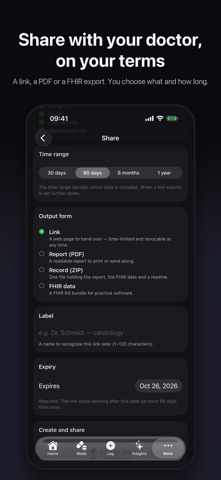
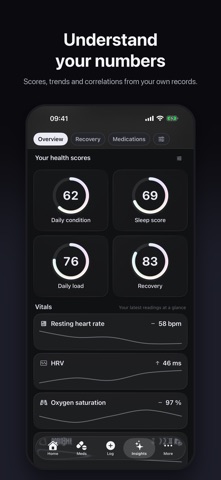
HealthLog is a native iOS client for the HealthLog server, the self-hosted personal health tracker you run yourself. Your health on your iPhone. Your data on your server. REQUIRES YOUR OWN SERVER HealthLog ships with no built-in server and no default host. On first launch you point the app at your own instance (a homelab box, a NAS, a small VPS), and every reading lands in your own database, the same one your web UI reads. Never a parallel silo, never a middleman. No server yet? Point the first-launch step at the public demo instance and try the whole app first. The steps are at the end. WHAT YOU GET A calm dashboard. A Health Score ring, then your vitals at a glance: blood pressure, pulse, weight, steps, mood, glucose, sleep, with today's medication compliance inline. One-tap capture. A central "+" sheet for every metric your server tracks, plus quick-entry surfaces that get out of your way. Apple Health, both directions. Steps, weight, body composition, blood pressure, heart rate, HRV, blood oxygen, glucose, workouts, sleep, ECG recordings and State of Mind, with an external-UUID scheme so your server and Apple Health never echo each other into duplicates. Medications that nag without annoying. Daily, weekly, cyclic, rolling and as-needed schedules, intake history you can correct after the fact, Live Activities for due doses, and notification buttons that record a dose without opening the app. GLP-1 medications additionally get drug-level curves from your actual doses, titration ladders, injection-site tracking and a side-effects logbook. Charts that mean something. Per-metric drill-down with linear or logarithmic axes, reference bands from ESC/ESH and ADA, and VoiceOver chart descriptors. Insights and a coach. A Health Score breakdown, correlation cards, a daily briefing and a conversational coach. Every AI feature is opt-in. Watch, widgets and Shortcuts. An Apple Watch companion with complications, home- and lock-screen widgets, App Intents, and Spotlight indexing of your medications. Share on your terms. Choose the content, the time range and the form: a revocable link, a PDF report, or a ZIP of the record. Plus a FHIR-flavoured doctor report. SIGNING IN Sign in to your own server the way the web does. On a self-hosted instance the sign-in screen can open your instance's own login page in a secure in-app browser, so your passkeys and password manager work exactly as they do on the web. A one-time "Connect Apple Health" card after updating, for installations that never finished connecting, including the newly supported ECG and mood types. Plus a Health Score that computes from whatever pillars you actually track, down to a single one. PRIVACY There is no HealthLog cloud. The app talks to the server you chose and to nothing else that we run: no developer backend, no account system of ours, no analytics SDK, no tracking, no advertising. The assistant is your choice and it is off until you make one: none at all; on-device via Apple Intelligence, where nothing leaves the iPhone; your own provider key, where requests go straight from your device to your provider and the key lives in your Keychain; or your own server's provider. Before any health data reaches a provider, the app states plainly what is sent and what is not. TRY IT FIRST 1. Open the app. The first screen asks for a server URL. 2. Enter https://demo.healthlog.dev 3. Sign in with the demo credentials published on healthlog.dev. The demo is read-only: a year of synthetic data to browse, nothing to change. REQUIREMENTS An iPhone on iOS 18 or later. The Watch companion needs watchOS 11, the on-device assistant an Apple-Intelligence-eligible iPhone on iOS 26. English and German are both fully supported. HealthLog is not a medical device. It does not diagnose, treat or give medical advice, and it is not a substitute for your doctor.
What's new · 1.2.0
HealthLog 1.2 syncs more reliably in the background and shows you at the top when it last synced. • Steps, activity, heart rate and walking metrics now reach your server without tapping "Sync now", when you open the app and in the background. • Sync status: a symbol turns next to your profile picture while syncing, then briefly shows a checkmark. Tap it to see when the last sync happened. If something needs your attention, a symbol stays there. • Sync Diagnostics are easier to read and show when each value was last sent. • Workouts: new workouts arrive first, the list loads more as you scroll and shows the real total. More workout types are recognised. • The heart rate tile shows its value, trend and target range from the same series. • On iOS 27 the app also sends HRV as RMSSD (needs HealthLog server 1.42). • Readings from Health Connect are labelled as their own source. • Clearer messages, for example for passkey problems or when the server cannot decrypt its data. • Fixed a rare crash when iOS started the app in the background right after a restart. Plus fewer background AI requests and many small fixes. Thanks for using HealthLog!
Details