

CFD Signal
masafumi matsumoto · Finance
Independent analytics for this App Store listing. AppTracker is not affiliated with masafumi matsumoto.
Chart standing · US
What changed · US
Listing changes AppTracker has observed for this app in this storefront — new versions, price moves, rating shifts, and store copy.
• New "Schedule" tab: browse economic events from the past two weeks through the end of this week, grouped by day with time, impact (stars), currency, forecast and previous values. Filter by impact and currency. • Tap "High-impact events, next 24h" on the Home screen to open the Schedule tab. • When you reach your plan's limit, the app now tells you how many items you can turn on and how to turn on more. • Fixed an issue where Japanese text was not displayed correctly on some devices. • The app now lets you know when a new version is available. • Minor UI improvements and stability fixes.
In-app purchases · US
What this app sells inside itself, grouped by kind and priced for this storefront.
Screenshots


About
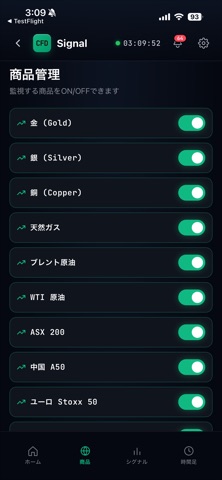
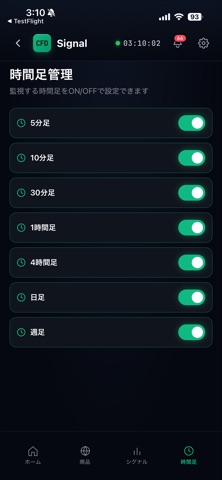
CFD Signal notifies you of technical-indicator events on CFD instruments — precious metals, energy, and stock indices. Stay on top of key market moments without watching charts all day. Key features: - Alerts for technical signals: moving-average crossovers, RSI, price breakouts, and more - Monitors multiple timeframes at once (5-minute to weekly) - Fine-grained notification settings — filter by instrument, timeframe, and signal type - "Quiet hours" setting to suppress notifications at night - Quick access to the chart when a signal fires Instruments covered: Precious metals (gold, silver, platinum), energy (crude oil, natural gas), and major stock indices. Plans: - Free: 1 instrument x 1 timeframe x all signal types - Basic (¥700/month): 15 instruments x 4 timeframes (M5/M10/M30/H1/H4) x 40 signal types - Premium (¥1,500/month): 37 instruments x 8 timeframes (M5 through Weekly) x all signal types A one-month free trial is available for each paid plan. Auto-renewing monthly subscription, cancel anytime. Subscription details: - Auto-renewing monthly subscription. Renews automatically unless canceled at least 24 hours before the end of the current period. - Manage or cancel anytime in Settings > Apple ID > Subscriptions on your iPhone. - Payment is charged to your Apple ID account upon purchase confirmation. Important: This app provides objective, technical-indicator-based information. It is not investment advice or solicitation. It does not recommend any specific instrument or transaction; all investment decisions are your own responsibility. CFD trading involves risk. Terms of Use: https://yaneyuka.com/cfd-signal-terms/ Privacy Policy: https://yaneyuka.com/cfd-signal-privacy-policy/ Contact: info@yaneyuka.com Operator: Goudoukaisya slime (合同会社slime)
What's new · 1.2.0
• New "Schedule" tab: browse economic events from the past two weeks through the end of this week, grouped by day with time, impact (stars), currency, forecast and previous values. Filter by impact and currency. • Tap "High-impact events, next 24h" on the Home screen to open the Schedule tab. • When you reach your plan's limit, the app now tells you how many items you can turn on and how to turn on more. • Fixed an issue where Japanese text was not displayed correctly on some devices. • The app now lets you know when a new version is available. • Minor UI improvements and stability fixes.
Details