

ViSH - AI Coding Terminal
Wuhan Xiaoqiang Technology Co., Ltd. · Developer Tools
Independent analytics for this App Store listing. AppTracker is not affiliated with Wuhan Xiaoqiang Technology Co., Ltd.
Chart standing · US
What changed · US
Listing changes AppTracker has observed for this app in this storefront — new versions, price moves, rating shifts, and store copy.
• Automatic Picture in Picture now starts only when the current terminal session has a running command, background job, or SSH connection. • View full open source license texts in Settings → About.
Screenshots



Keywords this app targets
Search terms AppTracker associates with this app — estimates, not search volume. ❝ = in the app's title; a highlighted number is its current position for that term.
Similar apps
Competitors and close alternatives, as estimated by AppTracker.
 Vibe SSH Terminal
婉媚 邵
Vibe SSH Terminal
婉媚 邵
 VibeGo – Mobile Code Editor
Terceseht LLC
VibeGo – Mobile Code Editor
Terceseht LLC
 VVTerm: Native SSH Client
Vivy Technologies
VVTerm: Native SSH Client
Vivy Technologies
 Mobile SSH Terminal
Binaryscript Private Limited
Mobile SSH Terminal
Binaryscript Private Limited
 SSHive: SSH, SFTP & Terminal
NetMeSafe
SSHive: SSH, SFTP & Terminal
NetMeSafe
 MTerm - SSH Terminal
kazuki oinuma
MTerm - SSH Terminal
kazuki oinuma
 VybeCoding
SOBYTES LTD
VybeCoding
SOBYTES LTD
 NaviTerm AI - SSH,SFTP,Tunnels
Wuhan Trivix Technology Co., Ltd
NaviTerm AI - SSH,SFTP,Tunnels
Wuhan Trivix Technology Co., Ltd
About
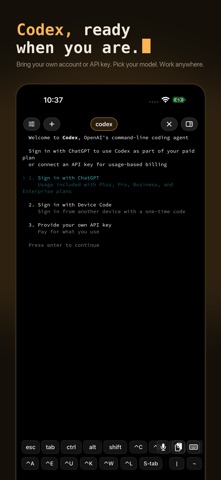
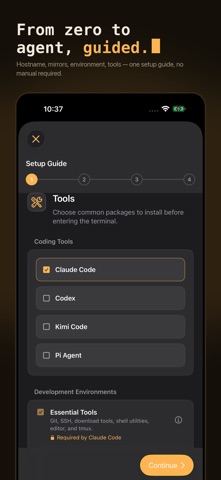
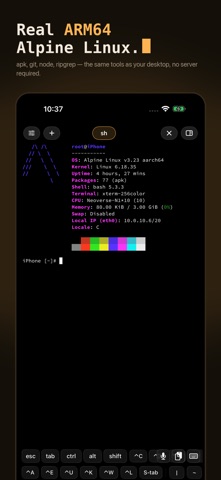
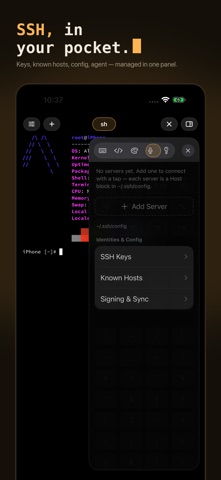
ViSH turns your iPad into a portable, local ARM64 Linux workspace. Run Alpine Linux or Ubuntu 24.04 in a touch-friendly terminal, use AI coding CLIs, manage project files, or connect to remote servers over SSH. Your local Linux environment runs without a remote server. ViSH requires an auto-renewing subscription (yearly or monthly) and offers a 7-day free trial. All features described below require an active subscription. AI coding wherever you are Install terminal tools such as Claude Code and Codex to explore code, write scripts, and refactor projects on iPad. Bring your own account or API key and configure your environment with guided setup. Use apk on Alpine Linux or apt on Ubuntu 24.04. Install Git, OpenSSH, Node.js, npm, pnpm, nano, ripgrep, tmux, and common build tools as needed. Manage files beside your terminal The session file browser lets you browse local Linux or SSH server directories, view file details, import files and folders, create directories, and delete multiple items. Insert selected file paths directly into the terminal to save typing. Keep multiple Linux filesystems, download supported systems or import your own archives, and switch which one boots. Each filesystem retains its login user, boot command, and setup state. Export tar.gz archives or browse all filesystems from a single ViSH location in the Files app. Flexible SSH connections and protected keys Save SSH servers with password or key authentication, jump hosts, port forwarding, keep-alive, and automatic tab reconnection. On supported devices, create Secure Enclave SSH keys whose private keys stay inside secure hardware. Optionally require Face ID, Touch ID, or your device passcode when using a key. You can also import existing keys. Secure Enclave keys remain on the device where they were created. Built for terminal work on iPad Use multiple terminal tabs and long-press + to choose a local or SSH tab. Side panels bring files, shortcut keys, appearance, voice input, and SSH tools beside your main terminal workspace. Make it your own with a phosphor-amber interface, 505 terminal themes with live previews, and coding fonts with glyph previews. Pinch to resize text, pin the shortcut bar, use sticky modifiers and command snippets, mirror the terminal in Picture in Picture, and open Linux links in Safari. Connect serial hardware Connect compatible Bluetooth serial adapters to Linux with modem controls and optional local RFC 2217 access. Settings includes device compatibility information and guidance for an ESP32 bridge to help you choose a connection method. Notes All app features require an active ViSH subscription after the 7-day free trial. Some Linux features are limited by the iOS sandbox. Third-party tools such as Claude Code and Codex require your own account or API key with those services and may require a separate paid plan purchased outside ViSH. Terms of Use (EULA): https://www.apple.com/legal/internet-services/itunes/dev/stdeula/ Privacy Policy: https://vishapp.dev/privacy
What's new · 1.0.8
• Automatic Picture in Picture now starts only when the current terminal session has a running command, background job, or SSH connection. • View full open source license texts in Settings → About.
Details