

Habit Tracker - TimeSince
Mar San Agustin · Productivity
Independent analytics for this App Store listing. AppTracker is not affiliated with Mar San Agustin.
Chart standing · US
What changed · US
Listing changes AppTracker has observed for this app in this storefront — new versions, price moves, rating shifts, and store copy.
- A fresh, consistent ticket-inspired design throughout the app. - Make it yours with six paper colours and four background patterns. - New receipts when you create a counter, log a moment, or reset a quit counter. - Slide to confirm a reset, with the run you completed and your longest run kept in view. - Quit-counter calendars now show the days between resets, including when shared. - A refreshed Timeline with entries grouped by day and photos shown in their original shape. - A full-page Explore experience for finding your next counter. - Clearer text, improved layouts, and extra confirmation before deleting a counter.
Price & rating history · US
Reconstructed from the listing changes AppTracker has observed in this storefront. A field is charted once it has changed more than once, and each line starts at the value it moved from.
Average rating · ★ 4.67 now · 3 changes on record
Ratings breakdown · US
The star breakdown behind this app's rating in this storefront.
In-app purchases · US
What this app sells inside itself, grouped by kind and priced for this storefront.
Screenshots




About
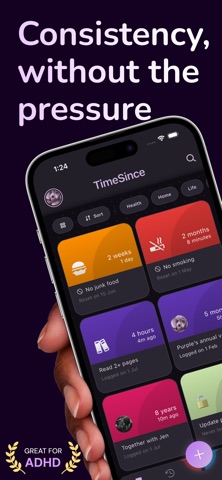
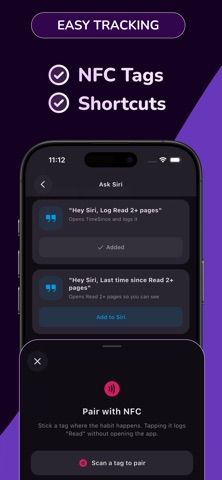
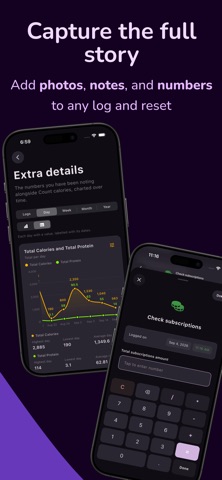
In a world obsessed with rigid schedules, hourly calendars, and stressful daily streaks, we often lose track of the dynamic, fluid rhythms of our actual lives. TimeSince is a premium, privacy-focused, local-first personal tracker designed to help you monitor the natural space between your moments. Plants watered, parents called, car oil changed, migraine logged, TimeSince gives each one a gorgeous, secure home, and shows you the tempo you actually keep. The Problem TimeSince Solves Habit trackers and to-do lists assume life runs on rigid daily schedules. Anything without a fixed deadline slips through the cracks, leading to: The "When Did I Last...?" Guesswork: Forgetting vital, irregular chores, medical routines, or social connections. Rigid Tracker Anxiety: Stressing over broken "daily streaks" for habits that naturally recur every few days or weeks. Scattered Information: Messy notebooks and spreadsheets holding your maintenance, health, and personal logs. Privacy Concerns: Reluctance to log deeply personal or sensitive habits in cloud-hosted trackers. TimeSince tracks the interval — time since last done — giving you a relaxing, data-rich way to manage life on your own terms. Key Features & Deep Customization 1. Dynamic Event Customization Make every tracked moment visually your own: A rich spectrum of curated, premium color palettes. Emoji icons to represent each event at a glance. Custom image covers for full visual personalization. 2. Advanced Custom Logging (Beyond Timestamps) Go beyond date-and-time stamps. Define custom inputs per event and attach structured fields to every log: Numbers: Perfect for doses, volumes, or costs, complete with a built-in calculator keyboard. Text Fields: For detailed, contextual journaling and notes. Photos: Capture visual progress or evidence. 3. Privacy-First "Hidden Events" Keep sensitive habits out of sight. A dedicated hidden layer, shielded by biometric security (Face ID / Touch ID), masks these events from the main UI and stores them in an encrypted database on your device. 4. Rhythm Analytics & Visual Statistics Discover your natural habits. TimeSince analyzes your history to: Calculate your average logging intervals. Smartly categorize events by frequency ("Frequently" vs. "Infrequently" logged). Render dynamic charts of interval trends and custom logged data over time. 5. Hands-Free Logging with Siri Capture a moment the second it happens, without opening the app. Every counter gets ready-made Siri phrases: "Hey Siri, Log Water the plants in TimeSince" to log and reset the interval. "Hey Siri, How long since Water the plants in TimeSince" to hear where you stand. Prefer shorter? Name your own shortcut and say just "Log Water" — or wire it to the Action Button or an automation. 6. Seamless Organization Categorize with custom taxonomy, then sort by multi-select category pills, alphabetically, or by time — a growing library stays as calm as a small one. 7. Private iCloud Sync & Complete Data Ownership Your history follows you between devices without ever passing through us: iCloud Sync: Counters, logs, resets, profile, and settings back up automatically to your own private iCloud container — not our servers. Toggle it any time. JSON Backups: Export your entire database to a portable file, and import it back on any device you own. Erase on Your Terms: Wipe this device alone, or choose Erase Everywhere to clear the iCloud copy with it. No lingering copy. Premium UI/UX & Native Engineering Works Fully Offline: Every feature runs on-device. iCloud sync is optional and stays off until you enable it. Fluid Micro-animations & Gestures: Interactive transitions that make the app feel alive. Storytelling Onboarding: An immersive, welcoming introduction to interval tracking. Encryption: Your database is encrypted at rest, with local-first performance throughout. --- Terms of Use: https://www.timesinceapp.com/terms Privacy Policy: https://www.timesinceapp.com/privacy
What's new · 1.11
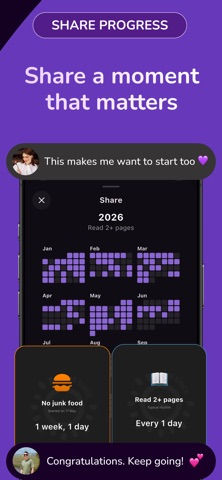
- A fresh, consistent ticket-inspired design throughout the app. - Make it yours with six paper colours and four background patterns. - New receipts when you create a counter, log a moment, or reset a quit counter. - Slide to confirm a reset, with the run you completed and your longest run kept in view. - Quit-counter calendars now show the days between resets, including when shared. - A refreshed Timeline with entries grouped by day and photos shown in their original shape. - A full-page Explore experience for finding your next counter. - Clearer text, improved layouts, and extra confirmation before deleting a counter.
Details