

Clef: Sight Reading Trainer
Mel Owen · Education
Independent analytics for this App Store listing. AppTracker is not affiliated with Mel Owen.
Chart standing · US
What changed · US
Listing changes AppTracker has observed for this app in this storefront — new versions, price moves, rating shifts, and store copy.
New in this version: • Playing on a MIDI keyboard? Clef can now hide the on-screen keys so the music gets the whole screen. Change it any time in Settings. • On iPhone, the keyboard now glides smoothly to the next note when it is off screen. • Stuck on an exercise? A short explanation with one example now appears when you need it, and stays out of the way when you don't. • Optional: sign in with Apple or add your email to save your progress and get a weekly practice reminder. Clef works the same without it.
In-app purchases · US
What this app sells inside itself, grouped by kind and priced for this storefront.
Screenshots




About
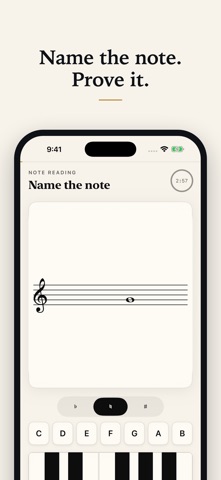
Clef: Sight Reading Trainer Connect written notes, note names and piano keys through short, repeatable drills. Choose your reading level and session length, then start practising. New beginners start with a small group of C-position notes and patterns. Short explanations introduce unfamiliar concepts, and help stays available during practice. Spaced repetition uses your answers to schedule what to revisit. READING - Note Naming: treble and bass - Grand Staff: alternate between treble and bass - Ledger Notes: notes above and below the staff - Intervals: the distance between two notes - Key Signatures: sharps and flats AT THE KEYBOARD - Keyboard Mapping: find the named note - Five-Finger Patterns: repeat short patterns and read-and-play exercises - Triads and Inversions: recognise and play chord shapes - Seventh Chords: practise four-note chords - Major and Minor Scales: follow note patterns and fingering guides - Arpeggios: practise broken chords - Hands Together: coordinate paired notes Fifteen focused practice tracks, with daily mixed sessions and individual drills. PLAY ON SCREEN OR WITH MIDI Use the on-screen piano and answer buttons, or connect a compatible MIDI keyboard. Follow the note and register instructions for each drill. Note names can use letters or do-re-mi. For played patterns, “Watch & listen” demonstrates the exercise; “Your turn” returns to practice. Clef checks the notes you enter. Fingering guides are references, not a measurement of your physical technique. SHORT SESSIONS, USEFUL FEEDBACK Choose three or five minutes, then continue practising from the results screen when you want to keep going. Review your answers, clean recall and best run, with an estimated recall forecast for the items practised in that session. Adjust your reading level, session length and practice goals in Settings. Paper, ink and a single gold accent keep the focus on the music. Practice history stays on your device. No account is required. FREE AND FULL ACCESS Treble and bass focused reading practice and one mixed daily session per calendar day are free. Full access is available through annual or monthly subscriptions, or a one-time lifetime purchase. Prices and any eligible introductory offer are shown before purchase. Existing owners of the earlier one-time unlock retain their access. Terms of Use (EULA): https://www.apple.com/legal/internet-services/itunes/dev/stdeula/ Privacy Policy: https://clefdrills.com/privacy/
What's new · 1.0.7
New in this version: • Playing on a MIDI keyboard? Clef can now hide the on-screen keys so the music gets the whole screen. Change it any time in Settings. • On iPhone, the keyboard now glides smoothly to the next note when it is off screen. • Stuck on an exercise? A short explanation with one example now appears when you need it, and stays out of the way when you don't. • Optional: sign in with Apple or add your email to save your progress and get a weekly practice reminder. Clef works the same without it.
Details