

ShellYeah - 3D UI Mockups Tool
子捷 陈 · Utilities
Independent analytics for this App Store listing. AppTracker is not affiliated with 子捷 陈.
Chart standing · US
What changed · US
Listing changes AppTracker has observed for this app in this storefront — new versions, price moves, rating shifts, and store copy.
● Pro: choose different images for each 3D motion segment. Timeline blocks show image thumbnails; long-press to choose or replace an image. ● Combine preset motions using the motion block’s long-press submenu. ● 3D Duo adds a glass-like interface effect during folding and a blur toggle. Exports follow the canvas setting. ● Multi-device Duo layouts support independent fold angles and separate outer and inner screen images for each device. ● Duo custom motion supports per-segment outer and inner screen images, shown as paired thumbnails. ● Custom motion sliders stay in sync with canvas gestures for more intuitive pose adjustments. ● Improved preset and custom background image clarity. Fixed a Dynamic Island-shaped gap at the bottom of some Flat Mockup exports. ● Improved image addition, segment undo, and material and reflection updates during Icon Card motion playback.
Ratings breakdown · US
The star breakdown behind this app's rating in this storefront.
Screenshots




About
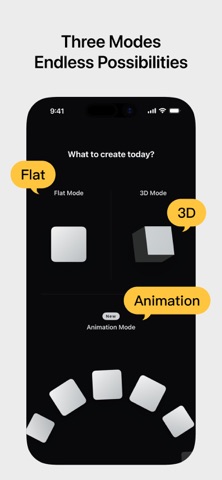
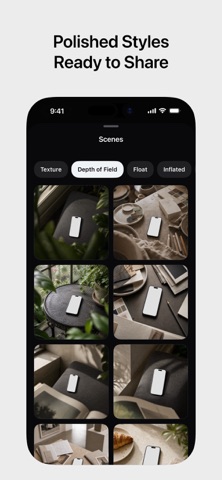
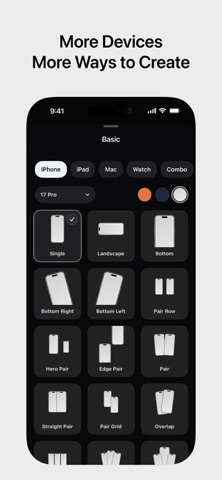
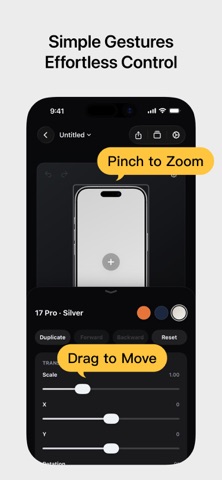
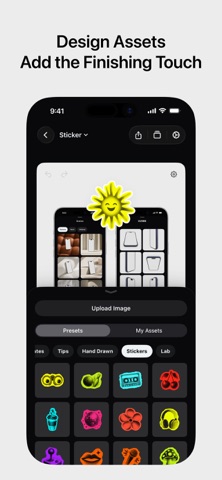
Shell Yeah is an animation, 2D, and 3D mockup tool built for developers, designers, and content creators. Drop in screenshots or screen recordings, choose Animation, Flat Mockup, or 3D Mockup, then set up your canvas size, device style, scene look, and design layers. Shell Yeah helps you create polished product images and short videos for the App Store, social platforms, launch posts, and product updates. Key features: ● Choose between Animation, 2D Flat Mockup mode, and 3D Mockup mode, each with its own projects and creative state ● Turn screenshots into motion-ready grids, orbits, card flows, and hero compositions with Motion presets ● Adjust Fit / Fill, zoom, position, and corners for each image in an Animation project ● Use PSD/Smart Object-based 2D templates with screen replacement, rounded corners, occlusion, and depth effects ● Import screen recordings in Flat Mockups, preview playback on the canvas, scrub the timeline, and export MP4 videos ● Build single-device and multi-device flat layouts with Basic 2D devices ● Use Icon Card to turn app icons and square artwork into polished 3D mockups with adjustable corner radius, thickness, bevel, body color, and automatic color sampling ● Use Progressive Blur and handheld styles to keep the interface as the visual focus ● Use People / Space, Hand / Indoor, and Dark Hand Grip lifestyle templates for more scene-rich product visuals ● Use GPU-accelerated PSD screen replacement when available for smoother Flat Mockup previews, image exports, video exports, and project thumbnails ● Import screenshots or screen recordings and fit them to device screens ● Adjust device angle, scale, screen close-ups, and canvas ratio, with support for showing 2-4 phones at once ● Add text, images, SF Symbols, SVG assets, ratings, badges, and shapes on top of the mockup ● Use built-in NEW, PRO, AI, 4K, Free, Sale, brand badge, rating, and decorative assets ● Use Stylized Icons assets like Dev and Line Art to expand your home-screen icon showcase ● Keep independent scene settings and design elements per image in multi-image projects, or copy/apply styles in one tap ● Switch device finishes and band colors ● Use mockups for iPhone, iPad, Apple Watch, Studio Display, and Macintosh Classic ● Create animated videos with preset Motion templates and AI animation ● Fine-tune lighting, background, depth, shadows, and scene bases ● Use solid colors, transparent backgrounds, linear gradients, mesh gradients, or custom background images ● Export PNG / JPEG / HEIC images, MP4 videos, and Live Photos ● Support common canvas sizes for social media and App Store content Shell Yeah is designed for app screenshots, product launch visuals, update posts, and social content, helping you create polished mockups without the usual manual hassle. Privacy Policy: https://taoker.fun/privacy/ Support: https://taoker.fun/support/ Apple Standard Terms of Use (EULA): https://www.apple.com/legal/internet-services/itunes/dev/stdeula/ Terms of Service: https://taoker.fun/terms/
What's new · 2.2.12
● Pro: choose different images for each 3D motion segment. Timeline blocks show image thumbnails; long-press to choose or replace an image. ● Combine preset motions using the motion block’s long-press submenu. ● 3D Duo adds a glass-like interface effect during folding and a blur toggle. Exports follow the canvas setting. ● Multi-device Duo layouts support independent fold angles and separate outer and inner screen images for each device. ● Duo custom motion supports per-segment outer and inner screen images, shown as paired thumbnails. ● Custom motion sliders stay in sync with canvas gestures for more intuitive pose adjustments. ● Improved preset and custom background image clarity. Fixed a Dynamic Island-shaped gap at the bottom of some Flat Mockup exports. ● Improved image addition, segment undo, and material and reflection updates during Icon Card motion playback.
Details