

SwingDiff: Golf Swing Analyzer
TEN HALF LIMITED LIABILITY COMPANY · Sports
Independent analytics for this App Store listing. AppTracker is not affiliated with TEN HALF LIMITED LIABILITY COMPANY.
Chart standing · US
What changed · US
Listing changes AppTracker has observed for this app in this storefront — new versions, price moves, rating shifts, and store copy.
• Improved the SwingDiff Pro purchase screen. • Minor fixes and stability improvements.
Screenshots


About
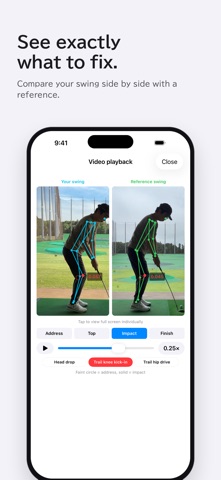
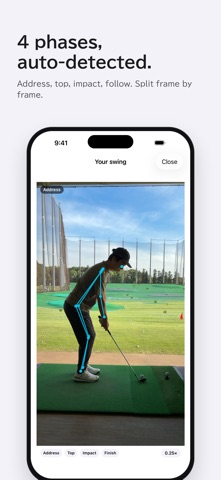
See what's off in your swing — through your own skeleton. SwingDiff analyzes your golf swing video on-device, then overlays your skeleton against a reference swing or one of your past swings so you can diff (compare) your way to a more repeatable swing. ON-DEVICE SKELETON ANALYSIS Skeleton extraction with Vision Framework. Address, Top, Impact, and Follow-through are auto-detected as the four key phases — no manual frame scrubbing. 15-POINT AUTO DIAGNOSIS Spine tilt, axis lean at the top, hand position at impact — 15 repeatability-critical points are graded pass / fail with a clear overall score, so you know exactly what to work on next. DIFF (COMPARE) VS. REFERENCE OR PAST SELF Overlay your skeleton on a built-in reference swing, or on a previously analyzed swing of your own. Phase by phase you can see where you drift — and that's where repeatability comes from. PROGRESS TRACKING Every analysis is saved to your history. Watch your score trend over time to see whether your practice is paying off. iPhone Slo-Mo videos (120fps / 240fps) are fully supported. PRIVACY-FIRST Videos, images, and skeleton data never leave your iPhone. No account, no sign-in. Every feature works offline. SWINGDIFF PRO • Monthly / Yearly / Lifetime tiers • Ad-free — no ad before each analysis • No home-screen banner ads Subscriptions are charged to your Apple ID at confirmation of purchase and auto-renew unless cancelled at least 24 hours before the end of the current period. Manage or cancel from iOS Settings > your Apple ID > Subscriptions. HOW TO SHOOT Record Down-the-Line (DTL) — directly behind your ball flight line — with your phone held vertically. Position the camera so you appear on the left and the ball on the right of the frame. Bright outdoor light, a simple background, and enough distance to capture your full body all help detection accuracy. LEFT-HANDED SUPPORT Right- and left-handed swings are both supported. Choose your dominant hand during onboarding or in Settings, and left-handed swings are analyzed and compared just like right-handed ones. Privacy Policy: https://10half.jp/swingdiff/privacy.en.html Terms of Use: https://www.apple.com/legal/internet-services/itunes/dev/stdeula/ Support: https://10half.jp/swingdiff/support.en.html
What's new · 1.2.7
• Improved the SwingDiff Pro purchase screen. • Minor fixes and stability improvements.
Details