

PicSquash - HEIC to JPG & More
Drizzling Bytes LLC · Photo & Video
Independent analytics for this App Store listing. AppTracker is not affiliated with Drizzling Bytes LLC.
Chart standing · US
What changed · US
Listing changes AppTracker has observed for this app in this storefront — new versions, price moves, rating shifts, and store copy.
PicSquash now compresses videos too! • Compress MOV and MP4 videos with four quality presets, including HEVC 1080p • Photos and videos appear together in one library grid, with duration badges on videos • New Media Type filter — show photos only, videos only, or both • Pick your video quality in Settings • Save compressed videos back to Photos or replace the originals to free up space • Pinch to zoom in the before/after comparison — both sides zoom together • Refreshed home screen and features list
Ratings breakdown · US
The star breakdown behind this app's rating in this storefront.
In-app purchases · US
No in-app purchases.
Screenshots



About
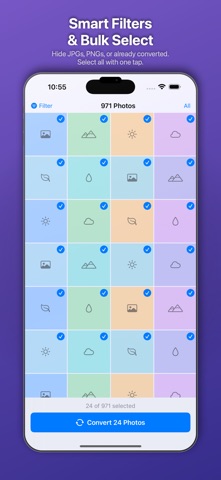
HEIC to JPG — Mass Photo Converter Your iPhone shoots HEIC photos that won't open on Windows, older Macs, or many websites. HEIC to JPG converts your entire library to universally compatible JPG or PNG — fast, easy, and in bulk. BROWSE & FILTER YOUR LIBRARY Tap Convert Now and your entire photo library appears in a full-screen grid. Smart filters let you: • Hide photos already converted • Hide JPGs or PNGs you don't need to touch • Show only HEIC photos • Select all or pick individual photos One tap to select everything. One tap to start converting. FLEXIBLE OUTPUT OPTIONS Choose JPG or PNG output. Set quality from 10% to 100%. Limit each photo to a maximum file size (great for email). Reduce resolution to 4K, 1080p, 720p, or 480p. All settings accessible from the conversion options panel. BATCH CONVERT WITH CANCEL Watch real-time progress as photos convert one by one. Cancel anytime — partial results are kept. EXIF metadata (dates, GPS, camera info) is preserved in every converted photo. SHARE ANYWHERE After conversion, share your photos instantly: • Email with smart auto-batching (splits into batches under your size limit) • AirDrop to any nearby device • Share via Messages, WhatsApp, or any app PHOTO LIBRARY MANAGEMENT Save converted photos back to your Photo Library. Replace originals in-place (saves the JPG and deletes the HEIC) to free up space. Or delete the original HEICs after you've shared the JPGs. REMEMBERS WHAT'S DONE Mark photos as converted so they're filtered out next time. Come back tomorrow and only see what's new. Your conversion history tracks every photo with before/after file sizes. PRIVACY FIRST All conversion happens on your device. No uploads, no cloud processing, no accounts. Your photos never leave your iPhone.
What's new · 1.1
PicSquash now compresses videos too! • Compress MOV and MP4 videos with four quality presets, including HEVC 1080p • Photos and videos appear together in one library grid, with duration badges on videos • New Media Type filter — show photos only, videos only, or both • Pick your video quality in Settings • Save compressed videos back to Photos or replace the originals to free up space • Pinch to zoom in the before/after comparison — both sides zoom together • Refreshed home screen and features list
Details