

PearCircle
Timothy Hudgins · Social Networking
Independent analytics for this App Store listing. AppTracker is not affiliated with Timothy Hudgins.
Chart standing · US
What changed · US
Listing changes AppTracker has observed for this app in this storefront — new versions, price moves, rating shifts, and store copy.
## What's Changed New Features - Watch your circle from a computer. The new PearCircle Watcher for Mac, Windows and Linux shows your circle on a map. It never shares a location and does not show trips. - To add a computer, tap a circle's share button and choose "Desktop watcher" to make an invite for it. - Computers watching a circle appear in a separate "Watching" list in Settings > Circles. Anyone in the circle can remove one with the trash icon. - Everyone in the circle gets a notice when a computer starts watching. Security - Live locations now go only to circle members and the computers they have approved. Bug Fixes - Fixed a rare crash that could stop the app from syncing until it was reopened.
Screenshots



About
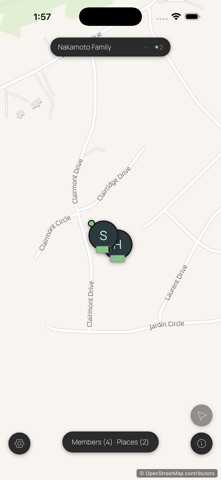
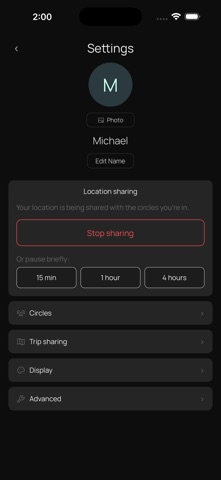
Share live location and presence with the people you trust, your family, your friends, the people on your road trip. No accounts. No tracking. No subscriptions. Your circle's location data lives only on the devices you pair. PearCircle has no central server storing it, no analytics and no telemetry, and PeerLoom holds no key that could read a single thing about you or your circle. KEY FEATURES - Private circles: create a circle, invite people via a link or QR code, share live location directly with them - Multiple circles: one identity, many circles such as family, friends, or partners on a trip; switch between them or see everyone at once - Places and geofences: long-press the map to drop a Place; everyone in that circle gets a notification when someone arrives or leaves - Trips: your motion timeline records each drive or walk; opt in per-circle to let members see each other's trips on the map - Motion at a glance: pins surface walking, driving, flying, or stationary state, with battery and last-seen time - Sharing pause: one tap silences your location for the rest of the day; peers see "Sharing paused" instead of stale dots - Offline map tiles: tiles you've viewed stay cached so the map keeps working without a network connection; download an area in advance for trips into dead zones - No accounts: your identity is a cryptographic key pair generated on your device - No data collection: PeerLoom, Apple, and no third party ever sees your location data HOW IT WORKS PearCircle uses peer-to-peer technology powered by Hypercore Protocol. When devices in the same circle are online at the same time, they find each other using a distributed hash table, the same kind of technology that powers BitTorrent. Once connected, they sync directly, device to device, with no middleman. All sync traffic is encrypted in transit. Each location update, place change, and trip is cryptographically signed by the writing device, so circle members only apply updates they can verify came from a paired member. Place transitions such as "arrived at Home" or "left School" are computed locally on each device. When you cross a geofence, your device writes a signed transition that replicates to peers, and their devices fire the local notification. No service in the middle decides what you are told. PRIVACY - No accounts or sign-up required - No analytics, tracking, or telemetry - No third-party SDKs - All sync traffic is end-to-end encrypted - Location data stays on the devices in your circles, never uploaded to a service that can read it - Optional connection relay: when a network stops two phones connecting directly, PearCircle can fall back to a relay PeerLoom runs. It forwards encrypted data it has no key to read and stores nothing, though it can see that two devices are talking and how much data passes. Direct connections are always tried first, and one switch in Settings turns it off - Map tiles come from a public tile provider as stateless tile-coordinate requests; they don't identify you or your circle - Trip history is local-only by default; per-circle sharing is opt-in PERMISSIONS PearCircle asks for location permission on first launch and explains why each step is needed. "Always" lets the foreground worklet keep sharing while the app is in the background. "While Using the App" works only when PearCircle is foregrounded. If you previously declined, an in-app banner offers a direct link to your iOS Settings. LIMITATIONS - Both devices in a circle must be online at the same time to sync in real time. Changes made offline replicate the next time devices can reach each other. Open source. No vendor lock-in. Built by PeerLoom.
What's new · 1.1.7
## What's Changed New Features - Watch your circle from a computer. The new PearCircle Watcher for Mac, Windows and Linux shows your circle on a map. It never shares a location and does not show trips. - To add a computer, tap a circle's share button and choose "Desktop watcher" to make an invite for it. - Computers watching a circle appear in a separate "Watching" list in Settings > Circles. Anyone in the circle can remove one with the trash icon. - Everyone in the circle gets a notice when a computer starts watching. Security - Live locations now go only to circle members and the computers they have approved. Bug Fixes - Fixed a rare crash that could stop the app from syncing until it was reopened.
Details