

Imaging Console
栋 张 · Photo & Video
Independent analytics for this App Store listing. AppTracker is not affiliated with 栋 张.
Chart standing · US
What changed · US
Listing changes AppTracker has observed for this app in this storefront — new versions, price moves, rating shifts, and store copy.
- Added more video monitoring sources (iPad only): Supports HDMI capture cards and UVC cameras, with selectable resolution and frame rate, image rotation, horizontal/vertical mirroring, and zoom settings. - Added monitor recording (iPad only): Supports MP4/MOV containers and H.264/H.265 encoding, selectable audio inputs, and saving to the app gallery, Photos, or a folder in Files. - Added synchronized recording: When connected wirelessly to a camera while monitoring via HDMI, recording can start and stop simultaneously in the app and on the camera. When recording ends on the camera, the app automatically finalizes its local recording. - Added synchronized audio recording: Record high-quality audio using your Apple device’s microphone while shooting video. Supports audio/video synchronization adjustments and exporting a video copy with the audio recorded on your Apple device. - Improved audio monitoring: Supports USB audio monitoring, individual channel level meters, and audio input selection when used with synchronized audio recording. - Improved the self-timer experience: Starting the self-timer is now easier. - Improved the monitoring interface: The HDMI recording panel can be dragged and remembers its position. Also improved compact-window layouts and menu stability. - Remembers the monitoring source: Automatically saves and restores your HDMI/JPEG selection (iPad only). - Added support for the fish detection menu on the new Nikon Z5IIC. - Other bug fixes and performance improvements. - Getting the gear ready for a motorcycle trip. Due to iOS limitations, external video monitoring features are currently available only on iPad (iPadOS) and in the Android version.
Ratings breakdown · US
The star breakdown behind this app's rating in this storefront.
Screenshots




Keywords this app targets
Search terms AppTracker associates with this app — estimates, not search volume. ❝ = in the app's title; a highlighted number is its current position for that term.
Similar apps
Competitors and close alternatives, as estimated by AppTracker.


About
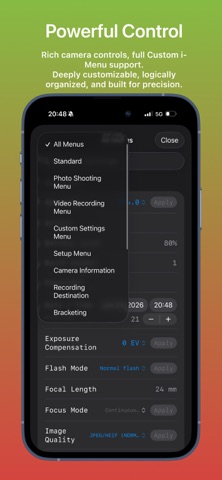
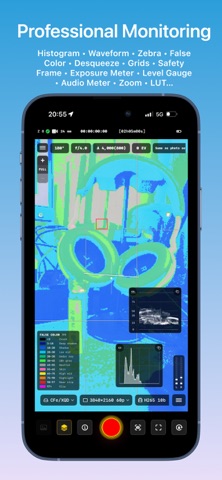
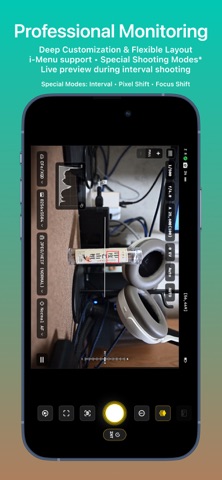
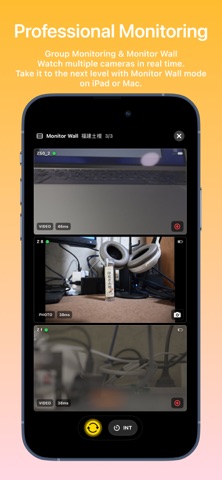
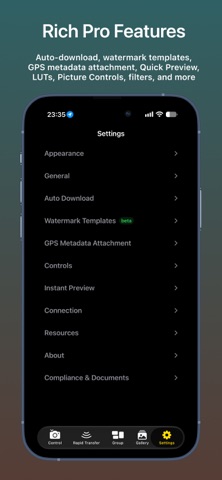
Imaging Console is a professional third-party camera control, monitoring, and file transfer application compatible with Nikon Z series mirrorless cameras and cinema cameras. **Compatibility** Expeed 7 models (Z9, Z8, ZR, Z6III, Z5II, Zf, Z50II) are fully compatible and support all app features. Expeed 6 models (Z5, Z6, Z7, Z6II, Z7II, Z50, Z30, Zfc) do not support group functions. For wireless connections: use "Connect to Smart Device" for control, monitoring, and in‑camera file access; use "Connect to Computer" for control and monitoring only. Important Notice Imaging Console is independently developed and is not affiliated with, endorsed by, authorized by, or associated with Nikon Corporation, RED Digital Cinema, or their affiliated companies. References to Nikon, RED, and related product names are used solely to identify compatible devices. Key Features Hybrid Connectivity Supports USB (MTP/PTP) and wireless (PTP/IP) connections, including camera hotspot, Wi-Fi, and mobile hotspot. Supports both single-camera and multi-camera workflows. Multi-Camera Control Manage and control multiple cameras wirelessly with synchronized photo capture, video recording, mixed capture modes, live monitoring, and synchronized operation for supported shooting modes. Professional Live View Monitor live video with touch focus and convenient camera parameter control. Includes professional monitoring tools such as LUT preview, false color, zebra, histogram, waveform, safe area, level indicator, and composition grids. In-Camera File Management Browse, review, download, protect, rate, and preview files with LUT support. Batch download and advanced filtering are supported. Voice memo management is available on supported flagship cameras. Rapid Transfer Workflow Automatically download newly captured files—or mark selected files as protected on the camera to send them directly to Imaging Console. Choose Gallery, Photos, or Files as the destination, automatically attach GPS, IPTC, and copyright metadata, and support cardless shooting workflows. Review, edit, and deliver selected content faster without interrupting camera operation. LUT & Image Optimization Import custom LUTs and optimization profiles for live preview, in-camera file browsing, post-capture preview, and library viewing. LivePhoto generation and export Supports flexible export from in‑camera video files or imported gallery videos, with HDR preservation and automatic GPS location tagging. Imaging Console is designed to provide photographers, filmmakers, and professional creators with a reliable and efficient camera control workflow.
What's new · 2.7.0
- Added more video monitoring sources (iPad only): Supports HDMI capture cards and UVC cameras, with selectable resolution and frame rate, image rotation, horizontal/vertical mirroring, and zoom settings. - Added monitor recording (iPad only): Supports MP4/MOV containers and H.264/H.265 encoding, selectable audio inputs, and saving to the app gallery, Photos, or a folder in Files. - Added synchronized recording: When connected wirelessly to a camera while monitoring via HDMI, recording can start and stop simultaneously in the app and on the camera. When recording ends on the camera, the app automatically finalizes its local recording. - Added synchronized audio recording: Record high-quality audio using your Apple device’s microphone while shooting video. Supports audio/video synchronization adjustments and exporting a video copy with the audio recorded on your Apple device. - Improved audio monitoring: Supports USB audio monitoring, individual channel level meters, and audio input selection when used with synchronized audio recording. - Improved the self-timer experience: Starting the self-timer is now easier. - Improved the monitoring interface: The HDMI recording panel can be dragged and remembers its position. Also improved compact-window layouts and menu stability. - Remembers the monitoring source: Automatically saves and restores your HDMI/JPEG selection (iPad only). - Added support for the fish detection menu on the new Nikon Z5IIC. - Other bug fixes and performance improvements. - Getting the gear ready for a motorcycle trip. Due to iOS limitations, external video monitoring features are currently available only on iPad (iPadOS) and in the Android version.
Details