

ClassPilot - School Planner
Efthymios Tampouris · Education
Independent analytics for this App Store listing. AppTracker is not affiliated with Efthymios Tampouris.
Chart standing · US
What changed · US
Listing changes AppTracker has observed for this app in this storefront — new versions, price moves, rating shifts, and store copy.
Thank you for using ClassPilot! We regularly update our app to give you a better user experience! In this release we implemented major improvements and fixes: - Added Support contact options within the app. - Complete Data management. Delete options for: scheduled, Apple calendar, or All Data items. - Various fixes in Ecosystem components (Import, Calendar sync, Backup/restore). - More use of Apple Intelligence and better integration of Foundation Models. ** Support: https://sites.google.com/view/yetanotherswiftapp/support
In-app purchases · US
What this app sells inside itself, grouped by kind and priced for this storefront.
Screenshots





About
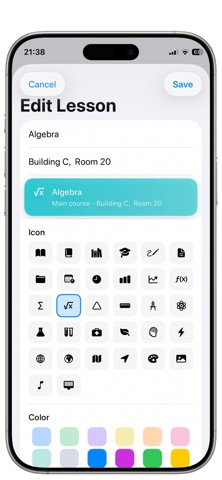
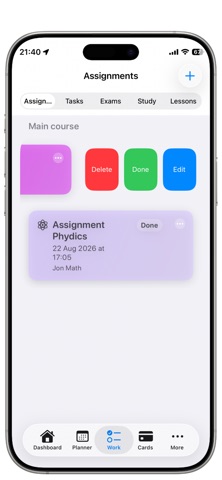
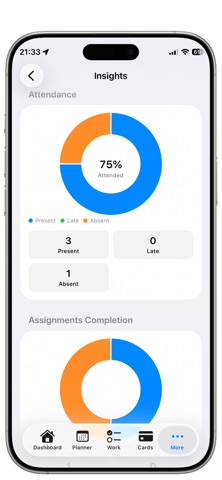
** ClassPilot ** helps you plan a semester, manage daily lessons, track grades, and stay on top of deadlines — whether you’re trying the app for free or running a full classroom workflow on Pro. ** ClassPilot - School Planner is translated in 22 Languages! ** Core capabilities: • Course management: create and organize courses with metadata. • Lesson planner: schedule lessons with start/end times, locations, and quick links. • Assignments & exams: add assignments and exams with due dates, priorities, estimated effort, and status. • Tasks & checklists: lightweight tasks with subtasks, priorities, and completion history. • Grades: full grade visibility with weighted categories and quick grade entry. • Study cards: create flashcards for quick review and spaced practice. • Documents & attachments: attach documents; preview and open files from the app. • Reminders & notifications: set reminders for items and receive local notifications. • Appearance & themes: choose light/dark and theme accents. • Import options: import course data from standard LMS exports. • Local backups: export and restore data. • Dashboard: concise dashboard showing next lesson, upcoming deadlines, and quick actions. • Security & privacy: iCloud sync for cross‑device continuity. • Deep links & sharing: open specific lessons, assignments or courses with classmates or teachers. • Performance: timeline views optimized for smooth scrolling. Extra Advanced Pro features: • Home‑screen widgets: full home widgets (Next Lesson, Today, Assignments, Exams, Course) with multi‑instance support and per‑widget configuration. • iCloud sync & background sync: automatic cross‑device sync and conflict resolution. • Expanded imports: direct imports from MSTeams, Moodle, Google Classroom, Canvas. • Dashboard customization: add, remove and rearrange dashboard modules and widgets. • Calendar sync: two‑way calendar integration with system calendars and advanced sync options. • Advanced exports & sharing: export full course packages, share read/write links, and bulk CSV/ICS export. Usability & reliability: • Deterministic day and week timeline rendering for clear, non‑overlapping event placement. • Overlap resolution and columned event layout for readable schedules. * Free vs Pro — Feature comparison Free: • Courses: 1 • Teachers: 2 • Lessons: 2 • Assignments: 2 • Exams: 2 • Tasks: 2 • Cards: 2 • Documents: 5 • Reminders: 1 • Grade visibility: Full • Appearance/themes: Included • In‑app widget preview: Included • Imports: LMS only • Calendar sync: No • iCloud sync: Yes • Backup & restore: No • Dashboard customization: Partial • Intelligence access: Disabled Pro (only for 1,99 EUR/month): • Unlimited courses, teachers, lessons, assignments, exams, tasks, cards, documents • Home‑screen widgets (multi‑instance, customizable) • iCloud sync & background sync across devices • Imports: MSTeams, Moodle, Google Classroom, Canvas • Backup & restore, encrypted exports • Dashboard customization and advanced widgets • Calendar sync and advanced export/sharing options • Priority support and migration assistance Terms of Use (EULA): https://www.apple.com/legal/internet-services/itunes/dev/stdeula/ Privacy Policy URL: https://ops-eng.github.io/ClassPilot/privacy.html - ClassPilot is free to download and use. ClassPilot Pro Subscription gives you unlimited access to our premium content and features. - Payment will be charged to your iTunes Account at confirmation of your subscription. Subscription automatically renews unless auto-renew is turned off at least 24-hours before the end of the current period.
What's new · 1.6.0
Thank you for using ClassPilot! We regularly update our app to give you a better user experience! In this release we implemented major improvements and fixes: - Added Support contact options within the app. - Complete Data management. Delete options for: scheduled, Apple calendar, or All Data items. - Various fixes in Ecosystem components (Import, Calendar sync, Backup/restore). - More use of Apple Intelligence and better integration of Foundation Models. ** Support: https://sites.google.com/view/yetanotherswiftapp/support
Details