

Discboard: Album Cover Art
Byteshire LLC · Music
Independent analytics for this App Store listing. AppTracker is not affiliated with Byteshire LLC.
Chart standing · US
What changed · US
Listing changes AppTracker has observed for this app in this storefront — new versions, price moves, rating shifts, and store copy.
Discboard 2.0 is here: a fresh new look, a much faster Discboard, and your boards on Apple Watch. A fresh new look Discboard has a new app icon — a capital D built from a wall of album covers, with a shining disc at its center — and a new violet accent throughout the app. The Now Playing sheet sits on tinted glass that follows light and dark mode. On iPhone and iPad, a board's buttons live in a standard toolbar at the top of the screen, and its name sits in a glass capsule of its own; tap it to rename the board. Covers stay clear of the status bar, the toolbar and the home indicator. On iPad and Mac, the wallpaper runs the full width of the window, behind your list of discboards. Much faster Your discboards are drawn by a brand-new graphics engine. Covers, shine and shadows look just as they did, while panning, zooming and rearranging are smoother, most of all on boards with many covers. Albums start playing sooner, and tapping another song from the album that's playing jumps straight to it. Discboard on Apple Watch Your discboards appear on your watch as crates. Turn the Digital Crown to flip through a board's covers, and tap one to play it on your iPhone. Press and hold a cover to play it or shuffle it. While music plays, the watch shows what's on: turn the Digital Crown to change the volume, press and hold to rate or favorite the song, and open the queue to jump to another track. Add Discboard to the Smart Stack or a watch face for a one-tap Surprise Me. Also in 2.0 • A new Surprise Me widget for your Home Screen and your Mac's desktop shows one of your discboards; tap it and Discboard plays a random album from that board • Albums from another country's store are matched to your own store's version, so more of them play • Covers you make bigger stay sharp, and a cover whose art is missing keeps looking for it • The layer slider appears beside the cover you selected and follows it as you move around the board • Toolbar buttons that don't fit move into the "…" menu under their proper names, and Done no longer goes missing while you edit on iPhone • The small status messages at the top of the screen hold still as they come and go • A board dragged past its edge always springs back • On iOS 27 and macOS 27, your discboards feed the album suggestions on the Lock Screen and in Control Center when nothing is playing • The full-screen player is easier to read in dark mode • Fixes for crashes that could strike in the app's first moments when the system opened it in the background Thanks for listening — keep the feedback coming.
Ratings breakdown · US
The star breakdown behind this app's rating in this storefront.
In-app purchases · US
What this app sells inside itself, grouped by kind and priced for this storefront.
Screenshots




About
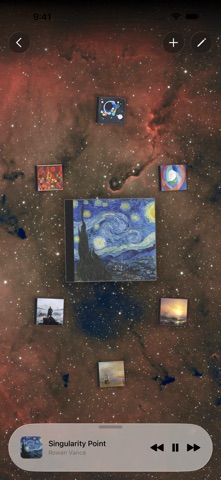
Remember pulling LP and CD sleeves out of their cases and spreading them across the floor? You'd put one on, sit with it for a while, set it back down, reach for another. No rush. The floor was the playlist — and looking at the covers was half the fun. Discboard is that feeling, on your iPhone, iPad, Mac, and Apple Watch — and in the car. Pick an album from your library — or drag one straight in from Apple Music — and set it down on a discboard. Nudge it where you want, pinch it to size, turn it to the angle that feels right. Pull out another. Fan them out, overlap them, tuck a small one behind a big one. Then sit back and look at it — a little arrangement of cover art that's all yours. Tap a cover and its jewel case lifts off the board and turns around: title, artist, every track. Tap a track and it plays through Apple Music. Then just listen. It's meant to be slow. A small, deliberate set of albums in front of you instead of an endless scroll — something to sit with, not swipe past. • Lay your covers out however you like — drag with one finger, pinch to size, twist to rotate. Or size them all at once by album length or your ratings • Tuck small covers behind big ones with a layer slider, or float a favorite above the pile • Every cover is a real CD jewel case — translucent shell, ribbed spine, and a sheen that drifts across the plastic as you move • Tap a cover to flip it open — full track listing with ratings and favorites, one tap to play any track • See a board whichever way suits the moment — the spatial layout, a scrolling list, or a grid of covers, ordered by album, artist, release date, or how they're stacked. Each board keeps its own choice • Take your boards to the car — CarPlay lists your discboards, folders and all, and plays any album, with favorites, star ratings, and Up Next right on the Now Playing screen • On your wrist — on Apple Watch, flip through a board's covers with the Digital Crown, tap one to play it on your iPhone, and rate what's playing • Bring your own wallpaper — drag an image onto a board, pick one from Photos or Files, or use the bundled set • Share a board — as a file that opens in Discboard as the other person's own copy, as a high-resolution image, or as an animation where the covers sweep or spin into place • Widgets for your Home Screen and Mac desktop — a board, what's playing, or Surprise Me, which plays a random album • A player rides along — track controls, a full now-playing view, and a mini-player that stays out of the way while you keep arranging • Works with your whole Apple Music library, including iTunes Match uploads — even cloud-only and uploaded artwork rides across your devices • Your boards, arrangements, wallpapers, and ratings sync across iPhone, iPad, and Mac through iCloud • No account to create, no sign-up Discboard is free to use — room for a couple of boards and a small collection of covers, enough to get the feeling. Discboard Premium opens it all the way up: unlimited boards and unlimited covers. Keep one board for late nights, one for road trips, one for the records you're rediscovering — as full as you like. • Group your boards into folders — and folders inside folders — as your collection grows • Back up your boards to a file and restore them on another device • Monthly or yearly, with a 7-day free trial It's not a streaming service. You bring your Apple Music library; Discboard gives it a place to be looked at and listened to. Discboard Premium is an auto-renewing subscription. • Monthly — $2.99 (US) per month • Annual — $19.99 (US) per year • New subscribers get a 7-day free trial. Payment is charged to your Apple ID at confirmation of purchase. Your subscription renews automatically unless you cancel at least 24 hours before the end of the current period. Manage or cancel anytime in your App Store account settings. Prices may vary by region. Terms of Use: https://byteshire.com/discboard-terms Privacy Policy: https://byteshire.com/discboard-privacy
What's new · 2.0
Discboard 2.0 is here: a fresh new look, a much faster Discboard, and your boards on Apple Watch. A fresh new look Discboard has a new app icon — a capital D built from a wall of album covers, with a shining disc at its center — and a new violet accent throughout the app. The Now Playing sheet sits on tinted glass that follows light and dark mode. On iPhone and iPad, a board's buttons live in a standard toolbar at the top of the screen, and its name sits in a glass capsule of its own; tap it to rename the board. Covers stay clear of the status bar, the toolbar and the home indicator. On iPad and Mac, the wallpaper runs the full width of the window, behind your list of discboards. Much faster Your discboards are drawn by a brand-new graphics engine. Covers, shine and shadows look just as they did, while panning, zooming and rearranging are smoother, most of all on boards with many covers. Albums start playing sooner, and tapping another song from the album that's playing jumps straight to it. Discboard on Apple Watch Your discboards appear on your watch as crates. Turn the Digital Crown to flip through a board's covers, and tap one to play it on your iPhone. Press and hold a cover to play it or shuffle it. While music plays, the watch shows what's on: turn the Digital Crown to change the volume, press and hold to rate or favorite the song, and open the queue to jump to another track. Add Discboard to the Smart Stack or a watch face for a one-tap Surprise Me. Also in 2.0 • A new Surprise Me widget for your Home Screen and your Mac's desktop shows one of your discboards; tap it and Discboard plays a random album from that board • Albums from another country's store are matched to your own store's version, so more of them play • Covers you make bigger stay sharp, and a cover whose art is missing keeps looking for it • The layer slider appears beside the cover you selected and follows it as you move around the board • Toolbar buttons that don't fit move into the "…" menu under their proper names, and Done no longer goes missing while you edit on iPhone • The small status messages at the top of the screen hold still as they come and go • A board dragged past its edge always springs back • On iOS 27 and macOS 27, your discboards feed the album suggestions on the Lock Screen and in Control Center when nothing is playing • The full-screen player is easier to read in dark mode • Fixes for crashes that could strike in the app's first moments when the system opened it in the background Thanks for listening — keep the feedback coming.
Details