

edEdit – Markdown & Notes
CHING FENG WANG · Utilities
Independent analytics for this App Store listing. AppTracker is not affiliated with CHING FENG WANG.
Chart standing · US
Screenshots



About
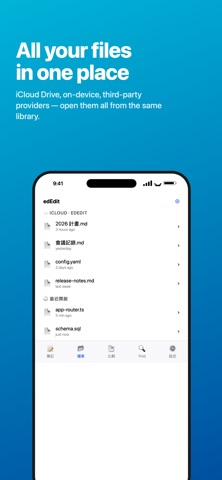
edEdit is a native text editor for Mac and iPhone/iPad that brings notes, Markdown, and source code editing into one app. WHY edEdit • Truly native: AppKit on macOS, SwiftUI on iOS — no web view sluggishness. • Consistent across platforms: your notes and files sync between Mac, iPhone, and iPad via iCloud. • Standard file formats only: everything is .md / .txt / .swift / .json — open elsewhere whenever you want. KEY FEATURES Notes — Apple Notes-style organization, with plain Markdown content: • Hierarchical tags (work/meeting/2026Q1) • iCloud sync across devices • Share from Apple Notes and we'll auto-convert formatting to Markdown — bold, italic, headings, lists, and checklists are preserved. Files — Open and edit any text file on your device: • Pull from the Files app, iCloud Drive, On My iPhone, or any provider • Automatic encoding detection (UTF-8, Big5, Shift-JIS, GB18030, …) • Syntax highlighting for Swift, JavaScript, TypeScript, Python, Go, Rust, C/C++, Java, HTML, JSON, YAML, Shell, Markdown, and more • Line numbers, light and dark themes • Save edits back to the original location iCloud Drive integration — Automatically creates an "edEdit" folder in iCloud Drive that syncs across all your devices. Dedicated Markdown editing: • Keyboard accessory bar: headings, bold, italic, lists, tasks, quotes, links, images • Hardware keyboard shortcuts: ⌘B (bold) / ⌘I (italic) / ⌘K (link) / ⌘E (code) / ⌘1-6 (headings) • Smart list continuation: pressing Enter in a list line auto-continues; pressing Enter on an empty item exits the list • Paste an image straight from the clipboard — we save it next to the .md file and insert a Markdown reference File compare — Visualize the differences between two files line-by-line, with added/removed/modified highlights. Find in Files — Recursively search a folder you pick, filterable by filename glob. Share & print — Built-in ShareLink, with AirPrint support. WHO IT'S FOR • Developers writing docs, reading logs, editing config files • Writers using Markdown for blog posts and drafts • Anyone who wants their files to stay theirs — no proprietary lock-in • People who switch between editing on Mac and quick capture on iPhone PRIVACY & COMPLIANCE • Notes, files, and images stay on your device or in your own iCloud — our servers never see them • Free tier includes ads served by Google AdMob (shown on app launch and occasionally when closing the note editor) • Upgrade to Pro to remove all ads
What's new · 1.3
1. Bugs fixed 2. Enable CSV file previewing and adjusting column width and height
Details