

BrushKit: Paint Calculator
ZHENGQIAO JIANG · Utilities
Independent analytics for this App Store listing. AppTracker is not affiliated with ZHENGQIAO JIANG.
Chart standing · US
What changed · US
Listing changes AppTracker has observed for this app in this storefront — new versions, price moves, rating shifts, and store copy.
BrushKit 1.4.0 helps you win more jobs and get paid faster: • NEW Job Templates — save a whole project (rooms, line items, pricing) and reuse it for repeat layouts • NEW Target Margin Pricing — enter the profit margin you want and see the equivalent markup instantly • NEW Production Rate presets — fill in labor hours from your own saved presets • NEW Present to Client mode — walk clients through optional add-ons on-site with a live-updating total • NEW Lead-source tracking — see which channels (referral, Google, yard sign, repeat client) actually close jobs • NEW Deposit, progress, and final payment status tracking • NEW Quote revision history for edits made after a quote is signed • Ask happy clients for a Google review, right from the app No ads, no tracking, no third-party accounts. iCloud sync (if you turn it on) uses only your own Apple ID.
In-app purchases · US
What this app sells inside itself, grouped by kind and priced for this storefront.
Screenshots


About
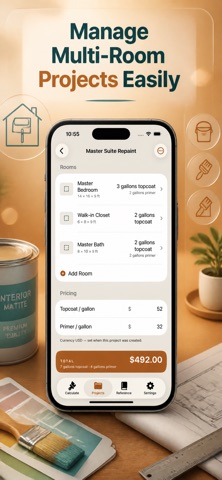
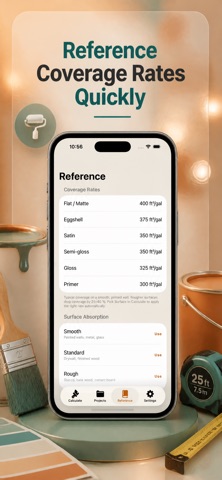
What does BrushKit do? BrushKit is a quoting toolkit for painting contractors — and a fast calculator for DIY painters. Get exact gallons of paint and primer for any room, wall, ceiling, or trim, build a professional client quote with labor and materials, and track it from draft to paid, all with industry-standard coverage rates and 10% waste built in. Is my data private? 100% offline. Nothing leaves your iPhone. No accounts, no analytics, no ads. How do I get started? 1. Pick a room template or scan with LiDAR or camera for instant measurements. 2. Get gallons, primer, and materials cost — add labor and your own Price Book line items. 3. Send a client-ready PDF quote and track it through your pipeline: Draft → Sent → Won → Scheduled → Completed. What can I do with it? - Calculate paint, primer, and labor for any room, wall, ceiling, or trim — interior or exterior - Scan rooms with LiDAR (iPhone 12 Pro and newer) or camera on any iPhone - Build a reusable Price Book for supplies, cleanup fees, and other line items - Save a whole project as a Job Template and reuse it for repeat layouts - Walk clients through optional add-ons on-site in Present to Client mode, with a live-updating total - Enter your target profit margin and get the equivalent markup instantly - Track every quote through a pipeline with a win-rate and pipeline-value dashboard, broken down by lead source - Split a job into deposit, progress, and final invoices, and track payment status - Get follow-up reminders for quotes that have gone quiet - Save multi-room projects and sync them across devices with iCloud - Export professional PDF quotes and CSV reports for bookkeeping - Switch between imperial and metric units What languages does it support? English, German, French, Korean, and Japanese. How much does it cost? 3-day free trial, then $1.99/week, $4.99/month, $29.99/year, or $79.99 lifetime. Terms of Use: https://taxlite.net/brush_kit/terms.html Privacy Policy: https://taxlite.net/brush_kit/privacy.html
What's new · 1.4.0
BrushKit 1.4.0 helps you win more jobs and get paid faster: • NEW Job Templates — save a whole project (rooms, line items, pricing) and reuse it for repeat layouts • NEW Target Margin Pricing — enter the profit margin you want and see the equivalent markup instantly • NEW Production Rate presets — fill in labor hours from your own saved presets • NEW Present to Client mode — walk clients through optional add-ons on-site with a live-updating total • NEW Lead-source tracking — see which channels (referral, Google, yard sign, repeat client) actually close jobs • NEW Deposit, progress, and final payment status tracking • NEW Quote revision history for edits made after a quote is signed • Ask happy clients for a Google review, right from the app No ads, no tracking, no third-party accounts. iCloud sync (if you turn it on) uses only your own Apple ID.
Details