

NudgeTable
Aegyrix, LLC · Productivity
Independent analytics for this App Store listing. AppTracker is not affiliated with Aegyrix, LLC.
Chart standing · US
What changed · US
Listing changes AppTracker has observed for this app in this storefront — new versions, price moves, rating shifts, and store copy.
- NudgeTable for Apple TV: your tables on the big screen with all six views, in your theme, kept in sync. - New TV Settings: move over a theme to see it on the whole screen, choose what the board shows, and switch profiles. - Link a TV with one tap: the app finds it on your Wi-Fi and shows its code to confirm. - Open a table on any device and your TV, phone and Mac switch to it too. - Lock a table. It stays hidden on every device until you unlock it with Face ID, Touch ID, or your PIN. - Fixes: Settings fits the screen on iPhone, and clearer messages when sign-up is limited.
Screenshots




About
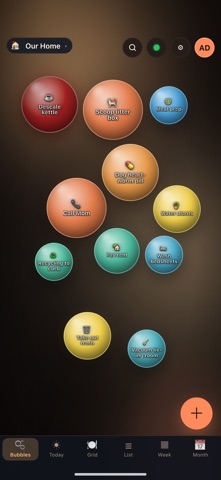
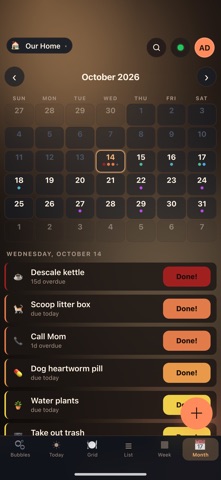
NudgeTable turns the recurring stuff in your life into bubbles on a table. Each reminder starts calm and gradually warms up — green to yellow to orange to red — as it ages past its expected cadence. Tap to mark it done. The bubble pops, the clock resets, and you move on. Six views show the same reminders the way you want to see them right now: a Bubbles board for glancing across a wall tablet, a Today list for cleaning up the day, a Week strip for planning, a Month calendar that lists each day's reminders when you tap it, plus Grid and List views for scanning everything at once. Share a table with anyone. Owner, admin, contributor, and viewer roles let you hand the litter-box list to a roommate without giving them edit rights to the whole household. Everything syncs across your devices and keeps working offline. Sign in with Apple, Google, Microsoft, GitHub, a passkey, or an emailed code. Eight themes, from warm Ember to full-spectrum Prism. No ads, and no tracking across apps or websites, just a tool to help you organize your life. Your reminders are encrypted at rest. Made by Ægyrix, LLC.
What's new · 1.2.5
- NudgeTable for Apple TV: your tables on the big screen with all six views, in your theme, kept in sync. - New TV Settings: move over a theme to see it on the whole screen, choose what the board shows, and switch profiles. - Link a TV with one tap: the app finds it on your Wi-Fi and shows its code to confirm. - Open a table on any device and your TV, phone and Mac switch to it too. - Lock a table. It stays hidden on every device until you unlock it with Face ID, Touch ID, or your PIN. - Fixes: Settings fits the screen on iPhone, and clearer messages when sign-up is limited.
Details