

ClearView Studio
Photurion, Inc. · Photo & Video
Independent analytics for this App Store listing. AppTracker is not affiliated with Photurion, Inc.
Chart standing · US
What changed · US
Listing changes AppTracker has observed for this app in this storefront — new versions, price moves, rating shifts, and store copy.
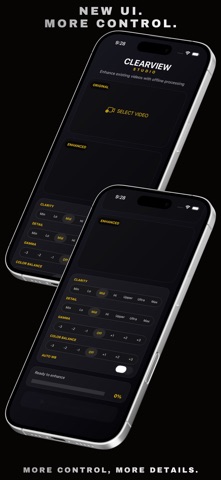
What’s New in ClearView Studio 2.3: * New Clarity and Detail controls for more precise enhancement * Expanded Gamma and Color Balance adjustment range * Improved Auto White Balance processing * Updated enhancement engine based on the latest ClearView pipeline * Better handling of portrait, landscape, and non-16:9 videos * Refined preview interface with improved selector design * Improved video export reliability and frame handling * General performance and stability improvements
Screenshots


About
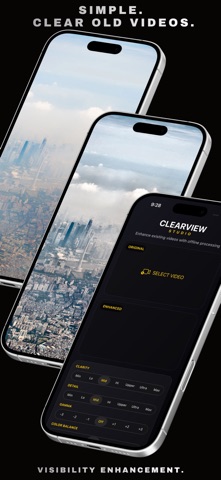
ClearView Studio is an on-device video enhancement app designed to reveal details and improve visibility in previously recorded videos. Import a video from your device and enhance difficult scenes affected by fog, haze, rain, low contrast, poor visibility, or challenging lighting conditions. ClearView Studio gives you precise control over the enhancement process with independent Clarity and Detail adjustments, Gamma and Color Balance controls, and Auto White Balance processing. Features: • Enhance previously recorded videos • Improve visibility, local contrast, clarity, and scene detail • Independent Clarity and Detail controls • Adjustable Gamma and Color Balance • Auto White Balance processing • Frame-by-frame video enhancement • Support for portrait, landscape, and different video aspect ratios • Fully on-device processing • No cloud processing • No account required ClearView Studio is built for users who want to extract more useful visual information from difficult video footage while keeping the entire processing workflow directly on their device. Vision Redesigned.
What's new · 2.3
What’s New in ClearView Studio 2.3: * New Clarity and Detail controls for more precise enhancement * Expanded Gamma and Color Balance adjustment range * Improved Auto White Balance processing * Updated enhancement engine based on the latest ClearView pipeline * Better handling of portrait, landscape, and non-16:9 videos * Refined preview interface with improved selector design * Improved video export reliability and frame handling * General performance and stability improvements
Details