

EPS Viewer: Open & View Files
Mohamed Nagy · Productivity
Independent analytics for this App Store listing. AppTracker is not affiliated with Mohamed Nagy.
Chart standing · US
What changed · US
Listing changes AppTracker has observed for this app in this storefront — new versions, price moves, rating shifts, and store copy.
Exporting high-resolution PNGs now uses far less memory — single and batch exports at high DPI are more reliable. The export menu can now be closed by tapping outside it, with a cleaner look.
In-app purchases · US
What this app sells inside itself, grouped by kind and priced for this storefront.
Screenshots


About
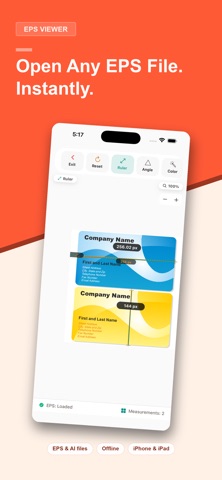
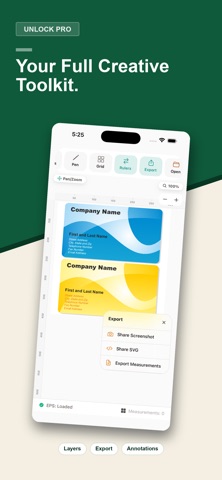
Open EPS files instantly — completely offline and 100% private. EPS Viewer renders Encapsulated PostScript (EPS) files right on your iPhone or iPad. Your files never leave your device: no uploads, no cloud servers, no file-size limits, no conversion queues. NEW IN VERSION 3 • Batch Convert: convert multiple EPS files at once and export as SVG, PDF or PNG • Print-quality vector PDF export • PNG export up to 3x resolution with transparent background option • Document Inspector: spot colors, separations, fonts and overprint at a glance • Recent files for one-tap reopening • The app now speaks 11 languages WHY EPS VIEWER • 100% offline & private — conversion happens entirely on-device, works even in airplane mode • No file-size limits or conversion quotas • True vector rendering — razor-sharp at any zoom level • Open EPS files from the Files app, Mail, WhatsApp, AirDrop and the share sheet PRECISION MEASUREMENT • Ruler tool: point-to-point distances with snap-to-entity accuracy • Angle tool: measure between any three points • Bounding box: exact width, height and position of objects • Units: mm, cm, inches, points — switch anytime INSPECT LIKE A PRO • Color inspector: tap any point to read its exact fill & stroke color • Layer control: show, hide and highlight layers in complex EPS artwork • Document Inspector for print pros: embedded fonts, spot colors with CMYK values, separations and overprint detection • Grid and scale-ruler overlays for alignment checks ANNOTATE & EXPORT • Freehand pen tool in multiple colors and widths • Export as PNG (up to 3x), print-ready PDF, or SVG • Send measurements as CSV PERFECT FOR • Designers reviewing client EPS artwork on the go • Print shops preflighting files — check fonts, spot colors and overprint before production • Cricut & laser-craft users previewing EPS cut files before converting to SVG • Engineers and architects reviewing PostScript drawings • Anyone who received an .eps file and just needs to see it Need AI, PS, PDF, DXF or SVG files? Check out Vector Viewer, our companion app for those formats. Some advanced tools are part of EPS Viewer Pro.
What's new · 3.0.3
Exporting high-resolution PNGs now uses far less memory — single and batch exports at high DPI are more reliable. The export menu can now be closed by tapping outside it, with a cleaner look.
Details