

StairPlan: Stair Calculator
ZHENGQIAO JIANG · Utilities
Independent analytics for this App Store listing. AppTracker is not affiliated with ZHENGQIAO JIANG.
Chart standing · US
What changed · US
Listing changes AppTracker has observed for this app in this storefront — new versions, price moves, rating shifts, and store copy.
V1.6.0 — Multi-floor stairs & precision update. - New: split-level and basement-to-upper-floor stairs — mark any landing as a floor level and get its own Rough Opening calculation - Rough Opening sizing now accounts for tread nosing for a more precise result - Deck Stair Mode now clearly supports wraparound and corner decks via multi-flight layouts - Hardened against extreme and edge-case inputs Still 100% offline. No tracking, no accounts, no servers.
In-app purchases · US
What this app sells inside itself, grouped by kind and priced for this storefront.
Screenshots




About
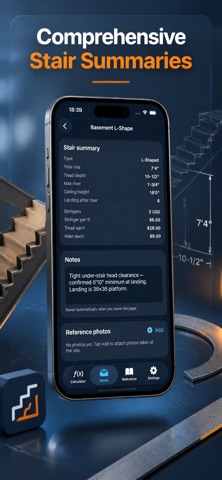
What does StairPlan do? Calculates stringer length, riser height, tread depth, and pitch angle for any staircase — straight, L-shaped, U-shaped, winder, spiral, deck, or multi-flight with landings. Checks your numbers against US IRC, IBC, OSHA, ADA, Canada NBC, UK Approved Doc K, or Australia NCC in real time. Is my data private? 100% offline. Nothing leaves your iPhone. No accounts, no analytics, no ads, no tracking. What stair types does it handle? - Straight, L-shaped, U-shaped, and winder stairs, plus multi-flight designs with 3+ landings, including split-level stairs that pass through more than one floor - Spiral and helical stairs — center-pole radius, walkline tread, outer helix length - Deck stairs with wood or composite stringer-spacing advisories, including wraparound and corner deck stairs via multi-flight layouts What codes does it check? - US IRC R311.7 (residential), IBC (commercial), OSHA 1910.25 (industrial), and ADA - Canada NBC, UK Approved Doc K, and Australia NCC 2022 - Handrail height, guard height, and graspability checks - Landing depth and minimum stair width compliance - Rough opening sizing for code-compliant headroom What else can it do? - AR camera measurement — two taps straight into Total Rise (LiDAR gets +/-1 cm) - 3D preview from 6 camera angles, alongside a scale side-view drawing - Framing Square layout table with a full step-off table - Smart Suggest — instant riser/tread combos that meet your chosen code - Baluster spacing and structural throat/span checks - Save unlimited projects with custom names and notes. Your saved projects stay viewable even if your subscription lapses — your work is never locked away. What can I export? Scale PDF cut diagrams that print at true size, a per-board cut list with plumb/level angles, DXF and SVG for CAD, a high-res PNG spec sheet, and a CSV cut list for spreadsheets. What units does it support? Imperial (feet and inches, fractions to 1/64) and Metric (millimeters and centimeters). Who is this for? Carpenters, finish carpenters, deck builders, renovation contractors, commercial and industrial estimators working to IBC or OSHA, and DIY homeowners building porch steps, deck stairs, or interior staircases. How much does it cost? 3-day free trial, then $1.99/week, $4.99/month, $29.99/year, or $79.99 lifetime. Terms of Use: https://taxlite.net/stair_stringer_calc/terms.html Privacy Policy: https://taxlite.net/stair_stringer_calc/privacy.html
What's new · 1.6.0
V1.6.0 — Multi-floor stairs & precision update. - New: split-level and basement-to-upper-floor stairs — mark any landing as a floor level and get its own Rough Opening calculation - Rough Opening sizing now accounts for tread nosing for a more precise result - Deck Stair Mode now clearly supports wraparound and corner decks via multi-flight layouts - Hardened against extreme and edge-case inputs Still 100% offline. No tracking, no accounts, no servers.
Details