

folino - Score Viewer & Player
Kiichi Ito · Music
Independent analytics for this App Store listing. AppTracker is not affiliated with Kiichi Ito.
Chart standing · US
What changed · US
Listing changes AppTracker has observed for this app in this storefront — new versions, price moves, rating shifts, and store copy.
- Added library sync across your devices, including the Mac app - Added shared groups: annotations and edits reach every member right away
In-app purchases · US
No in-app purchases.
Screenshots



About
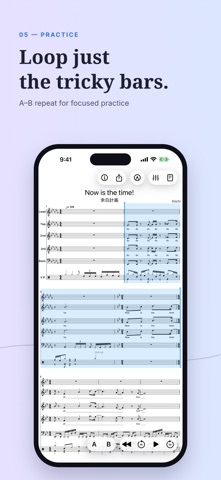
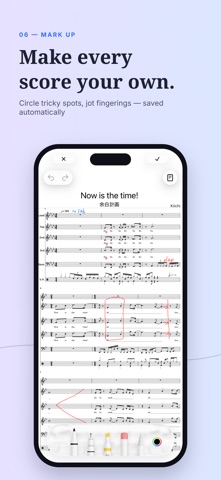
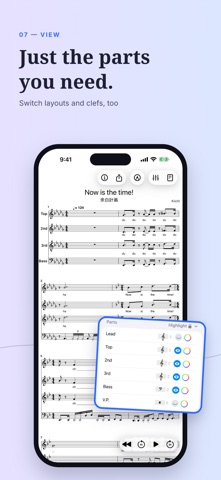
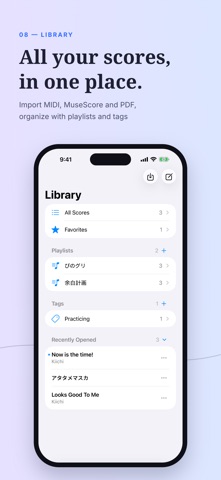
folino is a sheet music app for choirs, a cappella groups, and any ensemble that rehearses part by part — there for every step, from learning your notes to the performance. Import MuseScore .mscz, MusicXML, MIDI, or PDF, then solo your own part, mute the others, or turn one up. No more exporting a separate rehearsal track for every part. Write dynamics and breath marks onto the score with Apple Pencil or your finger, and fix a wrong note right where you are reading it. Sign in, and a score you have marked up or fixed reaches your other devices and the members of your shared group right away. [Part Practice] Adjust volume per part, mute or solo individual staves, and change instruments for each part so you can focus on the line you need to learn. Use A-B repeat, a metronome, a count-in, tempo control, and transposition to work through difficult phrases. Background playback and Picture in Picture keep the music playing and the score in view while you use another app. [Annotation] Write fingerings, practice notes, dynamics, and more directly on scores and PDFs with Apple Pencil or your finger. Change the zoom or the scroll mode and the music reflows — your marks follow it. You can also share the score as a PDF with your marks on it. [Editing and Creating] Enter and delete notes, change pitches, write chords, ties, and tuplets, edit rehearsal marks, and enter drum notation. Fix what an import got wrong, rewrite a passage for practice, or start a new score from scratch. On iPad, a hardware keyboard works too. [Sync and Shared Groups] Sign in, and your scores sync across your devices, annotations and edits included; create a shared group, and your choir or band shares them too. Either way, every mark and note fix shows up right away. Fix a score on your computer and mark it up on your tablet, or write a rehearsal note once and put it on every member's score. Reading, playback, annotation, and editing all work without signing in. [Formats] Import MuseScore .mscz files, MusicXML, and MIDI, then play them back while reading the score. PDF scores — scanned ones included — are read into real notation on import, so playback, transposition, part visibility, and note editing all work just like any other format. You can still switch to the original PDF. Export to MuseScore, PDF (with or without your annotations), MIDI, audio (.m4a), or a .folino file. [Reading and Organizing] Switch between vertical scroll, horizontal scroll, and page display, and hide the parts you don't need to focus on your own — even on an iPhone screen. Playlists and tags keep your scores organized by ensemble, event, or rehearsal set. [Pricing] Reading, playback, annotation, and editing are all free, and you can try sync and shared groups for free, too. To sync more scores, or to have more groups and more members in them, subscribe to folino plus or folino pro (monthly or yearly auto-renewing subscriptions). Plans belong to your folino account, so a plan you buy works on every device you sign in to. You can manage or cancel a subscription at any time in your Apple Account settings. Terms of Use (EULA): https://www.apple.com/legal/internet-services/itunes/dev/stdeula/ [Key Features] - Per-part volume, mute, solo, instrument, and visibility - A-B repeat, metronome, count-in, tempo control, and transposition - Handwriting with Apple Pencil or finger - Note editing, drum notation, and new scores - Sync across your devices and invite-only shared groups, where marks and edits show up right away - Import MuseScore, MusicXML, MIDI, and PDF - Export MuseScore, PDF, MIDI, audio, and .folino
What's new · 2.0.0
- Added library sync across your devices, including the Mac app - Added shared groups: annotations and edits reach every member right away
Details