

Pasty - Clipboard Manager
Anton Stremovskiy · Utilities
Independent analytics for this App Store listing. AppTracker is not affiliated with Anton Stremovskiy.
Chart standing · US
What changed · US
Listing changes AppTracker has observed for this app in this storefront — new versions, price moves, rating shifts, and store copy.
What’s New • New Keyboard Studio with live preview • Customize key shape, corner radius, depth and material • New background styles: Solid, Gradient, Glass and Transparent • New color palette controls for normal, action and accent keys • Improved multilingual keyboard support and layout rendering • Various UI, performance and stability improvements
Screenshots




About
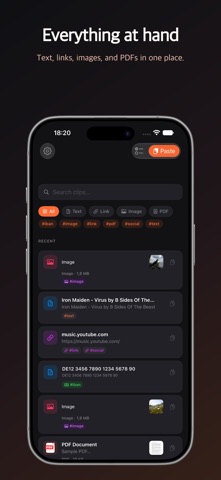
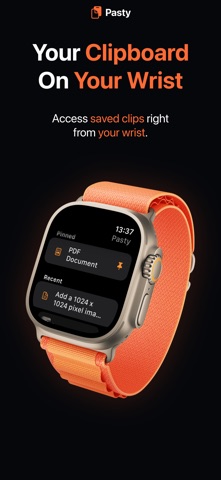
Pasty is the clipboard manager iOS always needed. Copy something once, find it again anytime. Save text, links, images, screenshots, and PDFs in one searchable place. Never lose an important link. Never retype a long address. Never dig through screenshots to find a phone number. Pasty keeps your clipboard history organized and ready when you need it. What Pasty can save: • Text • Links • Images and screenshots • PDFs Search Inside Images and PDFs Pasty uses on-device OCR to recognize text inside screenshots, images, and PDFs. Search for any word and jump straight to the clip that contains it. Auto Tags Pasty automatically tags your clips with useful labels like #link, #email, #phone, #image, #ocr, #pdf, and more. Filter your history in one tap. iCloud Sync Keep your clips up to date across iPhone and iPad with private iCloud sync. Apple Watch Access recent clips from your wrist and copy them back to your iPhone with one tap. Private Clips Protect selected clips with Face ID or passcode. Keep sensitive text, links, images, and PDFs private without locking the whole app. Keyboard Extension Use the Pasty keyboard to access your clips in Messages, Mail, Notes, Safari, and anywhere you type. Home Screen Widget Add a widget for fast access to your most recent clips. Privacy First No accounts. No tracking. Your data is stored on your devices, and sync uses your private iCloud. Pasty Pro is a one-time purchase. No subscription. Pasty Pro includes: • Unlimited clip history • Images and PDFs • Search inside images and PDFs • Private Clips • Home Screen widgets Free version includes up to 3 text or link clips.
What's new · 1.5.7
What’s New • New Keyboard Studio with live preview • Customize key shape, corner radius, depth and material • New background styles: Solid, Gradient, Glass and Transparent • New color palette controls for normal, action and accent keys • Improved multilingual keyboard support and layout rendering • Various UI, performance and stability improvements
Details