

Construction Gantt
Mengtong Pan · Productivity
Independent analytics for this App Store listing. AppTracker is not affiliated with Mengtong Pan.
Chart standing · US
What changed · US
Listing changes AppTracker has observed for this app in this storefront — new versions, price moves, rating shifts, and store copy.
Drag tasks smoothly — a line shows exactly where a task will land, and dropping it re-links the task chain automatically. Invite your team on any plan: new members can enter your join code right on the sign-up screen. Fixed a crash when adding custom holidays, and other improvements.
Screenshots





About
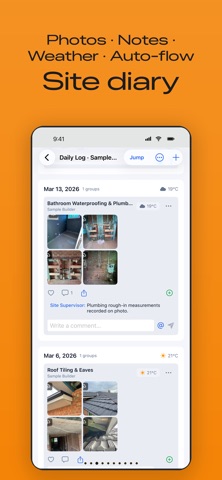
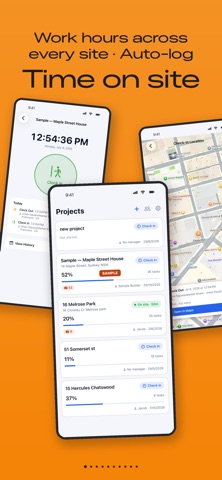
Construction Gantt is a visual project management tool built for builders, sub-contractors, renovation teams and owner-builders — and just as handy for any individual or team that needs to plan work and track it through to done. Plan the schedule, run the jobsite, and keep a photo diary in one app. And every time you complete a task, the app has a little surprise waiting for you — come and see what it is. GANTT SCHEDULE - Drag-and-drop Gantt chart with tasks, subtasks (WBS) and dependencies - Auto-cascading dates: change one task and downstream tasks follow - Holiday and working-week aware (skips weekends and public holidays) - Smart auto-sum phases: parent duration rolls up from subtasks, or set it manually - Export schedules to PDF, share or print directly CALENDAR AND REMINDERS - Month, Day and Events — three calendar views - Tasks and to-dos appear in the calendar automatically - Deliveries, meetings and bookings with alarm reminders and a choice of ringtones - Overdue to-dos roll forward to Today until you tick them off TO-DO LIST AND DAILY LOG - Quick to-dos with subtasks, due dates and reminders - Attach photos and videos; completed work publishes to the Daily Log - Export daily logs by date range JOBSITE DIARY - Photo groups tied to each task, with weather, GPS, comments and likes - Mention teammates with @ and they get notified - Clock in / clock out with location and work-hour history TEAM - Invite your team with a join code, on any plan - Cloud sync across iPhone, iPad and Mac Available in English and Simplified Chinese. Subscriptions (monthly), each starting with a 7-day free trial: Unlimited Planner — 1 seat, 200 MB storage; Pro — 1 seat, 2 GB; Team — 5 seats, 15 GB; Business — 15 seats, 60 GB, plus Project Story with AI writing; Enterprise — 30 seats, 200 GB, plus Project Story with AI writing. Every plan includes unlimited projects and tasks. People you invite can use the app for as long as your plan is active on Team and above, or free for 30 days on Unlimited Planner and Pro. Contractors and viewers never use a seat. Cancel anytime; cancelling during the free trial ends the trial immediately. Terms of Use: https://www.apple.com/legal/internet-services/itunes/dev/stdeula/ Privacy Policy: https://www.apple.com/legal/privacy/
What's new · 4.0
Drag tasks smoothly — a line shows exactly where a task will land, and dropping it re-links the task chain automatically. Invite your team on any plan: new members can enter your join code right on the sign-up screen. Fixed a crash when adding custom holidays, and other improvements.
Details