

Conjuo - French Conjugation
Antoine Boue · Education
Independent analytics for this App Store listing. AppTracker is not affiliated with Antoine Boue.
Chart standing · US
What changed · US
Listing changes AppTracker has observed for this app in this storefront — new versions, price moves, rating shifts, and store copy.
What's new in 1.1 - Learn as you drill: every verb now shows its meaning, its group and the verb it conjugates like — on the reference screens and right after each answer. - A clearer home screen: your tenses and number of questions sit at the top, and tapping a level opens its verbs. - Smoother typing: press Return to move to the next form without the keyboard jumping, and Return on the last form checks your answers. - Larger text and higher-contrast buttons throughout.
Screenshots



About
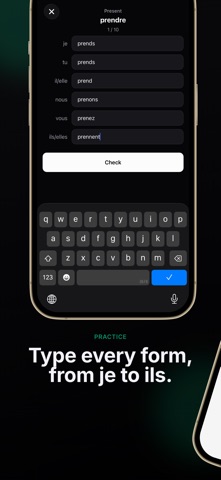
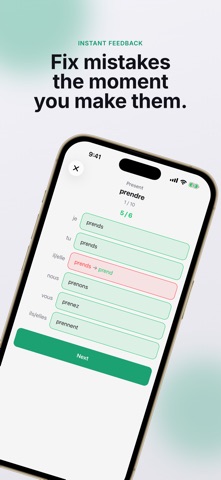
Conjuo makes French conjugation stick - by making you type it. Stop recognizing verb tables and start producing them from memory. Conjuo drills you through every form, from je to ils/elles, with instant feedback on each answer. Get one wrong and you see the correct form immediately, then move on. HOW IT WORKS - Choose the tenses and verb patterns you want to train - Type all six forms for every verb - Get instant feedback, form by form - Watch each verb + tense move from New to Seen, Acquired and Mastered EVERYTHING YOU NEED - 149 verb patterns across 5 levels, from Foundations to Mastery - 556 verbs and all 16 French tenses - A complete conjugation reference for every verb, grouped by family - Session lengths of 5, 10, 20, or endless - Mastery tracking so you always know what to review BUILT FOR REAL PRACTICE - Works offline - no account, no sign-up - A clean, focused interface with light and dark mode - English, French and Japanese interface Whether you are learning le présent for the first time or brushing up on the subjonctif, Conjuo turns recognition into recall - one tense at a time.
What's new · 1.1.0
What's new in 1.1 - Learn as you drill: every verb now shows its meaning, its group and the verb it conjugates like — on the reference screens and right after each answer. - A clearer home screen: your tenses and number of questions sit at the top, and tapping a level opens its verbs. - Smoother typing: press Return to move to the next form without the keyboard jumping, and Return on the last form checks your answers. - Larger text and higher-contrast buttons throughout.
Details