

Web Design Tool: Inspect Page
Ebenezer Oteng · Developer Tools
Independent analytics for this App Store listing. AppTracker is not affiliated with Ebenezer Oteng.
Chart standing · US
What changed · US
Listing changes AppTracker has observed for this app in this storefront — new versions, price moves, rating shifts, and store copy.
Added HTML Code Access to view and edit HTML in real time. Added HTML File Import for local web drafts. Added 20+ new font families. Added position controls for easier element placement. Improved element selection for small elements. Improved performance and stability. Fixed bugs and made overall improvements.
Price & rating history · US
Reconstructed from the listing changes AppTracker has observed in this storefront. A field is charted once it has changed more than once, and each line starts at the value it moved from.
Average rating · ★ 3.40 now · 2 changes on record
Ratings breakdown · US
The star breakdown behind this app's rating in this storefront.
In-app purchases · US
What this app sells inside itself, grouped by kind and priced for this storefront.
Screenshots


About
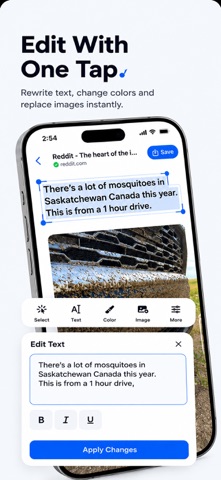
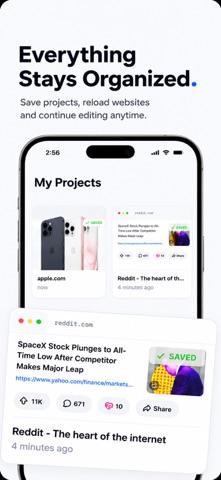
Edit HTML pages visually with live previews. Editra is a powerful HTML viewer and visual editor that lets you inspect, preview, and customize web pages without complicated tools. Open HTML files, edit text, change colors, replace images, adjust styles, and instantly see your changes. Whether you're learning web design, prototyping layouts, or experimenting with HTML and CSS, Editra provides an intuitive editing experience with real-time previews. FEATURES • HTML Viewer Open and preview HTML files with a fast and responsive interface. • Visual HTML Editor Edit page content without manually modifying source code. • Inspect Page Elements Select page elements and quickly customize their content and appearance. • Edit Text Change headings, paragraphs, buttons, and other text instantly. • Customize CSS Styles Modify colors, fonts, spacing, borders, backgrounds, and other visual styles. • Replace Images Preview different designs by swapping images directly on the page. • Live Preview See every change immediately while editing. • Save Projects Store your work and continue editing later. • Export Your Work Export edited projects for sharing or future reference. • Clean Interface Designed for speed, simplicity, and productivity. PERFECT FOR • Web designers • Front-end developers • Students learning HTML & CSS • UI/UX designers • Website prototyping • HTML experimentation • Design previews EDITRA PRO Unlock premium features: • Unlimited projects • Unlimited exports • Advanced editing tools • Premium customization options • Ad-free experience IMPORTANT Editra is intended for visual editing, learning, and prototyping. Changes are applied locally within the app and do not modify live websites or remote web content. Privacy Policy: https://redizeuz.com/privacy Terms of Use (EULA): https://www.apple.com/legal/internet-services/itunes/dev/stdeula/ Subscription Information • Editra Pro Weekly — $4.99/week • Editra Lifetime — One-time purchase Payment will be charged to your Apple ID account at confirmation of purchase. Weekly subscriptions automatically renew unless canceled at least 24 hours before the end of the current billing period. Manage or cancel subscriptions anytime in your Apple ID account settings.
What's new · 1.5
Added HTML Code Access to view and edit HTML in real time. Added HTML File Import for local web drafts. Added 20+ new font families. Added position controls for easier element placement. Improved element selection for small elements. Improved performance and stability. Fixed bugs and made overall improvements.
Details