

minical — Minimal Calendar
Lim Sangjin · Productivity
Independent analytics for this App Store listing. AppTracker is not affiliated with Lim Sangjin.
Chart standing · US
What changed · US
Listing changes AppTracker has observed for this app in this storefront — new versions, price moves, rating shifts, and store copy.
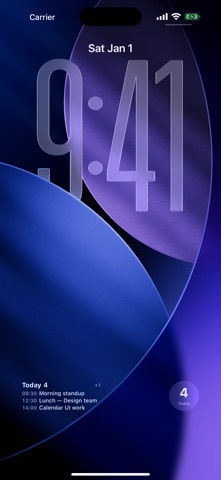
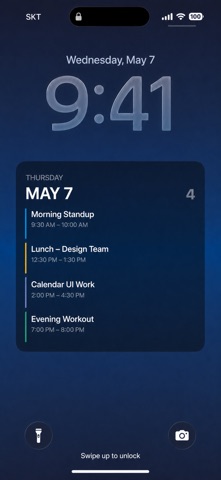
iOS system calendar events now appear in home and lock screen widgets. Calendar visibility and widget filters are respected, including hiding every device calendar.
Ratings breakdown · US
The star breakdown behind this app's rating in this storefront.
Screenshots




About
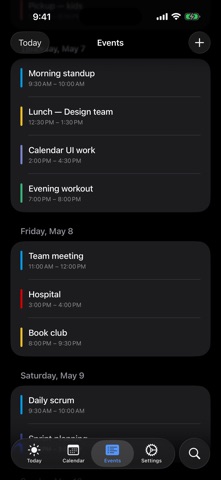
Every event at a glance — that's all minical does. linked calendar, iCloud / iOS system calendars, and minical's own events — wherever they're created, they all land on one screen, color-coded. What's on today, how the rest of the month flows, all visible without scrolling. ■ At a glance • Today screen — next-event countdown, ongoing, what's left, what's done • Month view — the entire month in one grid, color patterns visible at a glance • Widgets — today + tomorrow without leaving the home/lock screen • Shortcuts — your lock screen wallpaper becomes today's schedule • Apple Watch — at a glance from your wrist ■ Core • iOS 26 native Tab Bar — Today / Calendar / Agenda / Search / Settings • Month · Week · Day views — Month uses vertical paging with magnetic snap. Tap the year/month title to jump anywhere • Two-way linked calendar sync — add / edit / delete writes back to linked calendar immediately. Multi-account • Recurring events — daily / weekly / monthly / yearly with end conditions. Editing a series instance asks: this event only or the whole series • Natural-language quick add — "tomorrow 3 PM meeting 1 hour" • linked calendar's 11-color palette + brightness tones — long-press for shade variants • Read-only iOS system calendars (iCloud / Exchange) blended in • Multi-alarm (10 presets, stack as many as you want) ■ Full widget lineup Home screen • Up Next (Small / Medium) — bold when one event, compact rows when many. Long-press to filter calendars • Today List (Medium / Large) — today first; tomorrow only when today has room to spare • Month grid (Large) Lock screen • Inline (one line above the clock — timed events first) • Inline Long (multiple events compressed) • Rectangular (single event large, multi-event compact) • Circular (today's count) Apple Watch • Native Watch app — quick view + quick add • Four complications (Inline / Rectangular / Circular / Corner) ■ Auto-refreshing wallpaper via Shortcuts • "Generate Today Wallpaper" Shortcut — chain it with the system "Set Wallpaper" action and a daily 7 AM automation, and your lock screen refreshes itself with today's plan • "Save Today Wallpaper to Photos" — single-action variant • Three styles: Gradient / Minimal / Dark ■ Promises • No ads. No account required (linked calendar sync is optional). No tracking. No IAP. • All data stays on-device. calendar account tokens live only in Keychain. No analytics or ad SDKs. Scattered events on one screen — today at a glance.
What's new · 1.12.3
iOS system calendar events now appear in home and lock screen widgets. Calendar visibility and widget filters are respected, including hiding every device calendar.
Details