

Voice Recorder - OnePress Rec
Erkan Erdogan · Productivity
Independent analytics for this App Store listing. AppTracker is not affiliated with Erkan Erdogan.
Chart standing · US
What changed · US
Listing changes AppTracker has observed for this app in this storefront — new versions, price moves, rating shifts, and store copy.
More ways to work with your recordings: - A new player with a waveform, scrubbing and 10-second skip controls. - Add markers while listening, rename them later, and share a clip from one marker to the next or to the end. - Edit transcripts with headings and formatting, while keeping the original available to recall. - Clearer transcription language choices, including guidance and permission for Danish online recognition. - Select multiple recordings to lock, share or delete together. - Recover deleted recordings from Recently Deleted for 10 days, or permanently remove them sooner. - Refreshed recording controls, playback counters and a cleaner library. Still no account required. Optional lifetime Pro. No subscription.
Screenshots




About
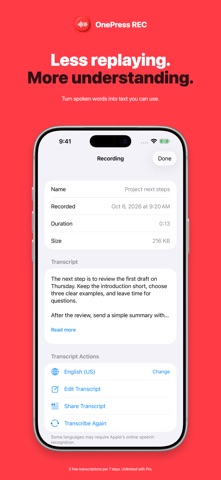
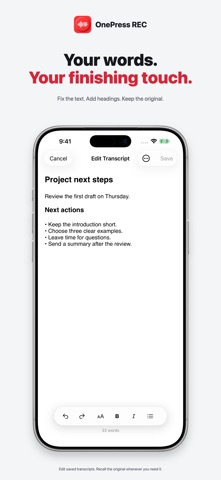
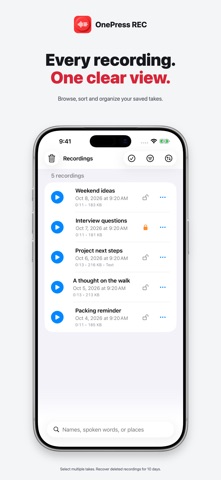
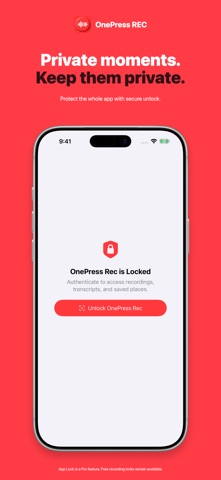
Remember what you said, but not what you named the recording? OnePress Rec helps you capture a thought and find it again. Record a voice memo, turn speech into text, then search for a word or phrase you remember saying. Search checks saved transcripts, recording names, markers and saved places. PRESS RECORD Capture ideas, personal notes, lectures, interviews and meeting notes with a simple record button. Pause when you need to, then stop and save with the same button. No account is required. LISTEN AND MARK THE MOMENT Open the player to see the waveform, scrub through a recording and skip forward or back 10 seconds. Add timestamp markers without interrupting playback, then name them later. Share an audio clip from a marker to the next marker or to the end without changing your original recording. TRY TRANSCRIPTION FOR FREE Free includes up to 10 saved recordings at a time and two successful manual transcriptions per rolling seven days. Each transcription allowance returns seven days after use. Failed transcriptions do not use an allowance. Saved transcripts remain searchable, editable and shareable after the allowance is used. MAKE THE WORDS YOUR OWN Choose the spoken language, read the transcript, fix punctuation and add headings or formatting in the built-in editor. The original transcript remains available to recall. New transcripts use punctuation and paragraph formatting where recognition supports it; the app does not automatically summarize or rewrite your words. Transcription must finish before spoken words become searchable. Pro removes the weekly allowance and adds automatic transcription of new recordings. KEEP YOUR LIBRARY ORGANIZED Open View All to search, filter and sort recordings by date, duration or name. Select multiple takes to lock, unlock, share or delete together. Deleted recordings stay in Recently Deleted for 10 days. Restore them, delete individual takes permanently, or empty the trash sooner. External shared and backup copies are unaffected. PROTECT YOUR RECORDINGS Free recording locks protect against accidental deletion. They do not prevent playback or sharing. Pro adds authentication before unlocking a recording and an optional App Lock to protect access when the app launches or returns from the background. Authentication uses Face ID, Touch ID or your device passcode. Exported and backed-up copies are outside App Lock. REMEMBER THE PLACE AND BACK UP With Pro, optionally save an estimated recording location and choose a backup folder in Files. Location is off by default. Recordings and transcripts stay on your device unless you share or back them up, or speech recognition uses online processing by Apple. ONE PURCHASE. NO SUBSCRIPTION. Optional lifetime Pro adds unlimited saved recordings, unlimited and automatic transcription, App Lock, secure recording unlock, optional recording locations and Files backup. Player, markers, clip sharing, editing saved transcripts and Recently Deleted are available without Pro. Transcription availability and accuracy depend on language, device and recording. Some languages require an internet connection. Danish online recognition is recommended, with an explicit choice and permission. No third-party AI transcription service is used. Works on iPhone and iPad with iOS/iPadOS 16 or later.
What's new · 1.4
More ways to work with your recordings: - A new player with a waveform, scrubbing and 10-second skip controls. - Add markers while listening, rename them later, and share a clip from one marker to the next or to the end. - Edit transcripts with headings and formatting, while keeping the original available to recall. - Clearer transcription language choices, including guidance and permission for Danish online recognition. - Select multiple recordings to lock, share or delete together. - Recover deleted recordings from Recently Deleted for 10 days, or permanently remove them sooner. - Refreshed recording controls, playback counters and a cleaner library. Still no account required. Optional lifetime Pro. No subscription.
Details