

VoiceButler
Christian Weissinger · Utilities
Independent analytics for this App Store listing. AppTracker is not affiliated with Christian Weissinger.
Chart standing · US
What changed · US
Listing changes AppTracker has observed for this app in this storefront — new versions, price moves, rating shifts, and store copy.
An update for readability and reliability. • The app now starts in your device's language – German used to be hard-wired • On a fresh install the writing board comes pre-filled in your language ("Yes", "Thank you", "Help!" instead of English) • A brief drop of the internet connection no longer ends the recording – the app retries on its own • The writing board's bin now clears as reliably as the main one: deleted text does not come back • The emergency alarm flashes more slowly and keeps the text readable – gentler for light-sensitive users • Much better readability in light mode: header, status line and board captions were washed out there • Error messages and hint texts have stronger contrast • If speech recognition fails to start, the app now says so instead of silently showing "recording"
In-app purchases · US
No in-app purchases.
Screenshots


Keywords this app targets
Search terms AppTracker associates with this app — estimates, not search volume. ❝ = in the app's title; a highlighted number is its current position for that term.
Similar apps
Competitors and close alternatives, as estimated by AppTracker.





About
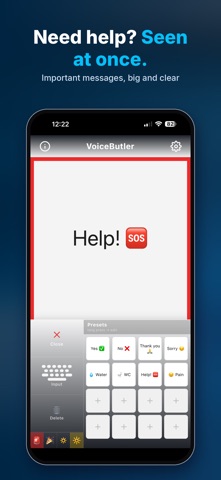
Can't hear? Can't speak? Visual contact only? VoiceButler – The Swiss Army Knife of Communication. One tap. Large, clear text. Instantly visible. VoiceButler turns spoken words into large, easy-to-read text in real time – giving people a voice when words can't be heard or spoken. WHO NEEDS VOICEBUTLER? Deaf & Hard of Hearing Someone speaks – VoiceButler displays the text instantly on screen. No lip-reading required, no misunderstandings. Mute & Voice Loss Tap a preset or type on the board – the text appears large on screen for your conversation partner to read. Loud Environments Concerts, motorsports, Grand Prix, construction sites, airports – where speech gets lost in the noise, the text remains readable. Illness & Temporary Conditions After surgery, with laryngitis or temporary voice loss – VoiceButler takes over your communication. Visual Contact Only Behind glass, underwater, at a distance, through a window, or on a screen – just hold up your display. Emergencies The red flashing border draws immediate attention. Tapping "Help!" activates the alarm effect automatically. FEATURES • Instant speech recognition – no login, no setup • Huge text, readable even from a distance • Writing board with presets: Yes, No, Thank you, Sorry, Water WC, Help!, Pain • Alarm effect: red flashing border for emergencies • Party effect: colorful rainbow border • Effect intensity: gentle or strong (pulsing text + scale) • Pinch gesture to adjust font size • 13 built-in languages • Online and offline speech recognition • Session archive: save and share conversations • No account, no ads, no subscription ZERO TRAINING REQUIRED VoiceButler explains itself. One button. No manual. No training. PRIVACY Speech recognition is handled by Apple's built-in technology (SFSpeechRecognizer). VoiceButler stores no audio, runs no servers of its own and collects no usage data. Session logs stay on the device. PLEASE NOTE VoiceButler replaces neither sign language nor an interpreter. It is made for the many everyday situations where neither is available.
What's new · 2.6.1
An update for readability and reliability. • The app now starts in your device's language – German used to be hard-wired • On a fresh install the writing board comes pre-filled in your language ("Yes", "Thank you", "Help!" instead of English) • A brief drop of the internet connection no longer ends the recording – the app retries on its own • The writing board's bin now clears as reliably as the main one: deleted text does not come back • The emergency alarm flashes more slowly and keeps the text readable – gentler for light-sensitive users • Much better readability in light mode: header, status line and board captions were washed out there • Error messages and hint texts have stronger contrast • If speech recognition fails to start, the app now says so instead of silently showing "recording"
Details