

The Color Encyclopedia
ANDREW SHERON · Music
Independent analytics for this App Store listing. AppTracker is not affiliated with ANDREW SHERON.
Chart standing · US
What changed · US
Listing changes AppTracker has observed for this app in this storefront — new versions, price moves, rating shifts, and store copy.
Ratings breakdown · US
The star breakdown behind this app's rating in this storefront.
In-app purchases · US
No in-app purchases.
Screenshots



Keywords this app targets
Search terms AppTracker associates with this app — estimates, not search volume. ❝ = in the app's title; a highlighted number is its current position for that term.
Similar apps
Competitors and close alternatives, as estimated by AppTracker.
 Harmonious: Music Theory
Jared Updike
1 shared topic
Harmonious: Music Theory
Jared Updike
1 shared topic
 Tetratonics: The 4th Dimension
Oliver Richard Erich Naumann
Tetratonics: The 4th Dimension
Oliver Richard Erich Naumann
 iHarmony
Alberto De Bortoli
1 shared topic
iHarmony
Alberto De Bortoli
1 shared topic
 Circle of Fifths Xtra
John Gellecum
1 shared topic
Circle of Fifths Xtra
John Gellecum
1 shared topic
 Tone Chroma
William Franke
Tone Chroma
William Franke
 Pentatonics - Take Five
Oliver Richard Erich Naumann
1 shared topic
Pentatonics - Take Five
Oliver Richard Erich Naumann
1 shared topic
 Neo-Riemannian
Martin Adler
1 shared topic
Neo-Riemannian
Martin Adler
1 shared topic
 Colorful Chords
Michael Schmidt
Colorful Chords
Michael Schmidt
About
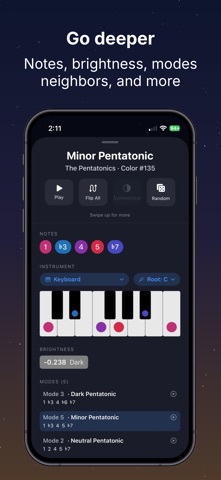
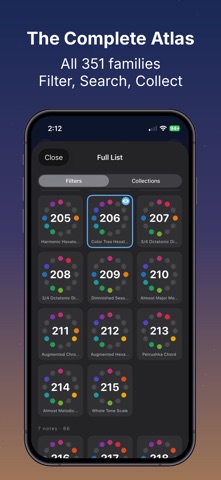
Every sound available in twelve-tone music - all 2,048 of them, organized into 351 "colors" - playable and searchable wherever you go. This Encyclopedia is a complete map of musical space. Each of the 351 unique families of notes gets an entry: hear it, visualize it, learn its name and how it relates to everything around it. Familiar scales and chords sit alongside thousands more - most musicians have never encountered. You may already know The Color Tree, the special-case sounds whose notes are all adjacent along the circle of fifths, organized from simple to complex and dark to bright. The Encyclopedia contains those 67 sounds - and every other sound there is. Key Features: • Fully offline - the whole map, no connection required • Listen to any color - customizable playback for every set of notes • Scale visualizer - see the notes laid out on your instrument of choice • Filter and search - narrow by scale degree, interval range, and more • Curated and custom lists - browse collections or build your own favorites • Reactive UI - a dynamic sky background that responds to your selections • Randomize - surprise yourself with sounds you've never heard! For composers, improvisers, theorists, sound designers, and anyone who has ever wondered what else is out there.
What's new · 1.1.5
• Loop is now a toggle, and looping playback is gapless. • The circle wheel and its controls now lay out correctly on smaller screens. • Rotating the wheel feels immediate — the selection now lands together with the connecting lines instead of trailing behind them. • Upside-down portrait is now supported. • A new tip link under Feedback in Settings. • Refreshed color and mode names throughout.
Details