

WattCheck: Charger Power Meter
Ibrahim Tosun · Utilities
Independent analytics for this App Store listing. AppTracker is not affiliated with Ibrahim Tosun.
Chart standing · US
What changed · US
Listing changes AppTracker has observed for this app in this storefront — new versions, price moves, rating shifts, and store copy.
• Improved clarity of the waiting time and stages involved in estimating charging power. • Name your chargers and compare their performance. • Sound and haptic feedback when a measurement is complete. • Charging animation and updated device calibrations. • Added 47 language and region options. • Performance and interface improvements.
Price & rating history · US
Reconstructed from the listing changes AppTracker has observed in this storefront. A field is charted once it has changed more than once, and each line starts at the value it moved from.
Average rating · ★ 3.20 now · 6 changes on record
Ratings breakdown · US
The star breakdown behind this app's rating in this storefront.
In-app purchases · US
What this app sells inside itself, grouped by kind and priced for this storefront.
Screenshots


About
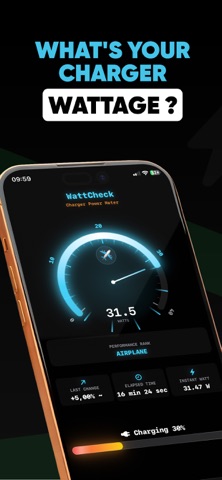
Is your charger actually fast charging your iPhone? WattCheck: Charger Power Meter estimates real-time wattage delivered to your device by analyzing how quickly your battery percentage rises — no extra dongle, no hardware tester required. HOW IT WORKS Since iOS doesn't expose raw watt readings, WattCheck uses your device model's battery capacity and typical voltage to calculate estimated power output. The more stable your environment, the more accurate the reading. LIVE CHARGING SCREEN • Speedometer gauge showing estimated watts in real time • Fun performance tiers: Bicycle → Sedan → Sports Car → Jet • Live battery %, charging status, and elapsed time • Measurement guide: best results at 20–60% battery CHARGE HISTORY Every +1% battery increment is logged during a session. Review average watts per session, compare cables and adapters, and spot patterns over time with easy-to-read charts. MULTI-LANGUAGE SUPPORT Full localization in English, Turkish, German, Japanese, Spanish, French, Korean, and Portuguese — so you can charge smarter in your language. PRIVACY FIRST All battery data stays on your device. Nothing is sent to external servers. No account needed. TIPS & FAQ Learn why the app needs to stay in the foreground, how to get the most accurate readings, and what affects watt fluctuations (cable quality, temperature, iOS charging management). FREE & PREMIUM Use WattCheck free with standard features. Remove ads with a one-time No Ads purchase — no subscription required. IMPORTANT: WattCheck provides estimated wattage based on battery percentage change over time. It is not a hardware wattmeter. Readings may vary due to charger quality, cable resistance, ambient temperature, and iOS power management. For best accuracy, keep the app in the foreground and wait for at least +1% battery increase. Download WattCheck and finally know if your charger is pulling its weight. Terms of Use: https://www.apple.com/legal/internet-services/itunes/dev/stdeula/
What's new · 1.6.1
• Improved clarity of the waiting time and stages involved in estimating charging power. • Name your chargers and compare their performance. • Sound and haptic feedback when a measurement is complete. • Charging animation and updated device calibrations. • Added 47 language and region options. • Performance and interface improvements.
Details