

Flip Animation: 2D Draw Create
ZENBYTE DIJITAL TEKNOLOJILER LIMITED SIRKETI · Graphics & Design
Independent analytics for this App Store listing. AppTracker is not affiliated with ZENBYTE DIJITAL TEKNOLOJILER LIMITED SIRKETI.
Chart standing · US
What changed · US
Listing changes AppTracker has observed for this app in this storefront — new versions, price moves, rating shifts, and store copy.
FlipAnimation 2.0.4 makes frame by frame 2D animation smoother and faster. • Improved 2D animation experience: drawing, playback and frame editing feel smoother • Bug fixes and stability improvements for a more reliable animation app • Performance improvements: projects and story series open faster, and heavy drawings save and load more efficiently • Small interface refinements throughout the app Thanks for animating with us!
Price & rating history · US
Reconstructed from the listing changes AppTracker has observed in this storefront. A field is charted once it has changed more than once, and each line starts at the value it moved from.
Average rating · ★ 4.68 now · 7 changes on record
Ratings breakdown · US
The star breakdown behind this app's rating in this storefront.
Screenshots



About
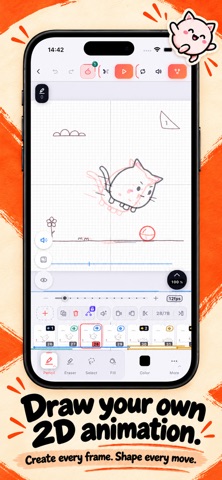
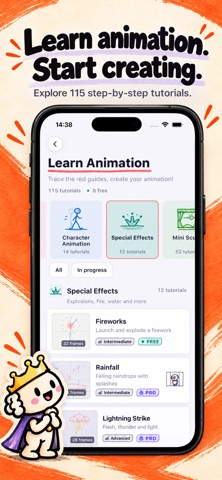
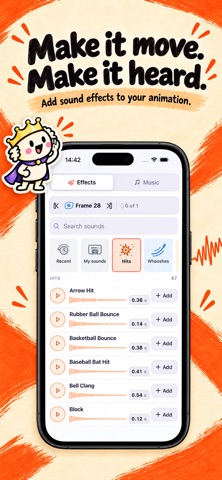
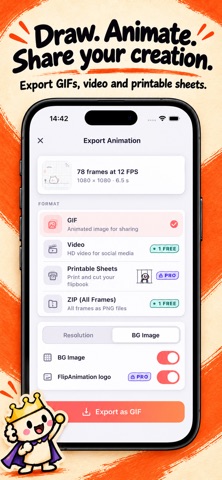
Turn your ideas, and even your own videos, into 2D animation! FlipAnimation is a complete frame by frame animation studio on your phone and tablet: draw cartoons like a flipbook, trace over video with Rotoscope, put background images behind your frames, learn from 115+ step by step lessons and export as GIF or HD video. ROTOSCOPE: DRAW OVER YOUR VIDEOS • Import any video from your gallery and trace it frame by frame • The easiest way to learn real motion: walk cycles, dance moves, sports, pets, faces • Trim the clip, place it on your canvas exactly how you want, adjust guide opacity • Everything is processed privately on your device, and you decide if the video appears in your export FRAME BACKGROUNDS • Put a background picture behind any frame, or behind all frames at once • Move, resize and rotate the image freely, then lock it in place • Draw your characters over photo scenes, storyboards and comic panels LEARN ANIMATION: 115+ GUIDED LESSONS • Step by step tutorials from bouncing ball to full mini scenes • The 12 principles of animation, walk cycles, effects, characters and more • Trace the guide strokes and watch your drawing come alive • Your lesson progress is saved so you can continue or reset anytime PROFESSIONAL DRAWING TOOLS • Pencil, ink pen, marker, crayon, fill and a precise eraser • Pressure sensitive strokes with smooth curves • Shapes, symmetry drawing, grid overlay and color eyedropper • Text tool, custom brush presets and a full color palette ANIMATE FRAME BY FRAME • Unlimited frames with per frame timing control • Onion skinning shows previous frames as ghost overlays • Auto In-Betweens generate the frames between your keyframes for you • Copy, duplicate and reorder frames; loop, ping-pong and one-shot playback LAYERS, TRANSFORM & AUDIO • Multiple layers per frame with lock and visibility controls • Free transform: scale, rotate, flip and move your selection • Import music or voice over, see the waveform on the timeline, export video with sound EXPORT & SHARE • GIF for social media, HD MP4 video with audio • Printable sheets to cut your own physical flipbook, ZIP with all frames as PNG • Share straight to Instagram, TikTok, YouTube and WhatsApp MADE FOR CREATORS OF EVERY LEVEL • Beginners: guided lessons and a friendly, clean interface • Artists and animators: pro tools, layers, rotoscoping and precise timing • Kids and families: draw, doodle and bring silly characters to life • Optimized layouts for both phone and tablet, dark theme for long sessions WHAT WILL YOU MAKE? • Animated memes, stickers and reaction GIFs for your chats • Rotoscope studies of dancers, athletes and animals from your own clips • Storyboards and animatics for films, games and school projects • Game sprites, walk cycles and pixel style motion tests • Birthday cards, logo animations, doodles on photos and mini music videos WHY ANIMATORS LOVE FLIPANIMATION • A real animation studio, not a toy: onion skin, timing, layers, audio sync • Auto In-Betweens save hours of drawing on every scene • Works fully offline: animate anywhere, no account needed • Fast and lightweight, with autosave protecting every stroke • Available in 20 languages PREMIUM (OPTIONAL) Unlock unlimited projects, every lesson, Auto In-Betweens, all brushes and watermark free HD export with a weekly plan or a single lifetime purchase. A generous free version lets you draw, animate and export from day one. Whether you are making your first flipbook doodle, teaching yourself the 12 principles, or rotoscoping reference footage like a pro animator, FlipAnimation turns every idea into motion. Sketch it. Animate it. Share it. Download FlipAnimation and make your first animation in minutes! Privacy Policy: https://flipanimation.app/privacy.html Terms of Use: https://www.apple.com/legal/internet-services/itunes/dev/stdeula/
What's new · 2.0.4
FlipAnimation 2.0.4 makes frame by frame 2D animation smoother and faster. • Improved 2D animation experience: drawing, playback and frame editing feel smoother • Bug fixes and stability improvements for a more reliable animation app • Performance improvements: projects and story series open faster, and heavy drawings save and load more efficiently • Small interface refinements throughout the app Thanks for animating with us!
Details