

Tally Counter: Click & Count
Gunawan Santoso · Utilities
Independent analytics for this App Store listing. AppTracker is not affiliated with Gunawan Santoso.
Chart standing · US
What changed · US
Listing changes AppTracker has observed for this app in this storefront — new versions, price moves, rating shifts, and store copy.
What's new in 1.3.1: - Minor improvements and bug fixes
In-app purchases · US
No in-app purchases.
Screenshots



About
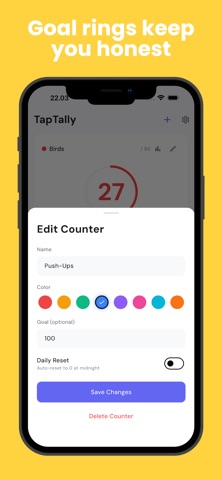
Tap to count anything. Reps at the gym, rows on a scarf, laps in the pool, guests at the door — a tally counter that keeps up with your thumb and never loses count. Set a goal and the ring fills as you get closer. Hit it, and the counter celebrates. WHY PEOPLE USE IT • Count without looking. The volume buttons work as a clicker counter, so you can count reps, laps or people with the phone in your pocket. Shake to count works too. • Several counters at once. Keep a rep counter, a row counter and a lap counter side by side, each with its own colour and its own goal. • Nothing to lose. Every count is saved on your device the moment you tap. No account, no sign-in, no connection needed. • See the pattern. Save a session to history and the chart shows how your counts add up day by day. BUILT FOR REAL COUNTING Knitting and crochet — a row counter and stitch counter that survives being put down mid-project. Tap between stitches, save the row, come back tomorrow. Fitness — a rep counter and set counter you can use mid-lift. Volume buttons mean you never break form to look at a screen. Prayer and meditation — a digital tasbeeh counter with a goal, so you always know where you are without breaking rhythm. Events and doors — a people counter and headcount tally for attendance, capacity or footfall. Multiple counters let you split the door. Inventory and surveys — a stock count tally, an audit counter, or a bird count for field survey work. Export the lot to CSV when you're done. FEATURES • Tap, volume buttons, or shake to count • Multiple counters, each with a name, colour and goal • Goal ring that fills as you approach the target • Daily auto-reset for counters you start fresh every day • Day streaks that build as you keep counting • Save and reset, with undo on both • History chart and a day-by-day log • CSV export for your full count history • Works fully offline • Light and dark themes Free to use. Some extras — extra counter slots, CSV export and extended history — can be unlocked by watching a short ad, and there are never ads while you're counting.
What's new · 1.3.1
What's new in 1.3.1: - Minor improvements and bug fixes
Details