

SmartRemote: TV Wi-Fi Control
APP TEAM · Utilities
Independent analytics for this App Store listing. AppTracker is not affiliated with APP TEAM.
Chart standing · US
In-app purchases · US
What this app sells inside itself, grouped by kind and priced for this storefront.
Screenshots


About
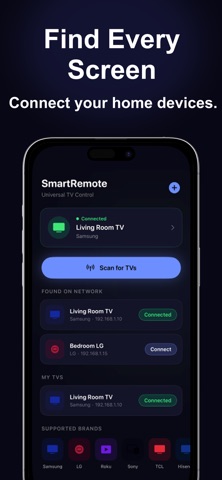
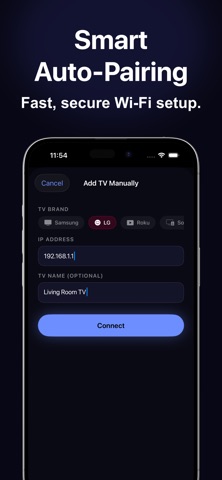
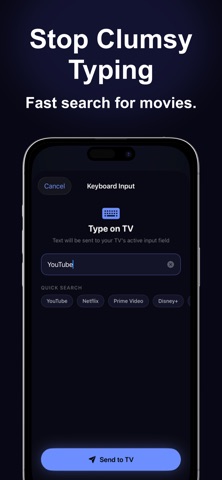
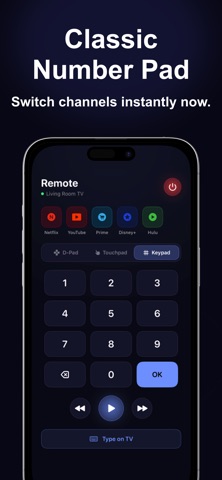
Turn your iPhone into the only remote you will ever need. SmartRemote connects to your Smart TV over Wi-Fi and gives you full control - no batteries, no line-of-sight, no lost remote. The app automatically scans your home network and finds compatible TVs in seconds. COMPATIBLE TV BRANDS > Wi-Fi Smart TVs using WebSocket protocol (2016 and later models) > Wi-Fi Smart TVs using webOS (LG Smart TVs) > Roku OS televisions including models by TCL, Hisense, Sharp, Insignia, and ONN > Sony Bravia televisions (2013 and later models) > Vizio SmartCast televisions Note: TVs must be connected to the same Wi-Fi network as your iPhone. IR-only televisions are not supported. REMOTE CONTROL MODES Three control modes let you choose how you navigate: D-Pad Mode - A classic directional ring with Up, Down, Left, Right, and OK in the center. Includes volume, mute, home, back, menu, and source buttons. Touchpad Mode - Swipe your finger to move the cursor on screen. Tap to select. Designed for gesture-based navigation. Number Keypad - A full 0-9 keypad for channel entry with a large OK button. KEY FEATURES > Automatic TV discovery - scans your Wi-Fi network and finds compatible TVs instantly > Manual add - enter an IP address to connect to any supported TV directly > One-tap app launch - open streaming apps with a single tap > Keyboard input - type on your iPhone and it appears on the TV > Multi-TV support - save and switch between multiple TVs > App shortcuts - launch streaming services directly > Volume and mute controls mapped per TV brand > Power control for supported TVs > Auto-reconnect if connection drops > Secure pairing - data stored locally only> PRIVACY SmartRemote requires no account and collects no personal data. All communication stays on your local Wi-Fi network. REMOVE ADS SmartRemote is free to download. A one-time in-app purchase removes all ads permanently. This is a non-recurring purchase. REQUIREMENTS > iPhone running iOS 16.0 or later > Same Wi-Fi network for iPhone and TV > TV must be powered on Privacy Policy: https://sites.google.com/view/tvremoteconfiguration/home Terms of Use: https://www.apple.com/legal/internet-services/itunes/dev/stdeula/
What's new · 1.1
Optimized features for a faster and more reliable experience
Details