

Dictanta: AI Meeting Recorder
FuturaApp, Inc. · Productivity
Independent analytics for this App Store listing. AppTracker is not affiliated with FuturaApp, Inc.
Chart standing · US
What changed · US
Listing changes AppTracker has observed for this app in this storefront — new versions, price moves, rating shifts, and store copy.
RECORDING • Recording keeps going when your AirPods connect or run out of battery. • You can now see which microphone is recording, and Dictanta tells you when it switches. • Tapped Record by mistake? Recordings under 3 seconds no longer use a free recording. • On iOS 27, the Record tab no longer disappears when you scroll. SUMMARIES • On iOS 27, fixed summaries that left out some action items. EVERYDAY • Copied and exported summaries now show when each item was said. Thank you for using Dictanta — please keep the feedback coming.
In-app purchases · US
What this app sells inside itself, grouped by kind and priced for this storefront.
Screenshots

Keywords this app targets
Search terms AppTracker associates with this app — estimates, not search volume. ❝ = in the app's title; a highlighted number is its current position for that term.
Similar apps
Competitors and close alternatives, as estimated by AppTracker.
 Memolith: AI Meeting Assistant
Memolith
Memolith: AI Meeting Assistant
Memolith
 Summary - AI Note Taker
Labhouse Mobile
Summary - AI Note Taker
Labhouse Mobile
 Cue: AI Note Taker & Recorder
44pixels
Cue: AI Note Taker & Recorder
44pixels
 文字起こしさん: 音声入力でテキスト変換、議事録、音声メモに
Atsushi Koyama
文字起こしさん: 音声入力でテキスト変換、議事録、音声メモに
Atsushi Koyama
 Notteka | AI Meeting Notes
Dawei Bi
Notteka | AI Meeting Notes
Dawei Bi
 AI Meeting Note Taker - Jamie
wespond UG (haftungsbeschraenkt)
AI Meeting Note Taker - Jamie
wespond UG (haftungsbeschraenkt)
 Notee: AI Note Taker
GM UniverseApps Limited
Notee: AI Note Taker
GM UniverseApps Limited
 Owll: AI Note Taker&Assistant
VOCALBEATS.AI PTE. LTD.
Owll: AI Note Taker&Assistant
VOCALBEATS.AI PTE. LTD.
About
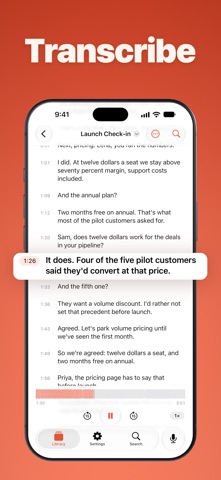
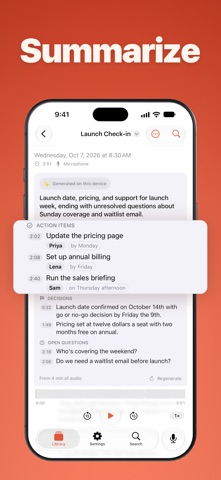
Be in the meeting. Let your iPhone take the notes. You can listen, or you can write. Not both. Dictanta listens for you, so you stay in the conversation and still leave knowing what happens next. HOW IT WORKS 1. Tap record. 2. Talk. Lock your phone if you like. It keeps recording. 3. Tap stop. Your notes start writing themselves. No account. Nothing to set up. WHAT YOU GET AFTER A MEETING • A short summary • The main action items and deadlines, with a name when it's clear who • What was decided • What is still open Not sure about a line? Most lines show when they were said. Tap the time to hear that moment yourself, on the device that recorded it. SEND THE FOLLOW-UP BEFORE PEOPLE LEAVE • Copy Recap turns your notes into a clean message: summary, owners, deadlines and timestamps. Paste it into email or chat. • Assign an action item in two taps. • Export as PDF, Word, Markdown, SRT subtitles or JSON. STAY IN THE CONVERSATION • Live captions while people talk. • Start with Siri ("Siri, start a Dictanta recording"), Control Center, a Shortcut, or the Action Button on iPhone. • Stop from the Lock Screen, Control Center, Siri or the Dynamic Island on iPhones that have one. • AirPods connect or run out of battery? It keeps recording. • Your recording saves as you go. If it stops early, Dictanta tells you and keeps what it captured. FIND WHAT WAS SAID LATER • Search every title, transcript and summary in the app. Titles and transcripts show up in Spotlight too. • The transcript follows the audio as it plays, at 1x, 1.5x or 2x. • Touch and hold a line to fix a misheard name. ASK THE ROOM FIRST One tap copies a short note for the chat: you're recording to take notes, the audio stays on your device, and no bot joins. ALSO • Bring in audio you already have (M4A, MP3, WAV, AIFF and more). Dictanta transcribes and summarizes it too. • Translate a transcript into Spanish, French, German, Italian, Portuguese, Japanese, Korean or Simplified Chinese, right on your device. • Summaries cover meetings up to about 2.5 hours. • See your recording live on your Apple Watch. Nothing to install. • On iPad: side-by-side columns, drag action items into other apps, and keyboard shortcuts. ON ZOOM, TEAMS OR MEET? ADD DICTANTA FOR MAC iPhone and iPad record through their own microphone or your AirPods. For video calls, Dictanta for Mac records the call audio and your own voice together, and no bot joins. Notes and transcripts sync through iCloud. Audio never syncs. PRIVATE BY DESIGN • Summaries are written on your device by Apple Intelligence. • Your audio is saved on your device. We never upload it, and it never syncs to iCloud. • On iPhone and iPad, the microphone is the only permission we ask for. • No ads. No trackers. No analytics. We collect nothing. PRICING • 3 free recordings to try everything, in total across your devices. The app shows how many are left. • Pro Monthly — $9.99/month • Pro Annual — $79.99/year (save 33%) • Lifetime — $149.99 once. No renewal. Subscriptions renew automatically until you cancel in your Apple Account settings. Prices shown in US dollars; you'll see yours in the App Store. Restore purchases anytime in Settings. WHAT YOU NEED An iPhone on iOS 26.4 or later, or an iPad on iPadOS 26.4 or later, with Apple Intelligence turned on: iPhone 15 Pro or later, or an iPad with M1 or A17 Pro or later. Dictanta transcribes in your device's main language. Apple's on-device model sometimes declines a topic. When it does, Dictanta tells you, and your transcript is still there. Privacy Policy › https://fierce-inlet-63133.herokuapp.com/dictanta-privacy Terms of Use › https://www.apple.com/legal/internet-services/itunes/dev/stdeula/
What's new · 1.7
RECORDING • Recording keeps going when your AirPods connect or run out of battery. • You can now see which microphone is recording, and Dictanta tells you when it switches. • Tapped Record by mistake? Recordings under 3 seconds no longer use a free recording. • On iOS 27, the Record tab no longer disappears when you scroll. SUMMARIES • On iOS 27, fixed summaries that left out some action items. EVERYDAY • Copied and exported summaries now show when each item was said. Thank you for using Dictanta — please keep the feedback coming.
Details