

RVKeeper: RV Maintenance App
Openroad Apps LLC · Travel
Independent analytics for this App Store listing. AppTracker is not affiliated with Openroad Apps LLC.
Chart standing · US
What changed · US
Listing changes AppTracker has observed for this app in this storefront — new versions, price moves, rating shifts, and store copy.
Rig Binder (Pro) Keep your owner's manual, registration, insurance card and warranty papers with your rig. Take a photo of a card or a page, or add a PDF, and it's right there whenever you need it. Find it under My RV in the menu. Task Photos Add your own photos to any task: the tools the job needed, a label or part number, or how something looks today. They're waiting on that task the next time it comes due. Essentials includes three photos per task, and Pro includes twenty. Browse everything you've saved in the Task Photo Library, filed by component, and pinch to zoom in on small print like serial numbers. Know what every task is Each task now opens with a short, plain description of what the job is, so an unfamiliar task name makes sense at a glance. Task screens also show the component's icon beside the title.
Price & rating history · US
Reconstructed from the listing changes AppTracker has observed in this storefront. A field is charted once it has changed more than once, and each line starts at the value it moved from.
Average rating · ★ 4.67 now · 2 changes on record
Ratings breakdown · US
The star breakdown behind this app's rating in this storefront.
In-app purchases · US
What this app sells inside itself, grouped by kind and priced for this storefront.
Screenshots




About
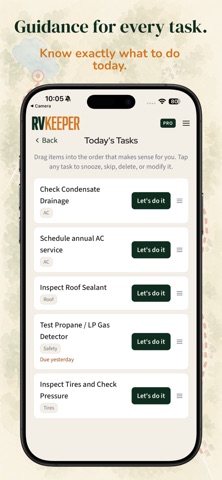
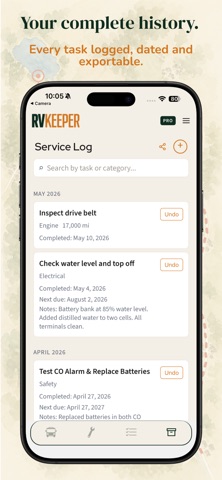
RVKeeper is an RV maintenance app that builds a maintenance plan customized to your exact year, make, model, and floorplan, then tracks service intervals for every component your rig actually has. You bought an RV. Now you have something incredible to take care of, and dozens of scattered maintenance schedules to figure out, one for every component. Until now. Answer a few questions from your couch and RVKeeper researches your rig and builds a maintenance plan customized to it. Minutes, not an afternoon. From roof seals to tire age to the safety items most owners forget, your plan reflects what your RV actually needs. WHAT MAKES RVKEEPER DIFFERENT Most maintenance apps hand you a generic checklist. RVKeeper starts with your specific year, make, model, and floorplan, then builds a plan around the components you actually have. A motorhome owner gets different reminders than a fifth wheel owner. A truck camper owner gets different reminders than a pop up owner. Two owners of the same model year and brand get different plans if their floorplans differ. Our library covers more than 2,000 rig identities across 325 manufacturers, from 1965 through today, with over 900 maintenance tasks spanning 240 component types. And it does not stop at setup. The more you use RVKeeper, the sharper it gets about your exact rig. Confirm a component, log a service, or add something you have changed since you bought it, new water heater, upgraded batteries, aftermarket suspension, a solar setup you installed yourself. Your plan follows the rig you actually own, not the one that left the factory. Every task explains why it matters and what to look for, so you finish knowing your rig better than most owners ever do. WHAT DOES RVKEEPER TRACK Roof and seal condition, so a slow leak gets caught before it turns into a structural repair. Tire age and pressure, so dry rot does not become a blowout on the highway. Electrical and battery health, so you are not stuck with a dead house battery at a boondocking site. Safety alarms including smoke, CO, and propane detectors, so an expired unit does not go unnoticed. Waste system components, so a failed seal or sensor does not become a mess you find out about the hard way. Plus engine, transmission, chassis, generator, slideouts, awnings, appliances, and anything aftermarket you have added yourself. WHAT IS FREE The Essentials Plan is free forever and covers eight full categories: roof, tires, electrical, toilet, waste system, leveling and support, canvas care, and seasonal tasks. Every safety item stays free too, including smoke, CO, and propane detectors, fire extinguisher, water filter, and fresh water sanitizing. Any task you create yourself is always free. No credit card to start. No spam. We will not sell your data. The Pro Plan is a monthly subscription that unlocks everything else on your rig: engine, transmission, chassis and brakes, generator, suspension, slideouts, awnings, water heater, appliances, and the rest. WHO IS RVKEEPER FOR New owners get a guided plan that takes the guesswork out of maintenance from day one. Experienced owners get the cohesive system they have been trying to build in spreadsheets and notebooks for years. Whether you just backed your rig into a spot for the first time or know it like the back of your hand, RVKeeper builds the plan around the RV you actually have. BUILT BY RV OWNERS We started this because we bought our first RV and realized how much we did not know. There was not one owner's manual. There were a dozen, one for every component. And the internet was full of contradictory takes on what really mattered. So we built the tool we wished we had, researched against manufacturer documentation, with intervals cited to a named source where manufacturers publish one. If your rig's a keeper, maintain it like one. Terms: http://www.apple.com/legal/internet-services/itunes/dev/stdeula
What's new · 2.0.8
Rig Binder (Pro) Keep your owner's manual, registration, insurance card and warranty papers with your rig. Take a photo of a card or a page, or add a PDF, and it's right there whenever you need it. Find it under My RV in the menu. Task Photos Add your own photos to any task: the tools the job needed, a label or part number, or how something looks today. They're waiting on that task the next time it comes due. Essentials includes three photos per task, and Pro includes twenty. Browse everything you've saved in the Task Photo Library, filed by component, and pinch to zoom in on small print like serial numbers. Know what every task is Each task now opens with a short, plain description of what the job is, so an unfamiliar task name makes sense at a glance. Task screens also show the component's icon beside the title.
Details