
Chart standing · US
What changed · US
Listing changes AppTracker has observed for this app in this storefront — new versions, price moves, rating shifts, and store copy.
Spanish and Portuguese — and numbers that follow your region. Nummeric is now translated into Spanish (Spain and Mexico) and Portuguese (Brazil and Portugal), on iPhone, iPad and Mac. Pick a language during setup or in Settings — it's independent of your device language. The names of the 214 specialty calculators are still in English. Numbers now use your region's format throughout the app. If you write 1,234.56, that's what you'll see. NEW • Pin a conversion to the calculator and watch it convert as you type • Share a graph as an image, or as a link that reopens the exact plot • The step-by-step solver now shows three methods for quadratics: the formula, factoring, and completing the square • Mix units in one expression: 5 ft + 3 in in cm • Ask Siri to convert units and see the result without opening the app • Full hardware keyboard support on iPad • The widget, keyboard, and iMessage calculator now speak your language and give the same answers as the app EASIER TO USE • Fixed five places where VoiceOver could get stuck with no way out • Text and controls now meet contrast standards in every theme • Layouts hold together at the largest text sizes FIXED • Continuing a calculation after = no longer drops the previous result • Square root, constants, memory recall and % no longer lose a number in the middle of an expression • Your history is protected if an update is interrupted partway through • The converter opens on useful units instead of the smallest ones • More accurate conversions — pounds, gallons, pressure and energy now use their exact definitions • Data sizes (KB, MB, GB) were converting 8× wrong • The Home Screen calculator keypad works while history is locked • Locked history no longer appears in widgets, Spotlight or Siri
Screenshots




About
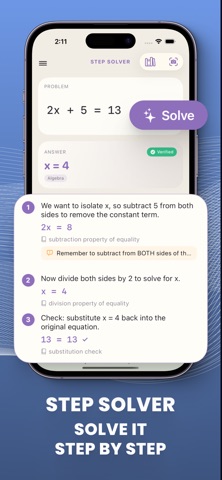
Nummeric is a calculator that grows with what you're doing. Start with a clean four-function keypad. Slide out the scientific panel when you need it. Switch to RPN if that's how you think. Then there's everything else. 214 SPECIALTY CALCULATORS Mortgage, auto loan, refinance, APR, income tax, take-home pay, BMI, TDEE, one-rep max, percentage, quadratic formula, concrete, roofing, tile — and two hundred more. Search by name. Each one shows the formula it uses and cites its source. GRAPHING Plot up to 10 equations at once. Pan, zoom, and trace with your finger. Find roots, intersections, maxima and minima. Share a graph as an image, or as a link that reopens the exact plot on someone else's iPhone. STEP-BY-STEP SOLVER See the working, not just the answer. Quadratics solve three ways — the formula, factoring, and completing the square — and switching methods rebuilds every step. UNIT CONVERTER 19 categories, from length and weight to torque, density and fuel economy. Currency rates come from a free, ECB-derived source and are cached so they still work offline. NOTEBOOK Write math the way you'd write it on paper. "5 ft + 3 in in cm" works. So does "20% of 150", and a "subtotal = 42.50" you can refer to on the next line. MORE TOOLS Matrices, base conversion for programmers, tip and split, sales tax, VAT, statistics, and date and time math. ON EVERY DEVICE iPhone, iPad, Mac, Apple Watch and Apple Vision Pro. Home Screen and Lock Screen widgets, a custom keyboard that calculates without leaving the app you're in, and a calculator inside Messages. BUILT TO BE TRUSTED Nine deep audit passes went into this release, backed by more than 1,100 automated tests. Full VoiceOver support, Dynamic Type, and contrast-checked colors in all eight themes. NO SUBSCRIPTION One purchase. No subscriptions, no in-app purchases, no ads. Your calculations stay on your device unless you turn on iCloud sync.
What's new · 5.0
Spanish and Portuguese — and numbers that follow your region. Nummeric is now translated into Spanish (Spain and Mexico) and Portuguese (Brazil and Portugal), on iPhone, iPad and Mac. Pick a language during setup or in Settings — it's independent of your device language. The names of the 214 specialty calculators are still in English. Numbers now use your region's format throughout the app. If you write 1,234.56, that's what you'll see. NEW • Pin a conversion to the calculator and watch it convert as you type • Share a graph as an image, or as a link that reopens the exact plot • The step-by-step solver now shows three methods for quadratics: the formula, factoring, and completing the square • Mix units in one expression: 5 ft + 3 in in cm • Ask Siri to convert units and see the result without opening the app • Full hardware keyboard support on iPad • The widget, keyboard, and iMessage calculator now speak your language and give the same answers as the app EASIER TO USE • Fixed five places where VoiceOver could get stuck with no way out • Text and controls now meet contrast standards in every theme • Layouts hold together at the largest text sizes FIXED • Continuing a calculation after = no longer drops the previous result • Square root, constants, memory recall and % no longer lose a number in the middle of an expression • Your history is protected if an update is interrupted partway through • The converter opens on useful units instead of the smallest ones • More accurate conversions — pounds, gallons, pressure and energy now use their exact definitions • Data sizes (KB, MB, GB) were converting 8× wrong • The Home Screen calculator keypad works while history is locked • Locked history no longer appears in widgets, Spotlight or Siri
Details