

OLVA:Live AI Meeting Assistant
Mindle Inc · Productivity
Independent analytics for this App Store listing. AppTracker is not affiliated with Mindle Inc.
Chart standing · US
What changed · US
Listing changes AppTracker has observed for this app in this storefront — new versions, price moves, rating shifts, and store copy.
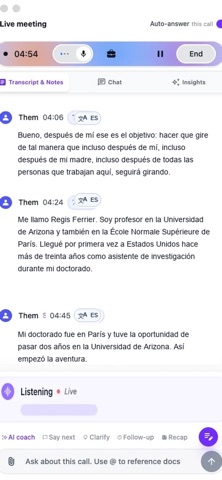
• Clearer transcripts: Read the original text with its translation underneath in shorter, easier-to-follow cards. • Simpler translation controls: Show or hide translations with a dedicated switch. • More control over Live insight: Turn it on or off during a meeting and save your preferred default in Settings. Question detection continues when Live insight is off. • More reliable translations: Improved handling of incomplete translations and conversations that mix languages. • Fixed an issue where a pending Live insight could appear after you switched the feature off.
Ratings breakdown · US
The star breakdown behind this app's rating in this storefront.
In-app purchases · US
No in-app purchases.
Screenshots





About
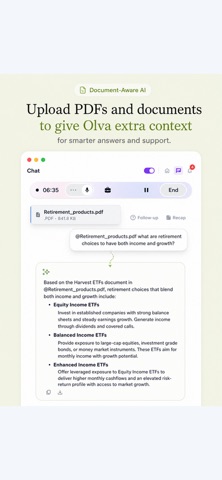
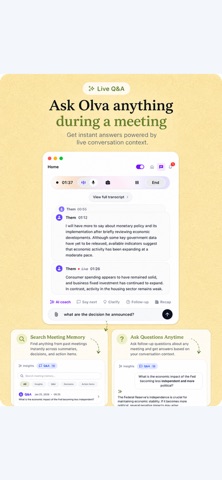
OLVA is an bot-less AI note taker and meeting assistant that works while your conversation is still happening — not after it ends. Take it anywhere. Use Olva in scheduled meetings, client dinners, interviews, negotiations, coffee catch-ups, on-site visits, or any spoken conversation where you can't afford to miss a detail. This is the AI that works in the room with you, not just on your laptop. No bot joins your call. No name in the participant list. Just live answers, real-time coaching, and automatic notes running silently on your device — invisible to everyone else in the room. Built for sales calls, client meetings, and consulting sessions where a visible recording bot isn't an option. Live AI while you're still talking Detects questions automatically as they're asked, no manual trigger. Answers live using your uploaded contracts, briefs, and decks. AI Coach surfaces suggested responses and real-time prompts. Flags risks, follow-ups, and insights as the conversation happens. AI Coach and invisible screen share AI Coach guides you through high-stakes conversations in real time — suggested responses, live prompts, and instant context, exactly when you need them. And when you share your screen, Olva disappears — invisible to everyone on the call, still working for you. Automatic notes, zero effort Auto-generated recaps cover decisions, action items, and open questions the moment your conversation ends. Searchable meeting memory lets you query any past meeting instantly. Export directly to Slack and your preferred workspace tools. Calendar-aware workflow syncs with your schedule automatically. Every platform, no bot required Works on Zoom, Google Meet, Microsoft Teams, Slack Huddles, Webex, and in-person. 87 languages Automatic language detection across 87 languages. Built for international sales, multilingual meetings, and global teams working across languages. Start a conversation with a tap, and OLVA begins transcribing instantly. As your meeting unfolds, it detects questions, surfaces insights, and generates meeting notes, action items, and follow-ups automatically. REAL-TIME AI, WHEN YOU NEED IT • Live transcription as conversations happen • Automatic question detection • Instant AI-powered answers based on meeting context • AI coaching, suggestions, and key insights while you talk • Stay focused on the conversation instead of taking notes WORKS WHEREVER YOU MEET • Perfect for in-person meetings, networking events, coffee chats, interviews, conferences, and phone calls • Great companion when you can't install software on your work computer or prefer using your iPhone • Works alongside Zoom, Microsoft Teams, and Google Meet MULTILINGUAL BY DESIGN • Support for 87 languages and regional variants • Automatically detects languages in multilingual conversations • Ideal for international meetings and global teams SMART MEETING NOTES, ZERO EFFORT • Automatically generate meeting summaries, action items, decisions, and follow-ups • Search and revisit previous conversations anytime • Chat with your meeting transcripts to find answers and important details PRIVATE BY DEFAULT • No bots joining your meetings • Your AI assistance stays visible only to you • Designed to help without interrupting the conversation Here's how it works: • Start a conversation with one tap • Let OLVA transcribe and analyze your meeting in real time • Receive live answers, coaching, and insights while you talk • Finish with a complete summary, action items, and searchable meeting notes • Revisit any meeting and ask questions whenever you need Considering security and privacy, OLVA never records your voice, never use your data for training any model, and gives you full control to manage or delete your content. Download OLVA today and experience real-time AI meeting note taking and meeting assistance wherever work happens.
What's new · 2.1.4
• Clearer transcripts: Read the original text with its translation underneath in shorter, easier-to-follow cards. • Simpler translation controls: Show or hide translations with a dedicated switch. • More control over Live insight: Turn it on or off during a meeting and save your preferred default in Settings. Question detection continues when Live insight is off. • More reliable translations: Improved handling of incomplete translations and conversations that mix languages. • Fixed an issue where a pending Live insight could appear after you switched the feature off.
Details