

File Box - Private Vault
建 焦 · Utilities
Independent analytics for this App Store listing. AppTracker is not affiliated with 建 焦.
Chart standing · US
What changed · US
Listing changes AppTracker has observed for this app in this storefront — new versions, price moves, rating shifts, and store copy.
1. Added a space switcher at the bottom for quick access to the main space, private space and “On My iPhone/iPad”. 2. Improved the iPad layout and added support for switching between the inner and outer screens on iPhone Duo and using it in landscape.
Ratings breakdown · US
The star breakdown behind this app's rating in this storefront.
In-app purchases · US
What this app sells inside itself, grouped by kind and priced for this storefront.
Screenshots




Keywords this app targets
Search terms AppTracker associates with this app — estimates, not search volume. ❝ = in the app's title; a highlighted number is its current position for that term.
Similar apps
Competitors and close alternatives, as estimated by AppTracker.
 トルミル
ULTIMATE, Y.K.
トルミル
ULTIMATE, Y.K.
 Zip Unzip - Unrar Tool PRO
Grzegorz Rakoca
Zip Unzip - Unrar Tool PRO
Grzegorz Rakoca
 FileViewer USB for iPhone
Mitchell COHEN
FileViewer USB for iPhone
Mitchell COHEN
 USB Disk
Imesart S.a.r.l.
USB Disk
Imesart S.a.r.l.
 File Manager App - PATOPI
BRIANNA INC.
File Manager App - PATOPI
BRIANNA INC.
 Documents - File Manager
Readdle Technologies Limited
Documents - File Manager
Readdle Technologies Limited
 PDF Reader & PDF Editor
ABISHKKING LIMITED.
PDF Reader & PDF Editor
ABISHKKING LIMITED.
 Browser and Documents Plus
Eilvera UAB
Browser and Documents Plus
Eilvera UAB
About
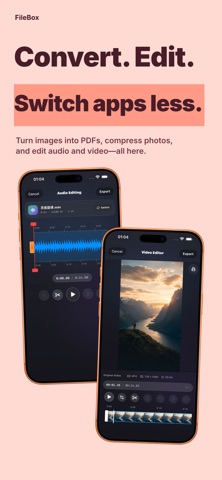
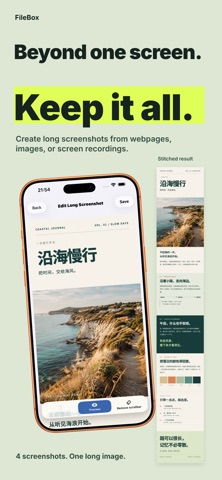
File Box brings file management, media playback, ebook and comic reading, and handy tools into one app, making it easy to organize, view and work with your files on iPhone and iPad. Store files in the app, lock it with Face ID or a password, or grant access to files in system folders. From work documents and photos to videos, music, ebooks and comics, keep everything in your own “Box,” ready whenever you need it. Keep your files organized • Use “On My iPhone/iPad” to browse, play and manage files in authorized system folders without importing them into the app. • Import, move, copy, rename, search and share files and folders with ease. • Customize folder colors, icons and images to make categories easy to spot. • Create ZIP archives and extract common formats such as ZIP and RAR, with support for password-protected archives. • View storage usage by file type, large files and duplicates, including in authorized system folders. • View and clear reading and thumbnail caches without affecting your files or reading history. Enjoy videos and music • Play common video formats including MP4, MOV, MKV, AVI and WebM, with audio track switching and Picture in Picture. • Press and hold the screen to speed up playback at your preferred rate. • Use dual subtitles, external subtitles and customizable subtitle styles, or cast videos to compatible TVs. • The new audio player shows artwork and lyrics, with playlists, shuffle and Lock Screen controls. Read ebooks and documents • The EPUB reader offers a table of contents, bookmarks, search and saved reading progress. • Adjust font size, layout and reading themes for comfortable reading. • View PDF and TXT documents, and add bookmarks to TXT files. Read and create comics • Read CBZ and CBR comics, or open image folders directly as comics. • Create your own CBZ comic files, with optional passwords and text watermarks. Redact images and share with confidence • Detect faces, QR codes and common sensitive details such as names, phone numbers and amounts on your device. Choose which categories to redact. • Select areas manually and choose from styles such as blur and pixelation, or add text watermarks. • Select “Redact Image” from the Photos share sheet and save the edited image directly to Photos. Keep useful tools close at hand • Browse and edit images, compress them in batches, and create long screenshots from web pages, multiple images or screen recordings. • Trim, split, join and convert audio, or extract audio from videos. • Edit audio artwork, song details and lyrics, including batch editing. • Crop and trim videos, and convert between MP4 and MOV formats. • Turn multiple images into a PDF, add watermarks or password-protect PDFs. Transfer files across devices • Use Nearby Transfer to easily send and receive files with nearby devices. • Upload, download, manage and preview files in your computer’s browser over your local Wi-Fi network. • Record audio on Apple Watch and sync recordings to iPhone. • Import files shared from other apps, with drag and drop and multitasking for browsing and playback. Choose a monthly or yearly subscription, or a lifetime purchase, to access the same premium features. Your files. Your device. Your “Box.” Terms of Use (EULA): https://www.apple.com/legal/internet-services/itunes/dev/stdeula/ Privacy Policy: https://filebox.dogegg.cc/privacy
What's new · 1.0.36
1. Added a space switcher at the bottom for quick access to the main space, private space and “On My iPhone/iPad”. 2. Improved the iPad layout and added support for switching between the inner and outer screens on iPhone Duo and using it in landscape.
Details