
Chart standing · US
What changed · US
Listing changes AppTracker has observed for this app in this storefront — new versions, price moves, rating shifts, and store copy.
Price & rating history · US
Reconstructed from the listing changes AppTracker has observed in this storefront, so each line starts at the first change on record.
Price · USD
Screenshots




About
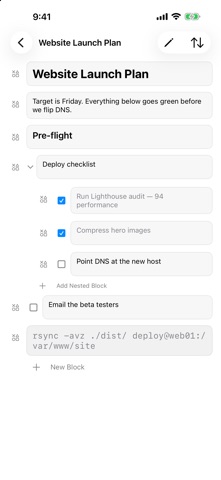
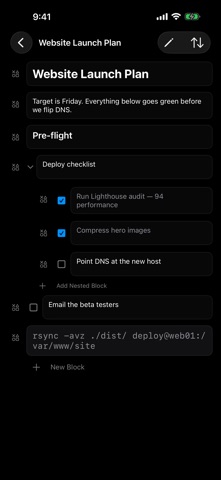
Easily reach into your menubar to quickly jot down a thought or reference, edit it on your synced iPhone and iPad app with your private iCloud keeping every device in step. No accounts or signups are needed and no data is collected. I always wanted a simple tool like this and I hope someone else finds it useful. On Mac, it sits in your menu bar. Click the icon or press ⌥⌘N from any app to open your notes, and click the icon again or press Esc to put them away. On iPhone and iPad, it's a clean, touch-first editor that stays out of your way. Markdown Style Blocks Every note is built from blocks: text, headings, collapsible toggles, to-dos with checkboxes, and code. Type shortcuts like "# ", "> ", or "[] " at the start of a line and the block transforms as you write. Toggles nest without limit, so a quick list can grow into a real outline. Browser Style Tabs Notes are tabs. Switch with ⌘1–⌘9, open a new note with ⌘T, close one with ⌘W. Privately Sync over iCloud- No Account Needed iCloud sync keeps iPhone, iPad, and Mac in step automatically. No account to create, no subscription — your notes live in your personal, private iCloud. Forgiving By Design Deleted notes and blocks go to the Trash, where they can be restored for 30 days. FEATURES • Block editor: text, Heading 1 and 2, toggles, to-dos, and code • Markdown-style shortcuts for instant block transforms • Collapsible toggle blocks with unlimited nesting • Duplicate any block along with its children • Menu bar quick capture on Mac, with a global ⌥⌘N (Option-Command-N) hotkey • Tabbed notes with full keyboard navigation on Mac • iCloud sync across iPhone, iPad, and Mac • 30-day Trash with restore • No accounts, no tracking, no data collection Menu Notes stores your notes on your device and syncs them through your own private iCloud database. We can't read them, and we wouldn't want to.
Details