

ReadAloud: Text to Speech
ZHENGQIAO JIANG · Utilities
Independent analytics for this App Store listing. AppTracker is not affiliated with ZHENGQIAO JIANG.
Chart standing · US
What changed · US
Listing changes AppTracker has observed for this app in this storefront — new versions, price moves, rating shifts, and store copy.
ReadAloud 1.8.6 adds new Mandarin voices, better voices in more languages, and a way to choose what is read from a PDF. • New Mandarin voices: five natural voices (three female, two male), offered as an optional download on a device set to Chinese. English words inside Chinese text are now read aloud too • Better French, German, Russian and Arabic voices (four of each): they download once when your device uses one of these languages, and the system voice reads until then • The Spanish, Italian, Portuguese, Hindi, British English and French voices are now built into the app, so they start right away • New Reading Area for PDFs: in the player menu, drag a frame over a page; only what is inside is read, and what is left out is shaded on the original page • PDF headers, footers and page numbers are no longer removed automatically; you choose with Reading Area • Word-by-word highlighting now also works with the French, German, Russian, Arabic and Mandarin voices • “Try a Sample” starts instantly in 11 languages • The total and remaining time of a book are accurate from the start • Better pronunciation: Portuguese nasal vowels; numbers, dates, abbreviations and apostrophes in Spanish, Italian, French and Portuguese; Chinese, Japanese and Korean words inside English text are no longer read as “Chinese letter”; headings and divider lines are no longer read aloud • The speech the app keeps for listening again now takes about a tenth of the space • Smoother playback when a long sentence follows short ones, and faster speech on iPad Pro (2018 and 2020) • Fixed a crash when importing some textbooks. The original view now opens EPUBs saved with folders, and files that would unpack to an absurd size are refused with a message
Price & rating history · US
Reconstructed from the listing changes AppTracker has observed in this storefront. A field is charted once it has changed more than once, and each line starts at the value it moved from.
Average rating · ★ 3.80 now · 5 changes on record
Ratings breakdown · US
The star breakdown behind this app's rating in this storefront.
In-app purchases · US
What this app sells inside itself, grouped by kind and priced for this storefront.
Screenshots




About
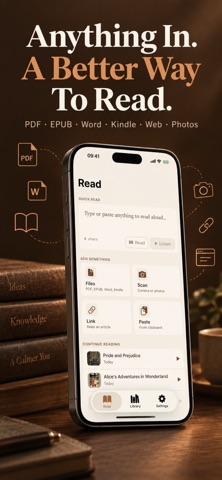
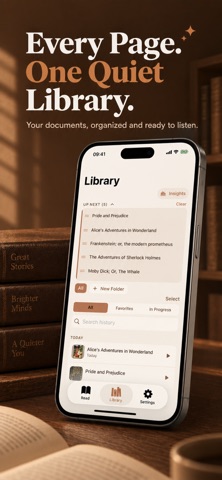
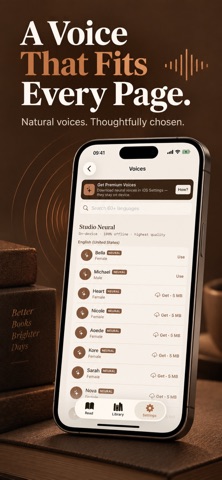
ReadAloud turns any text into natural speech with on-device voices: neural voices for English, Spanish, French, German, Chinese and more, plus Apple's system voices. Listen to PDFs, Word documents, articles, photos, and any text in 60+ languages — 100% offline. WHAT YOU CAN DO • LISTEN TO ANYTHING Type or paste text, import a PDF, Word (DOCX), EPUB, or Kindle (MOBI/AZW3, DRM-free) document, scan a photo or a printed page with your camera, or paste a URL to hear the article text. Auto language detection picks the right voice for you. Jump between chapters in EPUB and Word documents, and skip straight to any page in a PDF. • CLEAN, DISTRACTION-FREE READING Reference/footnote numbers are automatically skipped so they never interrupt the flow of what you're listening to — and academic two-column PDFs read in the correct order, left column then right, instead of jumping between columns line by line. In any PDF, drag a frame in the Reading Area to choose what is read, so headers, footers and page numbers stay out. • ORGANIZE WITH FOLDERS Sort your Library into folders, so long reading lists stay easy to find. • 60+ LANGUAGES & VOICES All Apple system voices included — Default, Enhanced, and Premium neural voices. A voice quality indicator guides you to the best available voice for each language. • TAP TO DEFINE Long-press any sentence while listening to look up a word's definition, highlight it, or add a bookmark — without losing your place. • READING THEMES Choose System, Sepia, or Night page themes, adjustable line spacing, and a dyslexia-friendly OpenDyslexic font option. • TRACK YOUR PROGRESS See your daily listening streak and total minutes listened right on your Library screen. • POWERFUL PLAYBACK Speed control from 0.75x to 2x, drag the progress bar to jump to any point, current sentence highlighted with auto-scroll, skip forward or backward by sentence, full Lock Screen and AirPods support, and true background playback so you can listen while doing anything else. • BATCH EXPORT TO MP3 & NOTES Select multiple documents in your Library and export them all to MP3 at once, completely on-device, or export your highlights and bookmarks as a Markdown notes file. Share via AirDrop, Files, or Messages. • SIRI SHORTCUTS Send any text straight to ReadAloud from the Shortcuts app or Siri. • APPLE WATCH COMPANION See what's reading and control playback right from your wrist. • BUILT FOR IPAD A layout designed for the bigger screen, so reading and listening feel just as natural on iPad. PRIVACY FIRST Your text never leaves your iPhone. No account required, no data collection, no tracking, no third-party SDKs. The only network request is optional URL fetching when you paste a web link. Start by reading and importing documents with 10 minutes of real listening included. The yearly plan includes an eligible 3-day free trial. Monthly and lifetime options are also available. Terms of Use: https://taxlite.net/read_aloud/terms.html Privacy Policy: https://taxlite.net/read_aloud/privacy.html
What's new · 1.8.6
ReadAloud 1.8.6 adds new Mandarin voices, better voices in more languages, and a way to choose what is read from a PDF. • New Mandarin voices: five natural voices (three female, two male), offered as an optional download on a device set to Chinese. English words inside Chinese text are now read aloud too • Better French, German, Russian and Arabic voices (four of each): they download once when your device uses one of these languages, and the system voice reads until then • The Spanish, Italian, Portuguese, Hindi, British English and French voices are now built into the app, so they start right away • New Reading Area for PDFs: in the player menu, drag a frame over a page; only what is inside is read, and what is left out is shaded on the original page • PDF headers, footers and page numbers are no longer removed automatically; you choose with Reading Area • Word-by-word highlighting now also works with the French, German, Russian, Arabic and Mandarin voices • “Try a Sample” starts instantly in 11 languages • The total and remaining time of a book are accurate from the start • Better pronunciation: Portuguese nasal vowels; numbers, dates, abbreviations and apostrophes in Spanish, Italian, French and Portuguese; Chinese, Japanese and Korean words inside English text are no longer read as “Chinese letter”; headings and divider lines are no longer read aloud • The speech the app keeps for listening again now takes about a tenth of the space • Smoother playback when a long sentence follows short ones, and faster speech on iPad Pro (2018 and 2020) • Fixed a crash when importing some textbooks. The original view now opens EPUBs saved with folders, and files that would unpack to an absurd size are refused with a message
Details