

RawCam – Raw DNG Camera
Santiago Alonso Alexandre · Photo & Video
Independent analytics for this App Store listing. AppTracker is not affiliated with Santiago Alonso Alexandre.
Chart standing · US
What changed · US
Listing changes AppTracker has observed for this app in this storefront — new versions, price moves, rating shifts, and store copy.
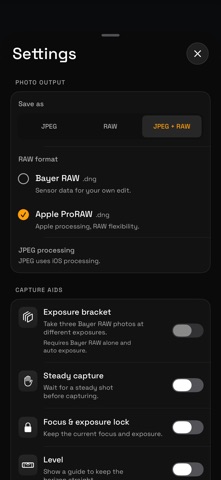
• Add Apple ProRAW on supported cameras, alongside Bayer RAW. • Choose JPEG, RAW, or JPEG + RAW from a simpler Photo output section. • Keep Save as in place while changing formats, with shorter descriptions and file extensions beside each option. • Open your recent photos from a larger stacked preview, with clearer Settings and camera-flip buttons. • Share JPEG and export the original DNG from paired captures. RawCam now focuses on photos. Video capture controls have been removed; existing videos in the RawCam roll remain playable.
Price & rating history · US
Reconstructed from the listing changes AppTracker has observed in this storefront. A field is charted once it has changed more than once, and each line starts at the value it moved from.
Average rating · ★ 4.33 now · 2 changes on record
Ratings breakdown · US
The star breakdown behind this app's rating in this storefront.
Screenshots


About
RawCam puts your original photo first. Choose Bayer RAW, Apple ProRAW, or a JPEG, with manual controls when you need them. CHOOSE WHAT YOU SAVE • JPEG: a photo ready to view and share. • RAW: a DNG original for editing. • JPEG + RAW: keep both. They appear separately in Photos and together in the RawCam roll. Bayer RAW preserves sensor data for developing your own image. Apple ProRAW combines Apple's image processing with RAW editing flexibility. Available formats depend on the selected camera. For JPEGs, From RAW develops Bayer sensor data with minimal enhancement. iOS processing uses Apple's processed-photo pipeline. ProRAW's JPEG companion uses iOS processing. CAMERA CONTROLS • Live exposure, shutter, ISO and white-balance readings • Manual ISO and shutter; adjusting exposure compensation restores automatic exposure • White-balance presets and supported native rear-lens selection • Front-camera switching, using JPEG where RAW is unavailable • Tap to focus, exposure adjustment and focus/exposure lock • Flash, self-timer, grid, horizon level, histogram and Zebra preview warnings • Steady capture and three-shot exposure bracketing for Bayer RAW alone with automatic exposure • Volume-button capture and an App Shortcut for Siri, Shortcuts and Action Button launch • Optional haptics YOUR CAPTURES Open recent RawCam photos inside the app, zoom into originals and inspect capture details. Share the JPEG or export the original DNG from a paired capture. Original viewing requires Photos access; saved previews remain available when an original cannot be accessed. Existing videos in the roll remain playable. Location tagging is optional and off by default. Saved coordinates can be viewed on a map. PRIVACY No account, analytics, advertising or developer-operated server. Photos are saved to your photo library. Your iCloud Photos and sharing settings determine where saved media goes. Opening an iCloud original or a saved-location map may use Apple services. CAMERA SUPPORT RAW availability and resolution depend on the camera and capture format. Bayer RAW can show more noise in low light. ProRAW includes Apple processing; it does not guarantee 48MP capture. JPEGs developed from RAW use the RAW file's dimensions. RawCam now focuses on photos. Video capture controls have been removed; existing videos remain viewable.
What's new · 1.7.0
• Add Apple ProRAW on supported cameras, alongside Bayer RAW. • Choose JPEG, RAW, or JPEG + RAW from a simpler Photo output section. • Keep Save as in place while changing formats, with shorter descriptions and file extensions beside each option. • Open your recent photos from a larger stacked preview, with clearer Settings and camera-flip buttons. • Share JPEG and export the original DNG from paired captures. RawCam now focuses on photos. Video capture controls have been removed; existing videos in the RawCam roll remain playable.
Details