

Daybreak - Sunrise Habits
CLMS Studio LLC · Health & Fitness
Independent analytics for this App Store listing. AppTracker is not affiliated with CLMS Studio LLC.
Chart standing · US
What changed · US
Listing changes AppTracker has observed for this app in this storefront — new versions, price moves, rating shifts, and store copy.
Daybreak is ready for iPhone Duo. Also in this update: stat tiles keep their numbers on one line on narrower screens, the completion ceremony sits in a readable column on iPad, holding a reflection lifts the card with its own rounded corners, and the Palette row in Settings opens from anywhere along the row.
Ratings breakdown · US
The star breakdown behind this app's rating in this storefront.
Screenshots




About
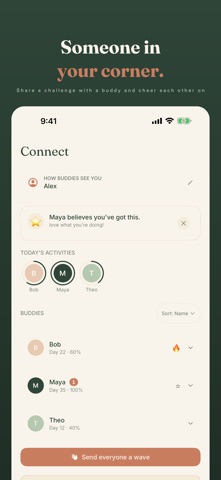
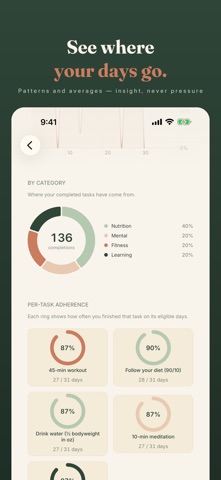
Daybreak is a habit tracker built around the rhythms most people actually keep. Pick 75 Soft, 75 Medium, or 75 Hard — or build your own challenge from scratch. Walk it alone, or invite up to ten friends to walk alongside you. Every morning the sun rises a little further. Tap your tasks as you go. Take a progress photo if you want to. Write a reflection if you have words for the day. Miss a day? It's still there waiting for you tomorrow. No accounts. No ads. No analytics. Your data lives on your device and (if you want) syncs through your private iCloud — never any server we run. — What's inside — • Three preset challenges: 75 Soft (gentle), 75 Medium (structured), 75 Hard (no compromises). Or build a custom one — 7 to 180 days, your own tasks, reminders, and target amounts. • A Today screen that's just today — your tasks, your day count, optional progress photo. Long-press any task for a focused logging sheet. • A heatmap calendar that shows the whole 75 days at a glance. Tap any past day to backfill or edit it; edited days stay marked, so you can tell them apart. • Streaks, milestones (day 7, 14, 30, 50, 75), perfect-week badges, and a comeback achievement when you bounce back from a slip. • Daily reminders per task, gently timed. • An interactive home-screen widget: the current day, your streak, and today's first three tasks. Tap a task circle right on the widget to mark it done — no app launch. • Lock-screen widgets too — circular, rectangular, and inline. • Save any progress photo to your Camera Roll. Daybreak asks once, and only for add-only access; it never reads your existing library. • Export every challenge as a CSV. — Daybreak Pro ($4.99, one-time) — • Walk with up to 10 buddies. See each other's day count, streak, and today's completion. Sort by name, today, streak, or who was active last. Send a small encouragement with a reaction and an optional note — or send everyone a wave at once. • Body measurements: weight, body fat, waist, chest, hips, arms, thighs — with trend charts across 30 days, your current challenge, or all time. • Auto-track water and workouts from Apple Health. No manual logging when you don't want to. • A sunrise share card to send to friends or social — the day count rendered on the daybreak palette. • Seven more themes beyond the default Dawn: Dusk, Forest, Ember, Slate, Carbon, Iron, and Storm. • Deeper analytics: completion trend across the 75 days, weekday patterns, per-task adherence rings, category breakdown donut. • More than one progress photo a day, with captions. (Free keeps one a day.) — Privacy — Daybreak has no backend. The only network it touches is Apple's iCloud (for syncing your data across your devices) and Apple's StoreKit (for the one-time Pro purchase). No analytics, no ads, no tracking, no third-party SDKs. Today is the start of a new you.
What's new · 1.4.0
Daybreak is ready for iPhone Duo. Also in this update: stat tiles keep their numbers on one line on narrower screens, the completion ceremony sits in a readable column on iPad, holding a reflection lifts the card with its own rounded corners, and the Palette row in Settings opens from anywhere along the row.
Details