

Perfect Sound
Daniil Auner · Photo & Video
Independent analytics for this App Store listing. AppTracker is not affiliated with Daniil Auner.
Chart standing · US
What changed · US
Listing changes AppTracker has observed for this app in this storefront — new versions, price moves, rating shifts, and store copy.
Perfect Sound 2.1 NEW • Fresh Liquid Glass design on iOS 26 and later. • Coughs, crackle & dropouts: mark the spot and Perfect Sound fills it seamlessly, optionally with a matching repeat from your own recording. • Repair mix: blend smoothly between original and repaired audio and hear the result live while you drag. • Export via the share sheet: save to Files, AirDrop, Messages and more. • Storage overview in Settings: size per project, clear caches, delete everything. • Subtitles are split into shorter, easier-to-read lines. AI IN PERFECT SOUND • Voice isolation removes traffic and ambient noise with an on-device AI model (neural network). • Subtitles are created with on-device AI speech recognition. • All other repairs use classic signal processing. AI runs entirely on your iPhone or iPad – your media is never uploaded. IMPROVEMENTS • The automatic before/after comparison now plays reliably. • AI voice isolation shows its progress. • After a call or Siri, the preview continues automatically when the system recommends it (iOS 27). • Pausing and resuming the preview no longer jumps back. • Importing from Photos no longer asks for full access to your library. • Fixed a crash during export. • Undo for voice corrections now works reliably. • No more echo when the AI noise filter is mixed with the original. • Editor cuts are kept when you mix. • Audio no longer keeps playing in the background when you open a tool.
In-app purchases · US
What this app sells inside itself, grouped by kind and priced for this storefront.
Screenshots



About
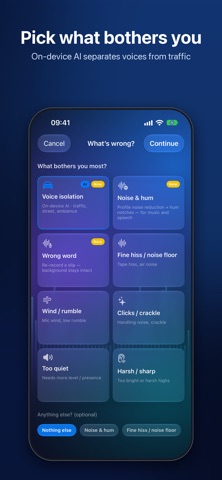
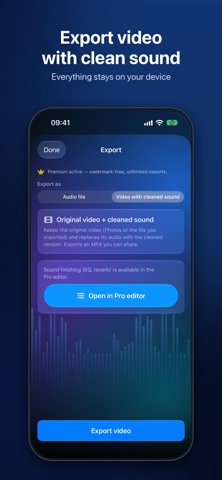
Bad sound ruins good videos. Perfect Sound fixes it – right on your iPhone or iPad. Pick what bothers you – traffic, hum, hiss, wind, crackle – and hear the difference in seconds. Hold one button to compare with the original. When you need more control, open the spectrogram workbench and repair section by section. CLEAN UP A RECORDING IN SECONDS • Choose the problem: matching filters are preset and the preview starts right away • Hold to hear the original, release for the cleaned version • Adjust the strength, clean the full take and export AI VOICE ISOLATION – ON DEVICE • Separates speech from traffic, crowds and room noise • Runs entirely on your iPhone or iPad – nothing is uploaded FIX WHAT BOTHERS YOU • Hum and electrical buzz, hiss and noise floor, wind and rumble • Handling noise, coughs, audience noise, applause • Clicks, crackle and dropouts, clipping and distortion • Too dull, too harsh, too quiet, too much reverb PRO TOOLS WHEN YOU NEED THEM • Interactive spectrogram with section-by-section repairs • Repair mix: blend original and repaired sound live • Editor repair: replace a bad passage with a clean one from another take, with crossfades • EQ and reverb for the final polish SUBTITLES • Transcribe speech on device, edit and translate subtitles • Export SRT or burn subtitles into your video • Fix voice: re-record a wrong word while the background stays intact IMPORT & EXPORT • Import from Photos or Files: MP4, MOV, M4A, WAV, MP3 and more • Export your video with the repaired sound in sync with the picture • Share via AirDrop, Files, Messages and more • Projects are saved – continue anytime FREE • The full clean-up, preview and mix workflow • 3 video exports (with a small watermark) PERFECT SOUND PREMIUM – ONE-TIME PURCHASE • Unlimited video exports without watermark • Audio export: M4A, WAV, MP3 Made for vlogs, interviews, podcasts, voice-overs, lectures, phone and drone recordings, rehearsals – every clip where the picture is fine but the sound is not.
What's new · 2.1
Perfect Sound 2.1 NEW • Fresh Liquid Glass design on iOS 26 and later. • Coughs, crackle & dropouts: mark the spot and Perfect Sound fills it seamlessly, optionally with a matching repeat from your own recording. • Repair mix: blend smoothly between original and repaired audio and hear the result live while you drag. • Export via the share sheet: save to Files, AirDrop, Messages and more. • Storage overview in Settings: size per project, clear caches, delete everything. • Subtitles are split into shorter, easier-to-read lines. AI IN PERFECT SOUND • Voice isolation removes traffic and ambient noise with an on-device AI model (neural network). • Subtitles are created with on-device AI speech recognition. • All other repairs use classic signal processing. AI runs entirely on your iPhone or iPad – your media is never uploaded. IMPROVEMENTS • The automatic before/after comparison now plays reliably. • AI voice isolation shows its progress. • After a call or Siri, the preview continues automatically when the system recommends it (iOS 27). • Pausing and resuming the preview no longer jumps back. • Importing from Photos no longer asks for full access to your library. • Fixed a crash during export. • Undo for voice corrections now works reliably. • No more echo when the AI noise filter is mixed with the original. • Editor cuts are kept when you mix. • Audio no longer keeps playing in the background when you open a tool.
Details