

Financial Payment Tracker
AegisMGK Technologies LLC · Finance
Independent analytics for this App Store listing. AppTracker is not affiliated with AegisMGK Technologies LLC.
Chart standing · US
What changed · US
Listing changes AppTracker has observed for this app in this storefront — new versions, price moves, rating shifts, and store copy.
IMPORTANT: Update Financial Payment Tracker on all of your devices before making changes. Encrypted iCloud Sync: with iCloud sync on, your balances, rates, account names, and notes are now stored encrypted in iCloud, using keys kept in your iCloud Keychain. A device still running an older version shows $0 balances and blank names until it is updated, so update every device first. Sensitive Number Warning: if you type something that looks like a card number, Social Security number, or bank routing number, the app warns you before saving and offers to remove it. Financial Payment Tracker never needs these numbers. Better Backups: backup files now include your savings goals and contributions. Older backup files still import. Before you export, the app reminds you that backup files are not encrypted, so you can keep them somewhere private. Also: clearer messages when something goes wrong, with a Copy Details option for support, and wording cleanups throughout.
In-app purchases · US
No in-app purchases.
Screenshots





About
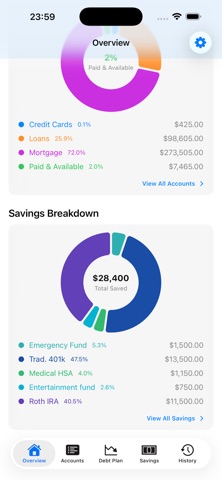
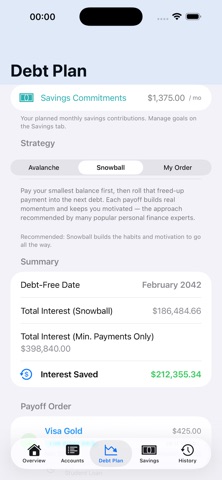
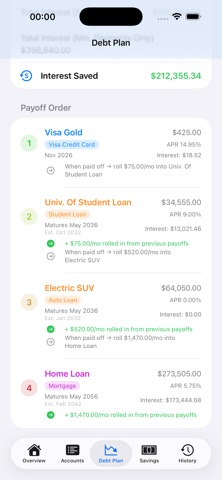
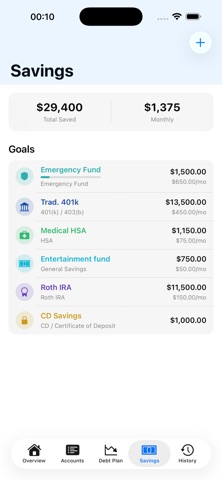
Take control of your debt, without connecting a single bank account. Financial Payment Tracker is a privacy-first app for managing credit card, loan, and mortgage payments. You enter only what you want to track: balances, APR, and due dates. No account numbers, no bank logins, no data ever leaves your device (unless you choose to sync with your own iCloud). WHAT YOU CAN DO • Track multiple accounts (credit cards, auto loans, personal loans, student loans, mortgages) all in one place. • Log payments and charges manually and watch your balance update with every entry. • Never miss a due date. Set smart payment reminders and the app notifies you a few days before each payment is due. • Sync your payment due dates, loan/mortgage maturity dates, and savings goal targets to Apple Calendar, so they show up alongside the rest of your life. Amounts stay out of your calendar by default; you decide if and where they appear. • Plan your payoff with Avalanche or Snowball strategies. See exactly which account to attack first, how much interest each strategy saves, and the month you'll be completely debt-free. • Track your savings goals alongside your debt. See your full financial picture in one app. • Export your payment history as a PDF statement or Excel-compatible CSV, perfect for budgeting reviews or sharing with a financial advisor. • Back up everything, accounts, payments, and savings goals, to a file you keep, and restore it any time. • View a monthly bar chart of all payments at a glance on the History tab. • Add a home screen widget to see your next payment due without opening the app. • Pair with your Apple Watch for a read-only companion showing upcoming payments and a watch face complication with a due-date countdown. • Lock the app behind Face ID or Touch ID so your financial data stays private even if someone picks up your phone. • Optionally sync across all your Apple devices with iCloud, in your own private iCloud database, never on our servers. PRIVACY BY DESIGN Most finance apps require you to connect your bank and hand over your login credentials. Financial Payment Tracker never asks for any of that. Every number you enter stays on your device. We have no servers, no analytics, and no advertising. With iCloud sync on, your balances, rates, account names, and notes are encrypted with keys kept in your iCloud Keychain. And if you ever type something that looks like a card number, Social Security number, or bank routing number, the app warns you and offers to remove it, because Financial Payment Tracker never needs them.
What's new · 1.10.0(19)
IMPORTANT: Update Financial Payment Tracker on all of your devices before making changes. Encrypted iCloud Sync: with iCloud sync on, your balances, rates, account names, and notes are now stored encrypted in iCloud, using keys kept in your iCloud Keychain. A device still running an older version shows $0 balances and blank names until it is updated, so update every device first. Sensitive Number Warning: if you type something that looks like a card number, Social Security number, or bank routing number, the app warns you before saving and offers to remove it. Financial Payment Tracker never needs these numbers. Better Backups: backup files now include your savings goals and contributions. Older backup files still import. Before you export, the app reminds you that backup files are not encrypted, so you can keep them somewhere private. Also: clearer messages when something goes wrong, with a Copy Details option for support, and wording cleanups throughout.
Details