

Swaytype: AI Tone Keyboard
Enrico Carrasco · Productivity
Independent analytics for this App Store listing. AppTracker is not affiliated with Enrico Carrasco.
Chart standing · US
What changed · US
Listing changes AppTracker has observed for this app in this storefront — new versions, price moves, rating shifts, and store copy.
Typing that feels like Apple's keyboard, now with autocorrect. • Autocorrect fixes your typos and knows which language you are writing in. You can turn it off in Swaytype's settings. • Keys respond like Apple's keyboard, and typing is smoother. • A bigger emoji panel with the emoji you use most. • Tips to keep Swaytype in every chat: pick it once in a chat and it stays there. • Fixed: the first letter of a message could stay small. • Small fixes.
In-app purchases · US
What this app sells inside itself, grouped by kind and priced for this storefront.
Screenshots



Keywords this app targets
Search terms AppTracker associates with this app — estimates, not search volume. ❝ = in the app's title; a highlighted number is its current position for that term.
Similar apps
Competitors and close alternatives, as estimated by AppTracker.
 TransKey: Text Translator Chat
Courtney Parsons
TransKey: Text Translator Chat
Courtney Parsons
 Keyboard Translator Pro!
luca calciano
Keyboard Translator Pro!
luca calciano
 Keyboard Translator Pro
Giacomo Guglielmi
Keyboard Translator Pro
Giacomo Guglielmi
 Talk Translator-GlobaTalk Live
Shaanxi Chenxing Yuandao Network Technology Limited
Talk Translator-GlobaTalk Live
Shaanxi Chenxing Yuandao Network Technology Limited
 Translate One: AI Translator
Tung To Dinh
Translate One: AI Translator
Tung To Dinh
 G Keyboard : Ai Writer
Viionr Infotech Private Limited
G Keyboard : Ai Writer
Viionr Infotech Private Limited
 Translate Live - AI Translator
Jerry Lee
Translate Live - AI Translator
Jerry Lee
 Hi Translate – AI Translator
EASETREND TECHNOLOGY LIMITED
Hi Translate – AI Translator
EASETREND TECHNOLOGY LIMITED
About
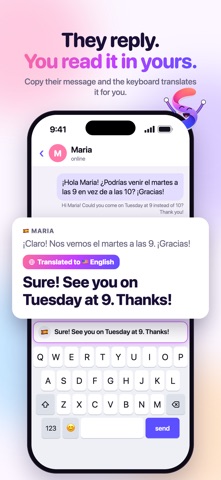
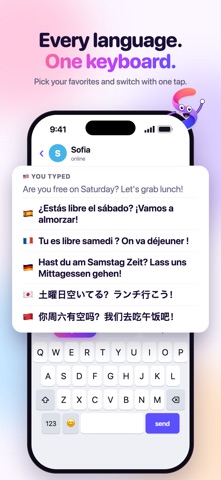
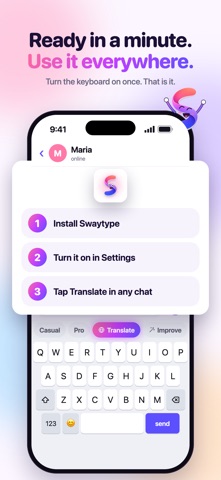
Type in your language. Send it in theirs. Swaytype is a keyboard for iPhone that translates while you type, in any app. Write in your own language, tap Translate, pick theirs, and your message is ready to send. Any direction, any language. No copy and paste, no switching apps. HOW IT WORKS 1. Open any chat and type with the Swaytype keyboard, the way you talk. 2. Tap Translate and pick their language. 3. Check it and send. Changed your mind? Tap Undo and your text comes back. NATURAL, NOT WORD FOR WORD Swaytype uses AI to translate what you mean, the way people really text in that language. Type with slang and typos: it reads what you meant, and slang comes out as real slang, not a dictionary translation. Casual stays casual. Formal stays formal. READ THEIR REPLY IN YOURS Got a message in another language? Copy it and the keyboard translates it into your language with one tap, right above the keys. Nothing gets pasted into your chat. FIX IT IN ONE TAP: CASUAL OR PRO Tap Improve to fix typos and grammar, in any language. Casual keeps your slang and your voice. Pro makes it clear and polite, for clients and work. WORKS IN ANY APP Your chats, texts and email, anywhere you type. Keep up to 3 favorite languages one tap away. READY IN A MINUTE The app walks you through it: add Swaytype in iPhone Settings and turn on Allow Full Access. Full Access lets the keyboard use the internet to translate. iOS shows the same warning for every keyboard. FREE TO START 10 a day, translations and rewrites combined, no card needed. Want more? Choose Monthly, Yearly (7 days free for new subscribers) or Lifetime, a one-time purchase. Paid plans are unlimited, with a fair use limit to prevent abuse. Subscriptions renew automatically until you cancel in iPhone Settings. Requires iOS 16 or later. Privacy Policy: https://swaytype.com/privacy Terms of Use (EULA): https://swaytype.com/terms Support: enricocarrasco1@gmail.com
What's new · 1.0.18
Typing that feels like Apple's keyboard, now with autocorrect. • Autocorrect fixes your typos and knows which language you are writing in. You can turn it off in Swaytype's settings. • Keys respond like Apple's keyboard, and typing is smoother. • A bigger emoji panel with the emoji you use most. • Tips to keep Swaytype in every chat: pick it once in a chat and it stays there. • Fixed: the first letter of a message could stay small. • Small fixes.
Details