

Run2Beat
Anders Westin · Health & Fitness
Independent analytics for this App Store listing. AppTracker is not affiliated with Anders Westin.
Chart standing · US
What changed · US
Listing changes AppTracker has observed for this app in this storefront — new versions, price moves, rating shifts, and store copy.
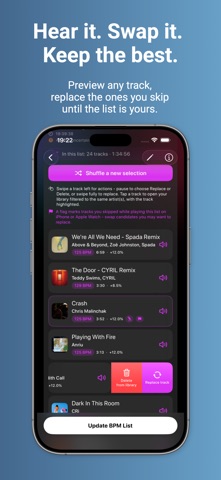
Version 1.0.9 This update focuses on the Apple Watch app. On iPhone, you'll find a new setting, a new help screen, and the timestamp of your latest iCloud save. APPLE WATCH - Quick Replay Button: The home screen can now show a button to replay your latest BPM list or playlist. The button is enabled by default and can be turned off in Settings. - Move Goal Gauge: A row of tick marks along the left edge of the home screen shows today's Move goal. The ticks fill with color from the bottom up, with longer accent ticks at the top, middle, and bottom. - Expanded Player View: Swipe left in the player to view today's Move and Exercise progress, watch and headphone battery levels, and total songs played. Swipe right to return. - Starred Songs: Your starred songs now sync to the watch as a standard playlist at original tempo. It appears first under Playlists, keeping the same track order as on iPhone. Toggle sync on or off on the Sync screen. - Two Complications: • Last list: Shows the list and its BPM, and lets you replay it. • Run2Beat: Quickly opens the app without starting playback. Text matches your watch face accent color. In the rectangular slot, the musical note stays in the app's signature green color. - New Look: Features the sand color Sahara for the whole app, plus a choice between filled buttons or buttons with a colored outline only. - Reorganized Settings: Settings are now regrouped into Home, Playback, While playing, and Appearance. - Permissions: The watch app requests access to Health and Bluetooth. Health powers the Move goal and Move/Exercise metrics on the session page. Bluetooth is used to display headphone battery levels. You can decline permissions and still play music as usual. IPHONE - New Setting – Swap Candidates: Decide how long a song must play before skipping marks it as a candidate (0 to 20 seconds). The default is 5 seconds, which Apple Watch also uses. - iCloud Status: Settings now displays when your listening history and equalizer presets were last saved to iCloud. - Help Screen: The Info button on the Sync screen leads to a new screen explaining how the watch app works. Thanks for using Run2Beat!
Screenshots






Keywords this app targets
Search terms AppTracker associates with this app — estimates, not search volume. ❝ = in the app's title; a highlighted number is its current position for that term.
Similar apps
Competitors and close alternatives, as estimated by AppTracker.


About
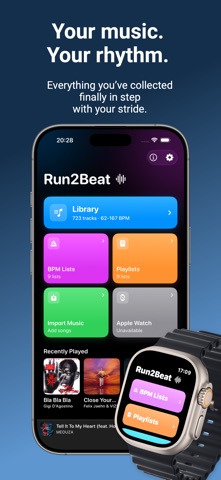
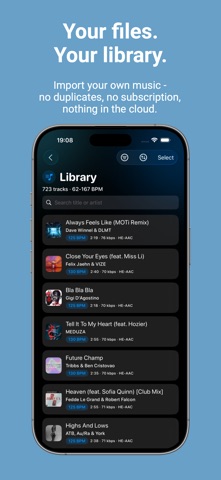
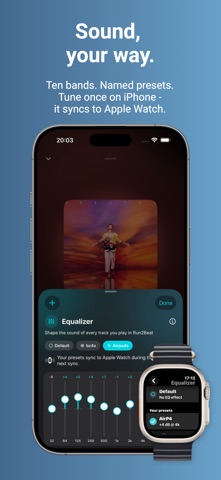
LET THE MUSIC SET THE PACE The right song at the right tempo changes everything. Run2Beat turns the music you already own into the beat you train to — whether you are running, powerwalking or sweating it out on an exercise bike. Set your target BPM. Run2Beat picks matching tracks and plays them at exactly that tempo, without making the vocals sound odd. From there, the music leads — you keep your stride or pedal stroke with it. Streaming apps pick songs that are “close enough”. Run2Beat times the tracks so the beat is steady — and you lock your steps (or pedal stroke) to it. WHY RUN2BEAT • Free and private: No subscriptions, no ads, no accounts. Works fully offline. BPM is analysed on-device — your files never leave it. • A full player on iPhone and usable without your phone when you prefer: The same BPM lists and the same tempo on Apple Watch. The equalizer curves come from the iPhone, and the watch chooses which one plays. You set crossfade and beat matching there. • Smart import: MP3, M4A or WAV. Shazam can fill in missing tags. Tips for free and indie music are on Run2Beat.com. Optional HE-AAC conversion saves storage. • Sound in balance: LUFS volume normalisation, a 10-band equalizer with presets and crossfade that can wait so the next song meets the beat — even on the Watch, which has no equalizer of its own. • Your rules: Warm-up, max pitching, and multipliers (1/1, 2/1, 1/2) — how your feet land on the beat. • Regular playlists too. Share BPM lists via AirDrop, or play in the car with CarPlay. THE BEST PART The music is yours. Not a mix that needs a subscription and a signal, not a favourite that vanishes when a licence ends. You bring the files (ones you own or get via AirDrop). We adjust them to your chosen tempo so the music drives your pace — on iPhone, or on Apple Watch with the phone left at home. Much more — including how to find tracks — at Run2Beat.com.
What's new · 1.0.9
Version 1.0.9 This update focuses on the Apple Watch app. On iPhone, you'll find a new setting, a new help screen, and the timestamp of your latest iCloud save. APPLE WATCH - Quick Replay Button: The home screen can now show a button to replay your latest BPM list or playlist. The button is enabled by default and can be turned off in Settings. - Move Goal Gauge: A row of tick marks along the left edge of the home screen shows today's Move goal. The ticks fill with color from the bottom up, with longer accent ticks at the top, middle, and bottom. - Expanded Player View: Swipe left in the player to view today's Move and Exercise progress, watch and headphone battery levels, and total songs played. Swipe right to return. - Starred Songs: Your starred songs now sync to the watch as a standard playlist at original tempo. It appears first under Playlists, keeping the same track order as on iPhone. Toggle sync on or off on the Sync screen. - Two Complications: • Last list: Shows the list and its BPM, and lets you replay it. • Run2Beat: Quickly opens the app without starting playback. Text matches your watch face accent color. In the rectangular slot, the musical note stays in the app's signature green color. - New Look: Features the sand color Sahara for the whole app, plus a choice between filled buttons or buttons with a colored outline only. - Reorganized Settings: Settings are now regrouped into Home, Playback, While playing, and Appearance. - Permissions: The watch app requests access to Health and Bluetooth. Health powers the Move goal and Move/Exercise metrics on the session page. Bluetooth is used to display headphone battery levels. You can decline permissions and still play music as usual. IPHONE - New Setting – Swap Candidates: Decide how long a song must play before skipping marks it as a candidate (0 to 20 seconds). The default is 5 seconds, which Apple Watch also uses. - iCloud Status: Settings now displays when your listening history and equalizer presets were last saved to iCloud. - Help Screen: The Info button on the Sync screen leads to a new screen explaining how the watch app works. Thanks for using Run2Beat!
Details