

Sync Sticky Notes
Okobbe LLC · Productivity
Independent analytics for this App Store listing. AppTracker is not affiliated with Okobbe LLC.
Chart standing · US
What changed · US
Listing changes AppTracker has observed for this app in this storefront — new versions, price moves, rating shifts, and store copy.
Changes in preparation for upcoming MacOS/iOS 27 Update A big update focused on organizing your notes and keeping them with you everywhere. Desktop Drawer (Mac): Tuck your notes into a sleek panel that slides out from the edge of your screen. Pick from 5 drawer styles, drag to resize it, and pop it open with a keyboard shortcut. Folder Boards (iPhone & iPad): Stay more organized with individual boards represented as customizable folders on your main board. Open on Devices Enhancements See what you left open on your other devices and it now stays accurate even when a device is asleep, off, or the app is closed. Devices you no longer use drop off on their own, or you can stop tracking one yourself. The sync badge now shows how long ago each note last synced. Polish • Icons throughout the Mac menus • Full emoji picker for note icons • Smoother note dragging, collapsing & expanding • The yearly plan now shows how much you save • Performance and reliability improvements Thanks for using Sync Sticky Notes! Questions or ideas? We'd love to hear from you.
Ratings breakdown · US
The star breakdown behind this app's rating in this storefront.
In-app purchases · US
What this app sells inside itself, grouped by kind and priced for this storefront.
Screenshots



About
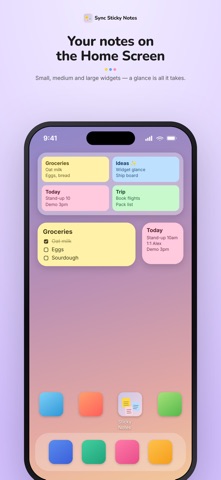
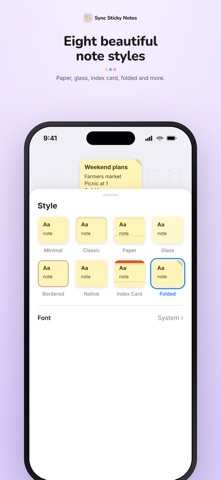
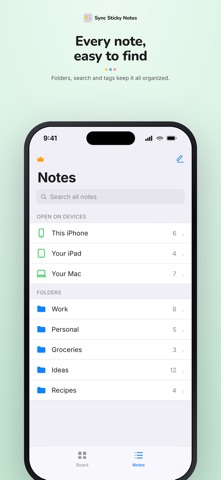
Sync Sticky Notes: Beautiful sticky notes that live on your desktop and follow you across every Apple device. Pin quick thoughts to your Mac desktop as floating notes, jot ideas on your iPhone, sketch on your iPad and everything stays perfectly in sync through iCloud. It even syncs two ways with the built‑in Apple Notes app, so your notes are never locked in. FLOATING DESKTOP NOTES (Mac) Keep notes right on your desktop where you'll actually see them. Drag them anywhere, restyle them, and tuck them into a screen‑edge drawer when you want a clean desk. SYNC EVERYWHERE: • Two‑way iCloud sync across iPhone, iPad & Mac • Two‑way sync and import with the Apple Notes app • "Open on devices" see what you left open elsewhere, even when a device is asleep or off • Per‑note sync status, so you always know it saved MAKE THEM YOURS: • 6 designs: Minimal, Classic, Paper, Glass, Bordered & Native • Custom colors, themes & fonts • Rich text with modern, tappable checklists ORGANIZE YOUR WAY: • Folders & tags • Link notes together with [[wiki‑style links]] and visual board connectors • Pin the important notes in place on the board • Templates for the notes you create again and again • Fast on‑device search, plus Spotlight • Screen‑edge drawer & quick capture for grabbing a thought instantly MORE THAN TEXT: • Add photos and Apple Pencil drawings • Set reminders so nothing slips • Lock private notes behind Face ID / Touch ID APPLE INTELLIGENCE (on‑device): Summarize a note, turn it into a checklist, or get a suggested title, tags, and reminder all processed privately on your device. WIDGETS & SHORTCUTS: • Home Screen widgets that show your notes at a glance • App Shortcuts, Siri & URL actions to create and open notes hands‑free SHARE & EXPORT: Send any note as text or as an image in a tap. SPEAKS YOUR LANGUAGE: English, Spanish, French, German & Chinese (Simplified). FREE & PRO: Create and edit your basic yellow notes free, forever. Unlock sync, styling, Apple Notes, photos, drawings, reminders, folders, tags, widgets and more with Pro: • 7‑day free trial • $3.99/month • $29.99/year • $89.99 Lifetime Payment is charged to your Apple Account. Subscriptions renew automatically unless canceled at least 24 hours before the current period ends; manage or cancel anytime in Settings. Lifetime is a one‑time purchase. The app and its yellow notes stay free without a subscription. Terms of Use: https://www.apple.com/legal/internet-services/itunes/dev/stdeula/ Privacy Policy: https://okobbe.com/SyncStickyNotesPP
What's new · 4.2
Changes in preparation for upcoming MacOS/iOS 27 Update A big update focused on organizing your notes and keeping them with you everywhere. Desktop Drawer (Mac): Tuck your notes into a sleek panel that slides out from the edge of your screen. Pick from 5 drawer styles, drag to resize it, and pop it open with a keyboard shortcut. Folder Boards (iPhone & iPad): Stay more organized with individual boards represented as customizable folders on your main board. Open on Devices Enhancements See what you left open on your other devices and it now stays accurate even when a device is asleep, off, or the app is closed. Devices you no longer use drop off on their own, or you can stop tracking one yourself. The sync badge now shows how long ago each note last synced. Polish • Icons throughout the Mac menus • Full emoji picker for note icons • Smoother note dragging, collapsing & expanding • The yearly plan now shows how much you save • Performance and reliability improvements Thanks for using Sync Sticky Notes! Questions or ideas? We'd love to hear from you.
Details